
Vandaag of morgen in huis

Kwaliteit gegarandeerd

Welkomstaanbiedingen ontgrendelen: GRATIS bezorging | Tot 80% korting | Gratis 30 dagen JoyPlus-proefperiode
Download de app
A wireless headset may seem easy to choose at first glance. However, marketing terms, unclear compatibility and a poor fit can leave you disappointed with your purchase once you get it home. Bluetooth headphones in particular are sometimes advertised with features such as long battery life, noise cancelling and Hi-Res audio without enough context.
Use this practical checklist to compare models based on features that really make a difference in everyday use: connection, comfort, microphone, battery life and what you intend to use the headphones for.
Advertised battery life usually depends on settings such as volume, active noise cancellation and the type of connection. So, headphones offering 60 hours of playback without ANC may last less in practice when noise cancelling is switched on.
Pay attention to:
Headphones with long battery life are particularly useful for train journeys, office work and everyday use, but always check the conditions under which the manufacturer states the figure.
Active noise cancellation uses microphones and electronic processing to reduce ambient sound. The result varies by model and by type of noise. Low, constant sounds such as train or aeroplane rumble may be processed differently from voices or sudden noises.
According to Soundcore’s own research, the Space One Pro features an automatically adjustable active noise cancellation system. This is a product claim made by the brand and does not guarantee that every user will have the same experience. Also consider the fit: well-sealing over-ear headphones can already reduce some ambient noise without ANC.
Bluetooth works well with many smartphones, tablets and laptops, but gaming sometimes calls for a different connection. A wireless gaming headset with a 2.4GHz USB receiver may be designed to offer lower latency. A Bluetooth model, on the other hand, is convenient for mobile use.
Check beforehand:
A wired gaming headset with a 3.5mm connection does not need a battery and is suitable for devices with a combined headset socket. This may be more practical than going completely wireless.
Over-ear headphones fit around the ear and generally provide more physical isolation. This can be comfortable when travelling or listening for long periods, but the design is often larger and warmer. An on-ear model rests on the ear and is usually lighter and more compact.
Consider the following points:
Foldable headphones are convenient in a bag, but check that the hinges feel sturdy and that the ear cups are protected when folded.
A range of, for example, 20 Hz to 20 kHz does not tell you everything about how the headphones sound. Driver size, tuning, codec and housing also play a part. Hi-Res audio headphones can only offer an advantage when the source, connection and music files being used support it.
LDAC, AAC and SBC are examples of audio codecs. Not every device supports every codec. Wired listening via USB-C or 3.5mm may also come with different limitations. Use technical claims as comparison information rather than as a guarantee of your personal listening experience.
For headphones for music and calls, microphone placement, wind sensitivity and controls are more important than simply the number of microphones. For gaming, also look for:
A headset with virtual 7.1 audio is not the same as genuine multi-channel speakers. Also check whether this feature is available on your platform and in the accompanying software.
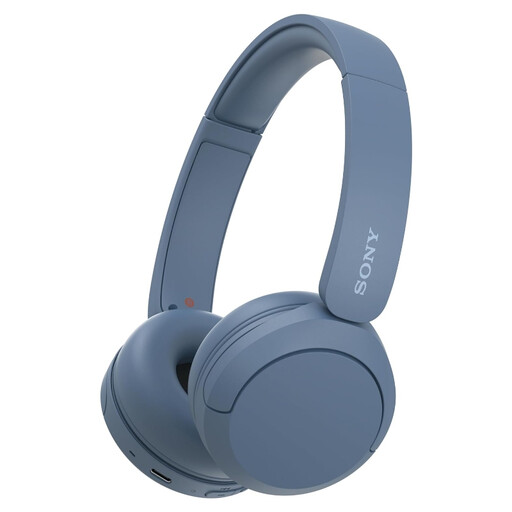
Why it suits this profile: This lightweight on-ear model is designed for everyday listening, mobile use and straightforward Bluetooth controls. The specifications state a weight of 147 grams and multipoint connectivity for your phone and laptop.
The features are straightforward: Bluetooth, buttons and a built-in microphone. However, check the current battery specification on the product page, as details may vary between product specifications.
147 grams, USB-C, multipoint connectivity and a compact design for carrying.
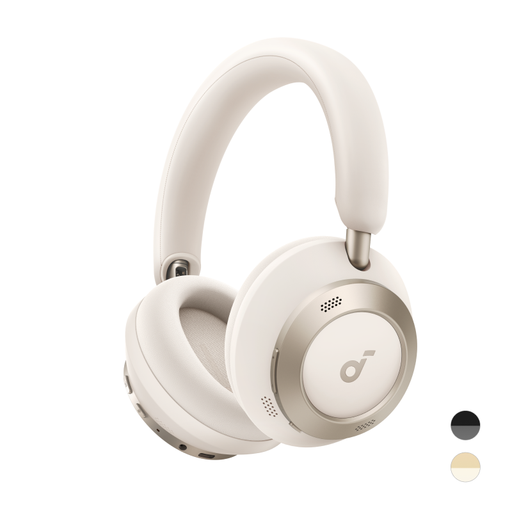
Why it suits this profile: The combination of adaptive ANC, LDAC, a foldable design and an advertised battery life of 60 hours without ANC makes this model suitable for listening to music, travelling and working in changing environments.
The battery specification separately states usage with ANC switched on and off. This helps you set more realistic expectations for travelling or working.
60 hours without ANC, 40 hours with ANC, LDAC and 5 minutes of fast charging for up to 8 hours of playback, according to the product information.
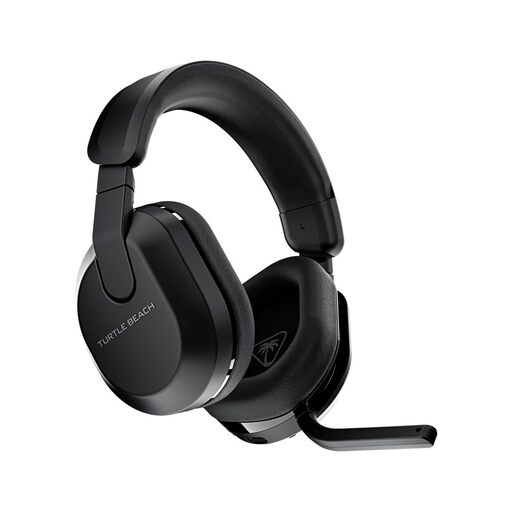
Why it suits this profile: This wireless gaming headset combines 2.4GHz, Bluetooth 5.2, a flip-to-mute microphone and an advertised battery life of up to 80 hours. Compatibility covers Xbox, PlayStation, PC, Steam Deck and mobile devices.
The connections and supported platforms are clearly listed. Before buying, however, check whether the included receiver is suitable for your version of the console.
Up to 80 hours of battery life, 50mm drivers, 2.4GHz and Bluetooth 5.2.
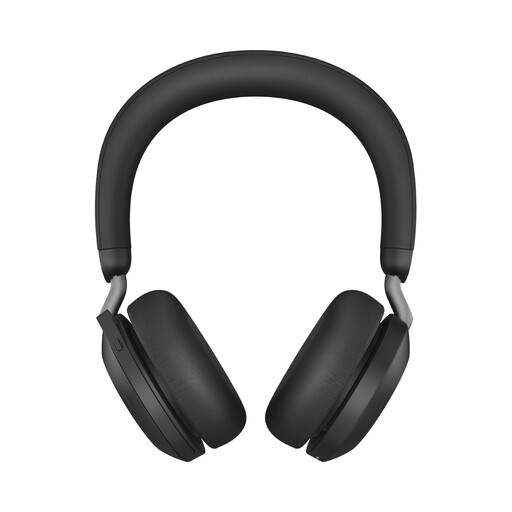
Why it suits this profile: This model is designed for calls and supports connections to up to two devices. The product information lists eight microphones, a range of up to 30 metres and up to 36 hours of audio use without ANC.
The specifications distinguish between talk time and audio use with or without ANC. This prevents you from applying a single battery figure to every situation.
Multipoint, USB-A, Teams certification according to the product information and eight microphones.
We have put together a complete, up-to-date list of products that fully meet these strict selection criteria and the applicable European safety regulations.
First, charge the headphones and switch them to pairing mode. Then open your phone’s Bluetooth settings and select the model name. You may need to confirm the connection the first time you pair the devices. If pairing does not work, remove an old connection from the Bluetooth list and try again.
Their lifespan depends on the battery, hinges, ear cushions and everyday use. A built-in battery gradually loses capacity over time. Keep the headphones dry, charge them with a suitable cable and avoid prolonged exposure to heat. With gaming headsets, a wired backup connection can be useful when the battery runs out.
The electricity used for charging is generally minimal. The main recurring costs arise when the battery, ear cushions or cable need replacing over time. Therefore, check whether replacement parts are available and whether the product is covered by the statutory warranty of at least two years. Use the specifications and compatibility as your starting point, rather than looking only at the price or a striking marketing term.
