
Vandaag of morgen in huis

Kwaliteit gegarandeerd

Welkomstaanbiedingen ontgrendelen: GRATIS bezorging | Tot 80% korting | Gratis 30 dagen JoyPlus-proefperiode
Download de app
Wireless headphones are handy for music, podcasts, calls, gaming and travel. But a long list of features doesn’t automatically mean a model is right for you. For example, Bluetooth headphones may have long battery life but feel uncomfortable to wear. Wireless earbuds may appear water-resistant, even though only the earbuds – not the charging case – are protected.
Joybuy’s Product Recommendation Officer highlights the product details that matter most in everyday use. That way, you can see which features really make a difference.
“Up to 30, 50 or 70 hours” often refers to the total including the charging case, or to use at a particular volume level. So always check:
Long battery life is especially useful if you travel often or don’t want to charge your headphones every day. For on-ear headphones, listening time is usually listed for the headphones themselves. With Bluetooth earbuds, make sure you distinguish between listening time on a single charge and total listening time.
Water-resistant earbuds aren’t automatically suitable for swimming. IPX4, for example, indicates protection against splashes, while IPX5 indicates protection against water jets. IPX7 covers temporary immersion under certain conditions, but always check the product specifications and instructions.
Check the case, too. For several in-ear models, the IP rating applies only to the earbuds. A wet charging case could still cause problems.
Noise-cancelling headphones use active noise cancellation to reduce background noise. How well it works can vary depending on the situation and fit. Low, steady sounds such as train or aeroplane noise are generally different from voices or sudden sounds.
Open-ear headphones work differently. They’re designed to let you hear more of your surroundings, which can be useful when walking or cycling. The trade-off is that music may sound less isolated in busy places.
Start by choosing between the main styles:
A good fit affects comfort, sound and passive noise isolation. A manufacturer’s claim of “all-day comfort” will still depend on your ears, head size and how long you wear them.
Check that your smartphone, tablet, laptop or gaming device supports Bluetooth. A newer Bluetooth version may support features such as energy efficiency or multipoint, but it doesn’t tell you everything about sound quality.
Multipoint is useful if you want to connect to a laptop and phone at the same time, for example. Also check whether you need an app for equaliser settings, firmware updates or extra features. For example, the HTC NE33 states that the EarJoy app, an account and a Bluetooth connection are required for its translation features.
If you make calls often, don’t just look at the number of microphones. Their placement, voice processing and performance in noisy places matter more. Headphones with a microphone are suitable for calls, but the sound quality for the person you’re speaking to can vary from one device to another.
Also check for:
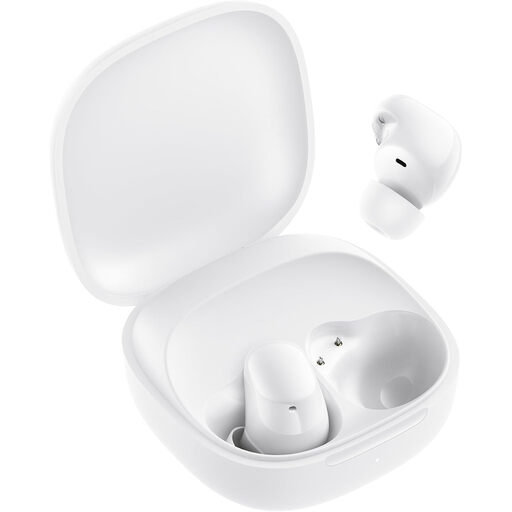
Why it suits this profile: A compact option for everyday listening, calls and podcasts, with no complicated setup.
The product specifications list 7.5 hours per charge and 36 hours with the case separately. The IPX4 rating applies only to the earbuds, making the limits of their water resistance clear.
Bluetooth 5.4, USB-C, a 10mm driver and dual microphones for calls.
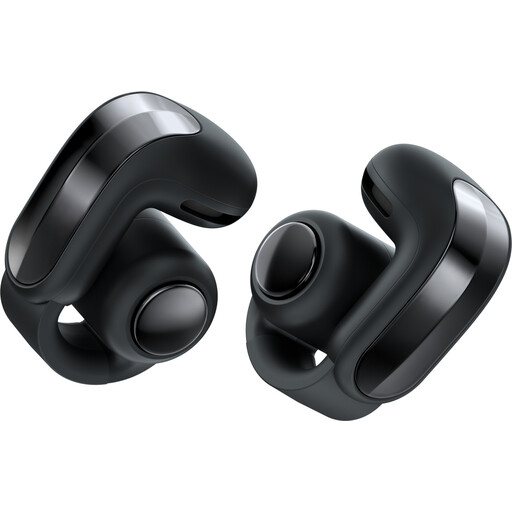
Why it suits this profile: The open design is made for people who want to stay in touch with their surroundings while walking, cycling or commuting.
The open-ear design means you don’t have to rely solely on active noise cancellation. The product information lists IPX4, so this model is designed to withstand splashes, not immersion.
Up to 9 hours of listening time, Bluetooth 5.4, an integrated microphone and wireless charging for the case.
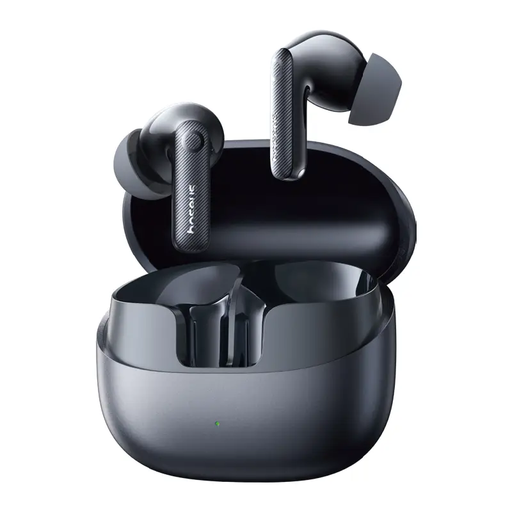
Why it suits this profile: Designed for people who want active noise cancellation, long battery life and clear calls on the go.
According to the product information, this model offers 11 hours of listening time per charge and around 55 hours with the case. Its stated IP55 rating is more informative than a vague claim such as “suitable for sport”.
50dB adaptive hybrid ANC according to the product information, six microphones, Bluetooth 5.4 and LDAC support.
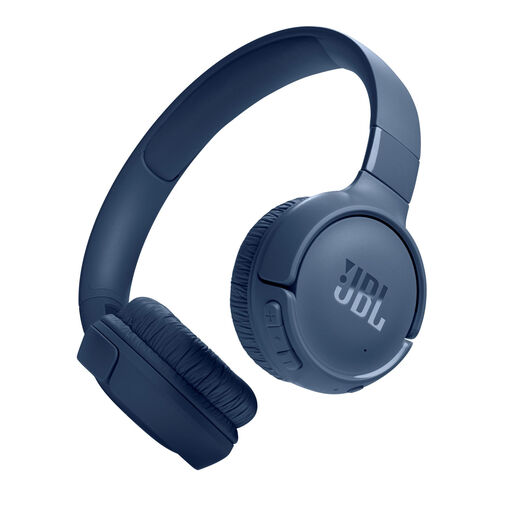
Why it suits this profile: These foldable on-ear headphones are a good fit for commuting, long listening sessions and travel when charging may not be convenient.
The battery claim is specified as up to 76 hours of playback and up to 45 hours of talk time. The product information also states that the headphones are not water-resistant.
Bluetooth 6.0, multipoint, two microphones, USB-C and up to five extra hours of use after five minutes of charging.
We’ve put together a complete, up-to-date list of products that meet these strict selection criteria and current European safety regulations.
Switch on Bluetooth on your phone, open the settings and put your headphones or earbuds into pairing mode. Then select the product name from the list. Some models need an app for extra features. Once connected, check that the microphone and media controls work, too.
Battery capacity decreases over time. How long your headphones last in practice depends on how often you charge them, heat, volume and the quality of the built-in battery. Don’t store the device completely flat for long periods, and use a suitable USB-C charger. A model with replaceable parts or a supplied cable may remain usable for longer if the battery runs out.
It depends on your surroundings. ANC can be useful on trains, planes or in the office, but it uses extra power and doesn’t always make background noise completely inaudible. If you want to hear traffic while cycling or walking, consider open-ear earbuds or a transparency mode instead. Keep the volume at a moderate level, too, and stay alert to traffic.
