
Vandaag of morgen in huis

Kwaliteit gegarandeerd

Welkomstaanbiedingen ontgrendelen: GRATIS bezorging | Tot 80% korting | Gratis 30 dagen JoyPlus-proefperiode
Download de app
A wireless headset may seem easy to choose at first glance. However, models vary considerably in comfort, battery life, sound isolation and call quality. A low price can be appealing, but an unsuitable fit, limited compatibility or disappointing battery life can quickly make everyday use inconvenient.
For music, films, podcasts and hands-free calls, these are the main pitfalls to watch out for:
Wireless earbuds and true wireless earbuds are compact and suitable for commuting, sport and everyday use. In-ear headphones generally provide a better seal, but choosing the right ear tip size is important. Some models come with several sizes of silicone ear tips.
Over-ear headphones cover the entire ear. This design is often practical for travelling, working from home and long listening sessions. An on-ear model, such as the Sony WH-CH520, is lighter and more compact, but lets in more ambient sound and rests directly on your ears.
For sport, a secure fit and a suitable IP rating are important. IPX5, for example, means protection against water jets according to the product specification, but does not automatically mean protection against immersion. Also check whether the charging case has the same protection as the earbuds.
Bluetooth 5.2, 5.3 or 5.4 mainly indicates the Bluetooth generation being used. The actual experience also depends on your phone, laptop, codec and software.
Look out for these features:
Headphones with long battery life are useful for travelling and studying, but compare models under the same testing conditions. Noise cancelling, high volume, calls and codec use can affect battery life.
Also consider the charging time and fast-charging function. With earbuds, the charging case capacity also counts, while over-ear headphones usually quote one battery-life figure for the device itself. Also check whether a USB cable is included; many models do not come with a mains adapter.
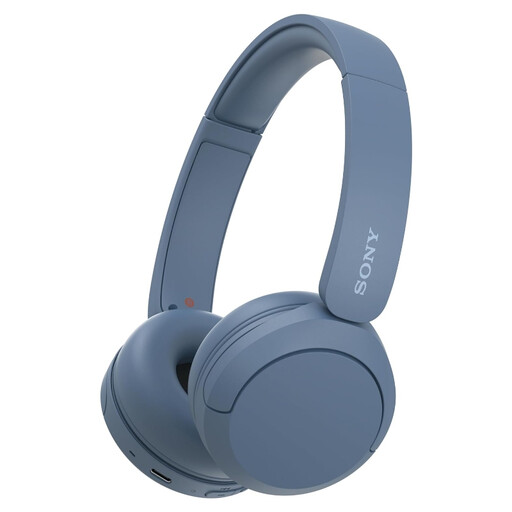
Why it suits this profile: This on-ear model is lightweight, compact and features multipoint connectivity. That makes it practical for students, home workers and everyday use without complicated set-up.
The product specifications list Bluetooth, a microphone and multipoint connectivity. Do note that the product information mentions both 40 and up to 50 hours of battery life, depending on the variant listed.
147 grams, Bluetooth 5.2 according to the specifications, USB-C and connection to two devices.
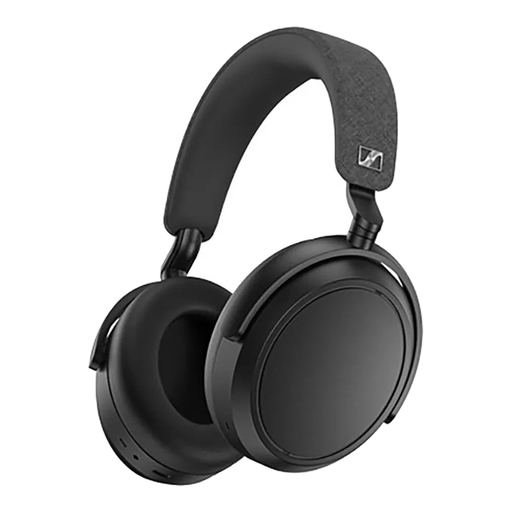
Why it suits this profile: Over-ear Bluetooth headphones for listeners who value adjustable sound, long listening sessions and calls.
The product information lists both active noise cancellation and a transparency mode. When using it for travelling or cycling, check which mode is safe for your surroundings.
Up to 60 hours of battery life according to the product information, four microphones, an app with equaliser and wired use via 3.5mm.
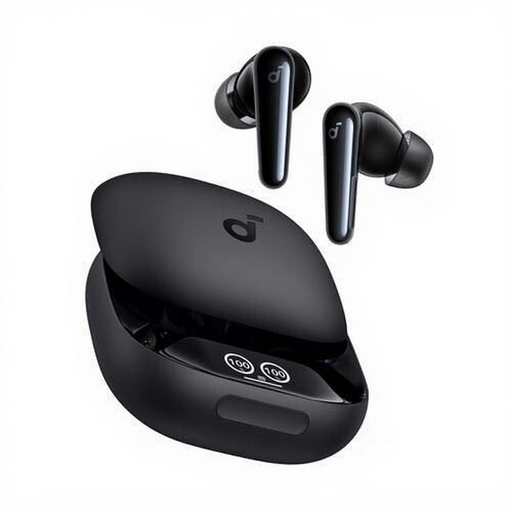
Why it suits this profile: These in-ear headphones are designed for calls, music, sport and everyday use. The additional ear tips included make it easier to find a comfortable fit.
The IPX5 rating is clearly stated. According to the product information, this indicates resistance to splashing water, but not suitability for use under water.
Up to 10 hours of playback, charging case, USB-C, six microphones and touch controls according to the product details.
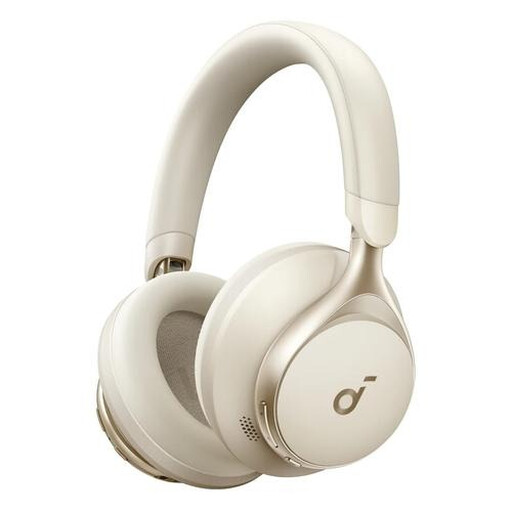
Why it suits this profile: The combination of Bluetooth, a 3.5mm connection and a foldable design is well suited to travelling, working and use with different devices.
The wired option means you are not entirely dependent on Bluetooth or a flat battery. Check beforehand whether your device supports a 3.5mm connection.
Up to 55 hours of battery life according to the product information, 40mm drivers, foldable design and USB-C.
We have put together a complete, up-to-date list of products that fully meet these strict selection criteria and the applicable European safety regulations.
Switch on Bluetooth on your smartphone, open the Bluetooth settings and put the headphones into pairing mode. With many true wireless earbuds, this happens when you open the charging case. Then select the product name from the list. If the connection does not work, remove an old pairing and charge the headphones sufficiently.
Playback time per charge varies by model and settings. A battery loses capacity over time through charging and use. Do not store the headphones completely flat for long periods, avoid heat and use a suitable USB-C charger. Overall lifespan also depends on the hinges, ear cushions, charging contacts and software support.
Bluetooth headphones generally use little power compared with a smartphone or laptop. Volume, active noise cancelling, calls and the codec being used have the greatest effect. However, a charging case or battery does need to be recharged regularly. Use a USB-C cable suitable for the device and follow the manufacturer's safety instructions.
