
Vandaag of morgen in huis

Kwaliteit gegarandeerd

Welkomstaanbiedingen ontgrendelen: GRATIS bezorging | Tot 80% korting | Gratis 30 dagen JoyPlus-proefperiode
Download de app
Wireless headphones may seem simple to choose at first: just look at Bluetooth, battery life and price. Yet many buyers run into problems after a few weeks. An uncomfortable headband, poor call clarity or a battery that lasts much less than promised in everyday use can quickly make a purchase less appealing.
This buying guide compares the key features of Bluetooth headphones. You’ll find out what to look for when listening to music, making calls, travelling, working and gaming. We’ll then recommend a few products to suit different needs.
Manufacturers often state battery life under specific conditions. Using active noise cancelling, listening at high volumes, making phone calls and using features such as spatial audio can all affect playback time. So check whether the stated battery life applies with noise cancelling switched on or off.
Specifications can also differ between product details. For the Sony WH-CH520, the description states up to 50 hours of use, while the specifications table lists 40 hours. Treat a discrepancy like this as a reason to check the full product information, not as a guarantee that you’ll get the higher figure.
Noise-cancelling headphones use electronics to reduce certain background sounds. How well they work can vary depending on your surroundings and how they fit. Low, constant sounds on a train or plane are usually different from voices in an office.
Over-ear headphones usually cover your ears more fully than on-ear headphones, but they can feel warmer or heavier. Transparency mode lets outside sounds through instead. This is useful when you’re walking outdoors or want to hear announcements at a station.
Terms such as ‘hi-fi’, ‘powerful bass’ or ‘crystal-clear calls’ don’t tell you much without technical context. Also look at the driver type, supported codecs, microphones, connections and app settings. According to UGREEN, for example, the HiTune Max5c uses multiple microphones and a noise-reduction algorithm for calls. This is a product claim; call clarity can vary depending on your phone, surroundings and how far you are from the microphone.
On-ear headphones rest on your ears. They’re often lighter and more compact, which makes them handy for commuting. However, the ear cups can put pressure on your ears during long listening sessions.
Over-ear headphones fit around your ears. They often provide better passive isolation and have more room for larger ear cushions. Check the weight and clamping force if you’re planning long listening sessions. A 248-gram model such as the Intenso O400HA will feel different to wear from a lighter model weighing around 150 grams.
Don’t just compare maximum playback time. Also check:
According to the product information, the Marshall Major V offers more than 100 hours of wireless playback and up to 15 extra hours from a 15-minute charge. The JBL Tune 520BT2 claims up to 76 hours and five extra hours from a five-minute charge. These are stated figures; actual results depend on volume, codec and usage.
A recent Bluetooth version doesn’t automatically mean that every device supports the same features. Check that your smartphone, laptop and tablet are compatible. Multipoint is useful if you want to stay connected to, for example, a laptop and phone at the same time.
A 3.5mm connection is a handy backup when the battery runs out. Some models also support audio over USB-C. Bear in mind that an included cable doesn’t always mean that every USB-C feature is supported.
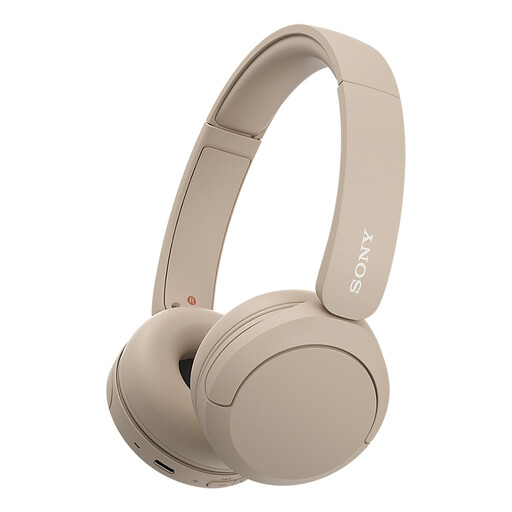
Why it suits this user: This lightweight on-ear model is designed for everyday use and features a microphone, multipoint and USB-C. It has an adjustable headband and soft ear cushions.
Key usage details are clearly stated. However, check the difference between the 50 hours listed in the description and the 40 hours in the specifications table.
147 grams, Bluetooth, multipoint, microphone, and support for AAC and SBC.
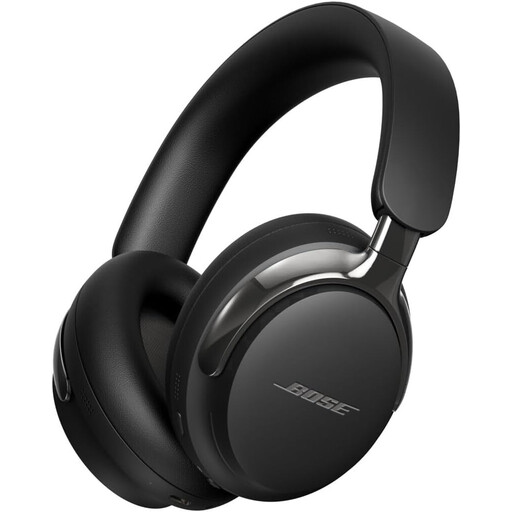
Why it suits this user: According to Bose, this over-ear model combines active noise cancelling with Immersive Audio and a Cinema Mode. It’s designed for users who value features and an immersive listening experience.
The product information distinguishes between wireless use and the detachable cable. So you still have a wired option when charging isn’t convenient.
Bluetooth 5.4, active noise cancelling, app support, multipoint and up to 24 hours of battery life.
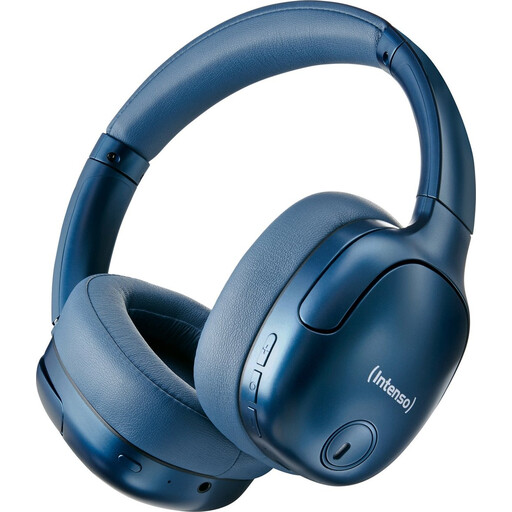
Why it suits this user: This model is designed for long listening sessions, travelling and working. Its over-ear cushions, hybrid ANC, transparency mode and 3.5mm cable give you plenty of ways to use it.
The stated ANC rating of up to 35 dB is a product specification, not a universal guarantee. Transparency mode helps when you want to remain aware of surrounding sounds.
Up to 75 hours of battery life, Bluetooth 5.3, a range of up to 15 metres, fast charging and a foldable design.
We’ve put together a full, up-to-date list of products that meet these strict selection criteria and current European safety regulations.
Switch on your headphones and hold down the power or Bluetooth button until pairing mode starts. Then open your phone’s Bluetooth settings and select the correct model. Fast Pair or Swift Pair can help with the initial connection on some devices. Check the manual if your headphones don’t appear.
Battery life depends on charge cycles, temperature, volume and usage. A model with a higher stated battery life won’t necessarily last longer in everyday use. Charge it with a suitable USB-C cable, avoid prolonged exposure to heat and store your headphones somewhere dry. If you plan to use them for years, also check whether the battery is replaceable.
It depends on your surroundings. ANC can be useful on trains and planes, and in busy offices. For cycling, walking in busy traffic or situations where you need to hear announcements, transparency mode or a lower level of isolation is more practical. Keep the volume moderate and stay aware of surrounding sounds.
