
Vandaag of morgen in huis

Kwaliteit gegarandeerd

Welkomstaanbiedingen ontgrendelen: GRATIS bezorging | Tot 80% korting | Gratis 30 dagen JoyPlus-proefperiode
Download de app
A pair of wireless headphones can seem easy to choose on paper. You see Bluetooth, long battery life and perhaps active noise cancelling. But a model can disappoint in everyday use. The fit may start to feel uncomfortable after an hour, the microphone may sound tinny during meetings, or the connection may not work with your games console.
That’s why the right choice starts not with a catchy marketing term, but with how you plan to use your headphones and the specifications you can check.
Manufacturers often quote battery life under specific conditions. Noise cancelling, RGB lighting, a 2.4GHz connection and high volume can all reduce listening time. So don’t just compare the highest number of hours. Check which connection mode and features are active when that figure is quoted.
For example, the ONIKUMA GT806 is said to last up to 60 hours in music and video mode with the lighting off, while the quoted battery life for gaming over 2.4GHz is up to 40 hours. That difference matters if you’re looking for a gaming headset.
Noise-cancelling headphones use microphones and electronics to reduce background noise. How well they work can vary depending on the type of sound, the fit and the settings. Low, constant sounds such as train or aircraft noise are different from voices or sudden sounds.
You should therefore treat performance claims as information provided by the brand. According to Sony’s own information, the WH-1000XM5 uses multiple microphones and processors for active noise cancelling. Also check whether the headphones have a transparency mode, so you can still hear your surroundings in traffic or at a station.
A pleasing sound profile won’t help much if the ear cushions don’t fit properly or the microphone isn’t suitable for calls. Also consider weight, adjustability, controls and whether you can use a cable.
For example, comfortable headphones for working from home may need an over-ear design and soft ear cushions. For exercise, a neckband or in-ear model may be more practical than a large pair of headphones.
Bluetooth is suitable for smartphones, tablets and laptops. Check the Bluetooth version and, above all, whether it’s compatible with your device. For gaming, a 2.4GHz dongle may offer lower audio latency than Bluetooth. A headset with both options is more flexible, but check which modes are supported on each platform.
According to the product specifications, the Razer BlackShark V2 uses Bluetooth 5.2, a USB-C dongle and a wireless radio connection. Its listed compatibility includes PC, PlayStation and Nintendo Switch. Still, check whether the dongle plugs directly into your console or computer.
A 3.5mm cable is useful when the battery runs out or when you want to connect to equipment without Bluetooth. The Soundcore Space One supports both Bluetooth and a 3.5mm connection and, according to the product information, comes with an AUX cable.
Compare battery life in the mode you’ll actually use:
According to the product specifications, the Sony WH-CH720N offers up to 50 hours without noise cancelling and 35 hours with it. The Sony WH-1000XM5 is listed at up to 40 hours without ANC and 30 hours with ANC. This shows why a single battery-life figure doesn’t tell you enough.
A built-in microphone is handy for music and calls, but the number of microphones doesn’t tell you everything about call quality. Also look at wind-noise reduction, microphone placement and whether there’s a detachable microphone.
A frequency range such as 20 Hz–20 kHz describes the range of tones the headphones reproduce, but it doesn’t tell you on its own how they’ll sound. Driver size, tuning and fit also play a part. The GT887-black is listed with a frequency range of 20 Hz–20 kHz and has physical buttons and a volume wheel.
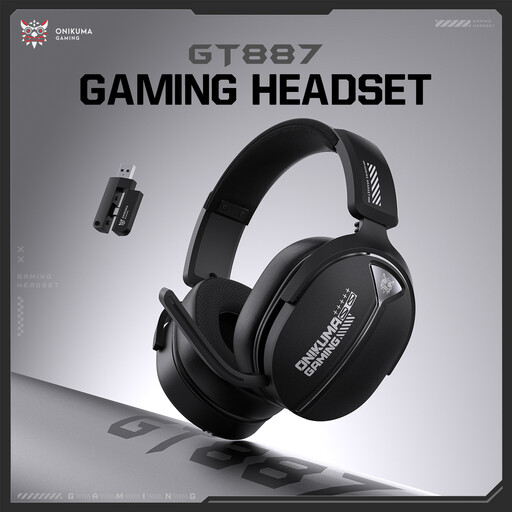
Why it suits this profile: This model is designed for straightforward everyday use, with controls directly on the ear cups. It’s a good choice if you mainly want to listen to music wirelessly without fiddling with lots of settings.
The product specifications list a frequency range of 20 Hz–20 kHz, along with physical buttons and a volume wheel. That means you’re less reliant on an app or touch controls.
Wireless controls; separate buttons; volume wheel on the ear cup.
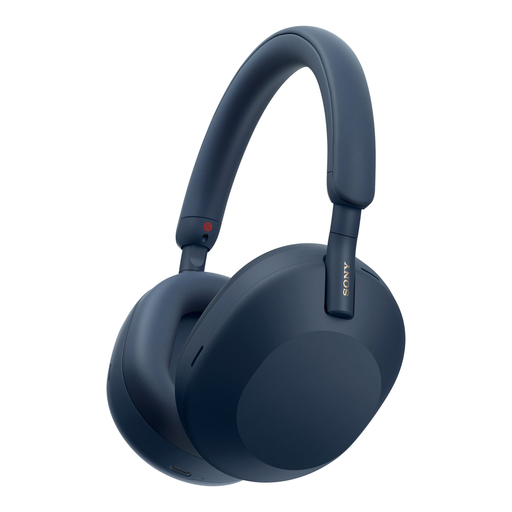
Why it suits this profile: These over-ear Sony headphones are designed for music, travel and working in places where adjustable active noise cancelling is useful.
The product information lists ANC, a microphone, multipoint connectivity and a detachable cable. This gives you several ways to use the headphones if Bluetooth or battery life doesn’t suit your needs.
Up to 30 hours with ANC; Bluetooth 5.2; LDAC, AAC and SBC support; multipoint connection.
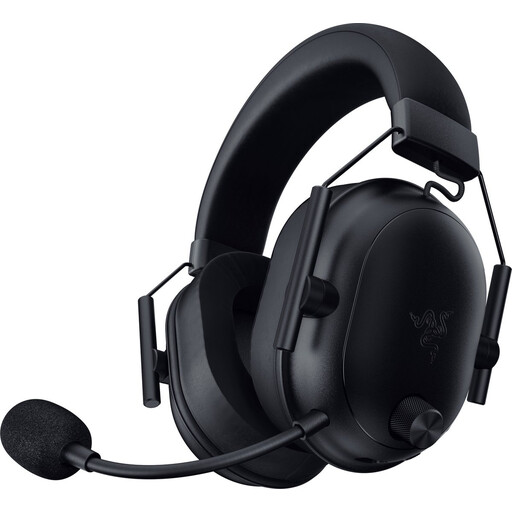
Why it suits this profile: For gamers, low latency, clear audio and a good microphone, and compatibility with multiple platforms matter more than Bluetooth alone.
Alongside Bluetooth, the headset uses a USB-C dongle and a HyperSpeed wireless connection. The detachable cable and mute button give you extra control when gaming and making calls.
Weighs 280 grams; quoted battery life of up to 70 hours; 50mm drivers; USB-C dongle included.
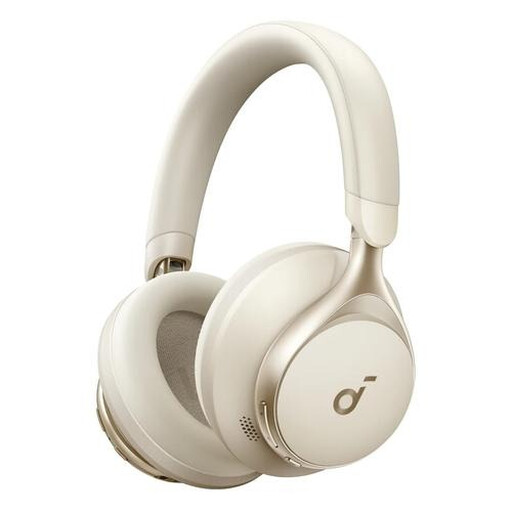
Why it suits this profile: This model combines wireless listening with the option of using a cable, making it suitable for music, calls, work and travel.
Bluetooth, a 3.5mm connection and the included AUX cable mean you’re not reliant on just one type of connection. According to the product information, the three built-in microphones are designed for calls.
40mm dynamic drivers; up to 55 hours of battery life; foldable design; Bluetooth and 3.5mm connection.
We’ve put together a full, up-to-date list of products that meet these strict selection criteria and the current European safety regulations.
Turn on the headphones and activate pairing mode. Then open the Bluetooth settings on your phone and select the model name. When connecting for the first time, the manufacturer’s app may offer extra settings. If pairing doesn’t work, remove any old connection and make sure the headphones are sufficiently charged.
Battery life per charge varies by model and settings. The overall lifespan also depends on the battery, hinges, ear cushions and how you store the product. Keep the headphones dry, avoid extreme heat and don’t use a damaged battery. Avoid listening at high volume for long periods to protect your hearing.
Not always. ANC can be useful on a train or plane, or in a busy office, while a well-fitting pair of headphones without ANC may be perfectly adequate at home. For calls, microphone quality, wind-noise handling and the connection mode you choose are just as important. Choose based on your surroundings, not just the “noise cancelling” label.
