
Vandaag of morgen in huis

Kwaliteit gegarandeerd

Welkomstaanbiedingen ontgrendelen: GRATIS bezorging | Tot 80% korting | Gratis 30 dagen JoyPlus-proefperiode
Download de app
Wireless headphones may seem straightforward to choose at first glance. However, small differences in comfort, battery life and connections can cause frustration after purchase. For example, a model may support Bluetooth but still be uncomfortable during a long train journey. “Noise cancellation” is also often mentioned without clearly explaining whether it refers to active or passive isolation.
So pay particular attention to these common pitfalls:
Start with your everyday situation. For commuting, over-ear headphones with active noise cancellation are worth considering. If compactness is your priority when travelling, wireless earbuds may be a better choice. For running or cycling, an open-ear model can be more practical because you can still hear your surroundings. If you regularly attend meetings, you should also pay attention to the microphone and call controls.
When choosing headphones for music, the frequency range, driver type and sound settings are more relevant than terms such as “Hi-Fi” or “3D audio” on their own. A range such as 20 Hz to 20,000 Hz does not, by itself, tell you how a model sounds, but it does indicate which frequencies the product specifications say it reproduces.
Over-ear headphones generally block out more of the surrounding environment than in-ear earbuds. This can be useful on public transport. Do check the weight, though: a heavier model may put more pressure on your head and neck during extended use.
For headphones used for calls, a built-in microphone, mute controls and a stable connection are important. Bluetooth 5.3 or Bluetooth 5.4 tells you which Bluetooth version is used, but it does not guarantee the same connection quality in every home. Distance, walls and the connected device also play a part.
Also look for multipoint pairing. This allows headphones to stay connected to multiple devices, such as a laptop and smartphone. Not every model supports this, so check the product specifications before relying on it.
Sports earbuds primarily need to stay securely in place. An ear hook, neckband or open-ear design may be more stable for some users than loose in-ear earbuds. Also check the IP rating:
A higher rating does not mean you can use a product underwater. Always follow the manufacturer’s warnings.
USB-C headphones use the USB-C port for audio and/or charging. The Samsung EO-IC100, for example, is a wired in-ear headset with USB Type-C and, according to the product specifications, does not have Bluetooth. It may be suitable for a smartphone, tablet or laptop with USB-C, but not for devices without a compatible connection.
A Bluetooth model does not need an audio cable, but it does need to be charged. Check that your device supports Bluetooth and whether a USB-C cable or charging case is included.
Passive noise isolation is created by the ear cushions or earbuds partially blocking out sound. Active noise cancellation uses electronics to reduce ambient noise. This is particularly relevant on planes, trains and in busy offices.
Noise cancellation does not work equally well for every type of sound. Low, constant tones are often handled differently from voices or sudden noises. So treat a brand’s claims as information from the product description. According to Apple’s own research, the AirPods Max with active noise cancellation blocks up to twice as much background noise as earlier models; the actual experience depends on the fit and your surroundings.
Check whether the battery life refers to the earbuds, the headphones themselves or the combination with a charging case. The Apple AirPods 4 are specified as offering up to 30 hours of total battery life including the case. According to the product specifications, the Apple AirPods Max offer up to 20 hours of use with noise cancellation switched on.
Lithium-ion batteries wear out through use and age. Extreme heat, storing them completely flat for long periods and physical damage can affect their lifespan. A built-in battery is also not always easy to replace yourself. Use a suitable USB-C charger and stop charging if a device becomes unusually hot or is damaged.
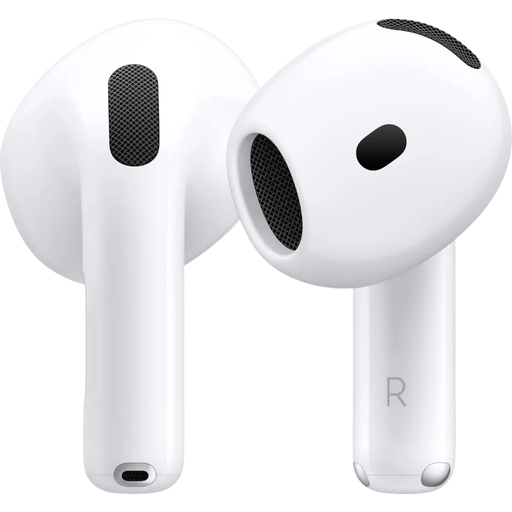
Why it suits this profile: This model is designed for everyday use and Bluetooth pairing. The earbuds come with a USB-C charging case and support iOS and other Bluetooth devices.
The product specifications clearly state that this model does not have active noise cancellation and that its IP54 rating provides protection against splashing water. This makes it clear what you are and are not buying.
Bluetooth 5.3, a USB-C charging case and up to 30 hours of total battery life according to the product information.
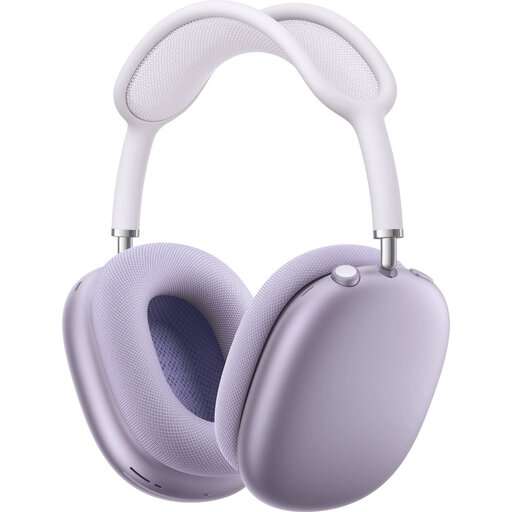
Why it suits this profile: These over-ear headphones are designed for anyone who values a roomier fit, active noise cancellation and control via the Digital Crown.
The information specifies both active noise cancellation and 20 hours of battery life with this feature switched on. It also clearly states that the model is not water-resistant.
Over-ear design, Bluetooth 5.0, USB-C connection and support for transparency mode.
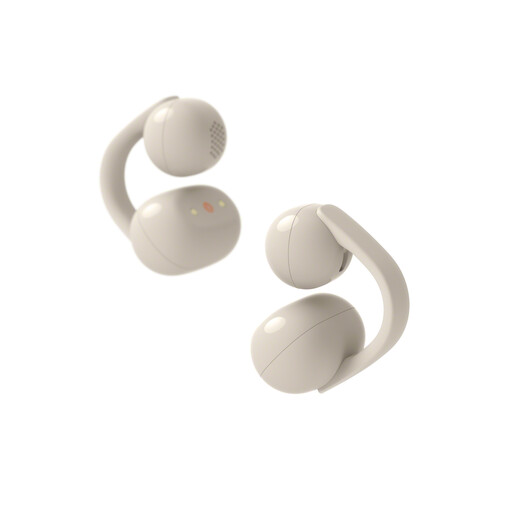
Why it suits this profile: The open-ear design with ear clips lets in ambient sound. This makes the model suitable for walking, cycling or working when you want to stay reachable and alert.
The IPX4 rating clearly defines the intended protection against splashing water. The open-ear model is also not a closed sports earbud, so you can expect to hear sounds from your surroundings.
Bluetooth 5.3, a USB-C charging case, 9 hours of playback from the earbuds and up to 37 hours including the case according to the product information.
We have put together a complete, up-to-date list of products that fully meet these strict selection criteria and the applicable European safety regulations.
Switch on Bluetooth on your smartphone, put the headphones into pairing mode and select the model from the list of available devices. With some Apple products, a connection window appears automatically. If it does not work, charge the device, disconnect an existing connection and try again.
Usage time per charge varies by model and function. Noise cancellation, volume, codec and call usage all affect battery life. The battery itself loses capacity over time. Store the headphones in a dry place, avoid extreme temperatures and use a suitable charger.
A Bluetooth model uses power and needs to be charged. The associated costs are generally limited; the practical difference mainly concerns the battery and any replacement needed over the longer term. Wired USB-C headphones do not need a built-in audio battery, but they do require a device with a suitable USB-C port.
