
Vandaag of morgen in huis

Kwaliteit gegarandeerd

Welkomstaanbiedingen ontgrendelen: GRATIS bezorging | Tot 80% korting | Gratis 30 dagen JoyPlus-proefperiode
Download de app
Wireless headphones are ideal for music, podcasts, films, calls and gaming. However, it is not wise to base your choice solely on the Bluetooth version, battery life or the term “noise cancelling”. The right choice mainly depends on the fit, how you plan to use them and the specifications that matter to you.
Manufacturers often state the maximum playback time under specific conditions. Noise cancelling, high volume, phone calls and using a wireless dongle can all affect battery life. So check whether the stated figure applies with or without ANC, and whether it refers to the earbuds themselves or the combined total with the charging case.
Fast charging is also useful when choosing headphones with long battery life. A short charge may be enough for your commute, a meeting or a gaming session.
ANC headphones use microphones and electronic processing to reduce background noise. The result varies from one product and environment to another. Low, constant sounds such as train or aeroplane noise are generally a different scenario from voices, traffic or sudden sounds.
Also consider the transparency mode. When cycling, walking or working somewhere you need to remain approachable, allowing ambient sound through may be more useful than maximum noise cancellation.
In-ear headphones can be light and compact, but not every earbud suits every ear. Earbuds that fit too loosely lose sound isolation more quickly and may move during exercise. Over-ear headphones can be more comfortable for long listening sessions, but they take up more space and may feel warmer.
So check the wearing style, weight, included ear tips and IP rating. An IP rating provides information about dust and water resistance, but does not automatically mean a product is suitable for swimming.
Bluetooth 5.2, 5.3 or 6.0 mainly indicates the connection technology being used. A higher version number does not automatically mean better sound. Also look at codec support, compatibility with your smartphone and the features you need.
With multipoint, headphones can be connected to, for example, a phone and laptop at the same time. This is useful when you listen to music while working and want to take phone calls. However, check that multipoint is supported by your devices and the functions you want to use.
For gaming, a low-latency USB-C dongle may be more relevant than Bluetooth alone. According to the product information, the Sony INZONE Buds offer latency of less than 30 milliseconds when using the USB-C dongle.
Headphones with a microphone are suitable for calls, online meetings and gaming, but how clearly you can be heard depends on the microphone position and your surroundings. Multiple microphones or call noise reduction can help, but product claims should be viewed as product information rather than a guarantee for every situation.
When exercising, pay attention to the IP rating:
Also avoid using wireless headphones at high volume for extended periods. Turn the volume down before you start and take regular breaks.
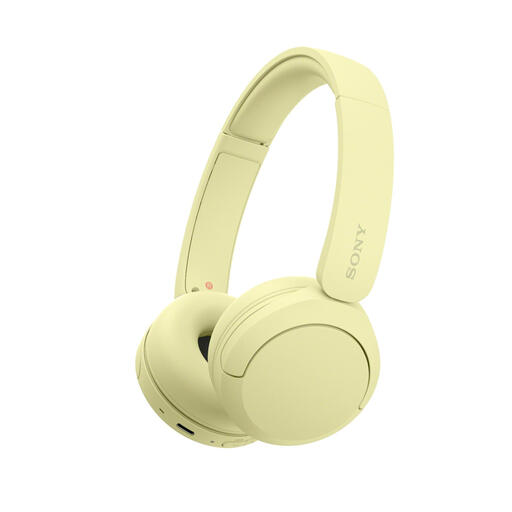
Why it suits this profile: Lightweight on-ear Bluetooth headphones for everyday listening, calls and use with a phone or laptop.
The specifications state a weight of 147 grams, multipoint and a built-in microphone. This means you do not automatically need to choose a heavier ANC model for everyday use.
Bluetooth, USB-C, multipoint and, according to the product listing, up to 40 hours of battery life.
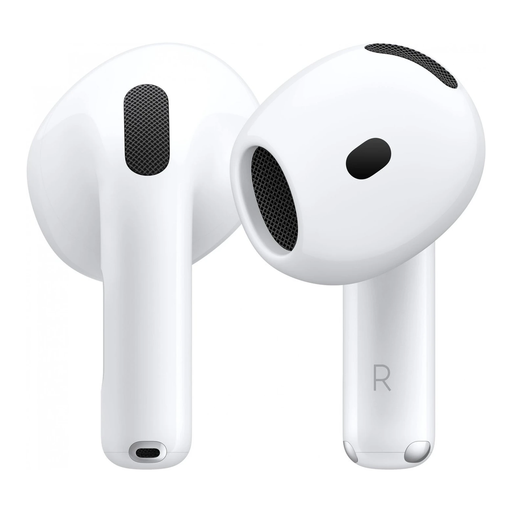
Why it suits this profile: Ideal for Apple users who consider ANC, transparency and integration with iOS important.
The product information mentions both active noise cancellation and a transparency mode. This lets you switch between blocking out noise and allowing ambient sound through.
Bluetooth 5.3, USB-C, wireless charging, IP54 and, according to the product listing, more than 30 hours of total battery life with the case.
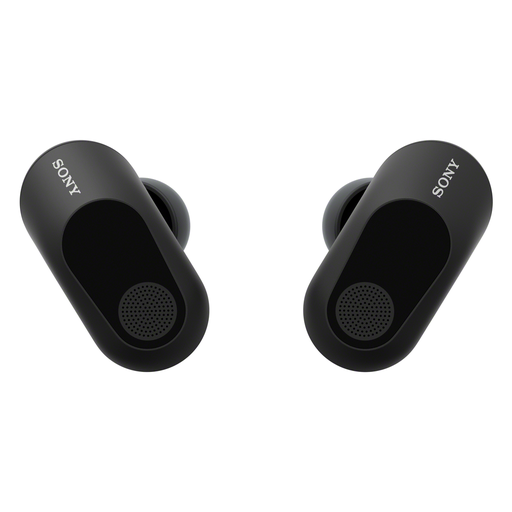
Why it suits this profile: Designed for gamers who prioritise low latency, a microphone and long sessions.
The product listing distinguishes between the USB-C dongle and LE Audio. So check in advance which connection your computer or console supports.
Active noise cancellation, microphone, IPX4 and, according to Sony’s product information, up to 12 hours via the dongle or up to 24 hours with LE Audio.
We have put together a complete, up-to-date list of products that fully meet these strict selection criteria and the applicable European safety regulations.
Turn on Bluetooth on your smartphone, open the Bluetooth settings and switch on the headphones. If necessary, activate pairing mode and select the product name. Features such as quick pairing or app control may vary between Apple, Android and Windows devices.
Playback time per charge ranges from a few hours for wireless earbuds to several dozen hours for an over-ear model. Overall service life also depends on charging cycles, storage, temperature and maintenance. Store earbuds in their case, keep charging ports dry and use suitable USB-C chargers.
That depends on the fit and IP rating. For exercise, it is better to choose a secure-fitting model with a stated level of splash protection. ANC can reduce ambient noise, so take extra care in traffic and use transparency mode when you need to hear your surroundings.
