
Vandaag of morgen in huis

Kwaliteit gegarandeerd

Welkomstaanbiedingen ontgrendelen: GRATIS bezorging | Tot 80% korting | Gratis 30 dagen JoyPlus-proefperiode
Download de app
Choosing wireless headphones may seem straightforward: select Bluetooth, check the battery life and compare the price. In practice, most disappointments are caused by details that only become apparent after purchase. Think of ear cushions that become uncomfortable over time, a microphone that is difficult to hear in a busy environment, or battery life that is only achieved under ideal conditions.
This guide helps you distinguish marketing claims from verifiable product specifications. That way, you can choose Bluetooth headphones that suit the way you use them: on the go, at home, in the office or during video calls.
Manufacturers often state the maximum playback time. This can vary depending on the volume, Bluetooth features, active noise cancellation and use of the microphone. So check whether the stated battery life applies to music, calls or a combination of both.
Headphones with long battery life are particularly practical if you travel frequently or do not want to charge them every day. Also pay attention to the charging port, fast-charging function and whether you can continue listening with a cable.
Headphones with noise cancellation reduce ambient sound, but they do not automatically make a train, office or aeroplane silent. Active noise cancellation generally works differently on constant low-frequency sounds than on voices or sudden noises. The fit also matters: poorly fitting ear cushions limit passive sound isolation.
According to a brand’s own research, certain technologies can reduce ambient noise by a specific percentage. Treat such figures as brand claims and also look at the type of ANC, listening modes and the construction of the ear cups.
Over-ear headphones surround the ear and can therefore be suitable for long listening sessions. On-ear headphones rest on the ear and are often lighter and more compact, but may create more pressure over time. The right choice depends on the shape of your head, whether you wear glasses, how long you wear them and how portable you want them to be.
Check the Bluetooth version and features such as multipoint. Multipoint allows headphones to remain connected to two devices, for example your laptop and smartphone. This is useful when switching between music and a phone call while working from home.
Also check whether a USB adapter, 3.5mm cable or USB audio connection is included. A wireless headset with a microphone may offer extra compatibility with Microsoft Teams or Zoom for business calls, but always check that this certification is actually stated in the product information.
For music and calls, the speaker is not the only important component. Look at the number of microphones, whether there is an adjustable microphone boom and which features are available for filtering background noise. A noise-cancelling microphone does not mean that every voice will sound clear in every environment. The microphone’s position, your distance from the laptop and the surrounding noise will still have an impact.
A wired headset can still be practical for a fixed workstation. You do not need to charge it, and a 3.5mm connection works with many computers, tablets and smartphones.
Compare at least these points:
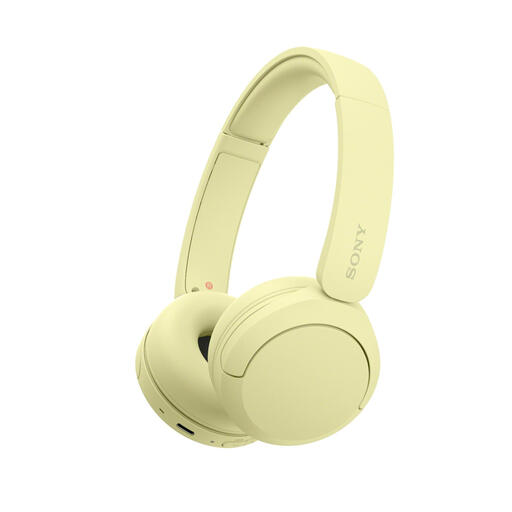
Why it suits this profile: This compact on-ear model is designed for everyday use, travel and easy listening via Bluetooth. The adjustable headband, soft ear cushions and weight of 147 grams are practical features when you are on the go.
The product information mentions multipoint, a microphone and USB-C charging. However, check the current battery-life information, as the details mention both a maximum of 50 hours and 40 hours.
Bluetooth 5.2, multipoint connection, AAC and SBC codecs, and a low weight of 147 grams.
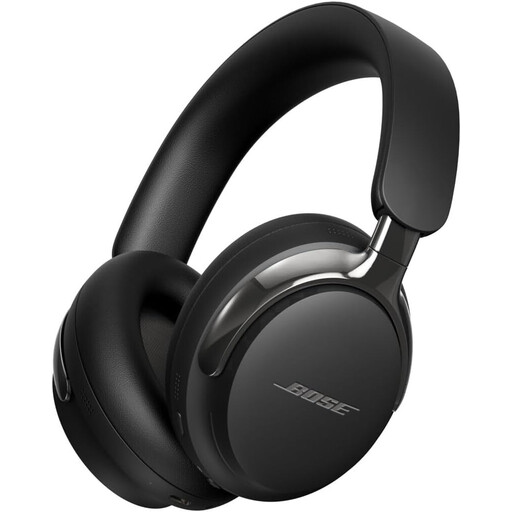
Why it suits this profile: This over-ear model combines Bluetooth 5.4 with active noise cancellation and a detachable cable. This makes it suitable for listening to music, travelling and focused work.
The cable provides an alternative when the battery is empty. The product information also mentions multiple connections and an app for adjusting the settings.
Bluetooth 5.4, active noise cancellation, USB-C and 3.5mm connections, and Cinema Mode according to the product description.
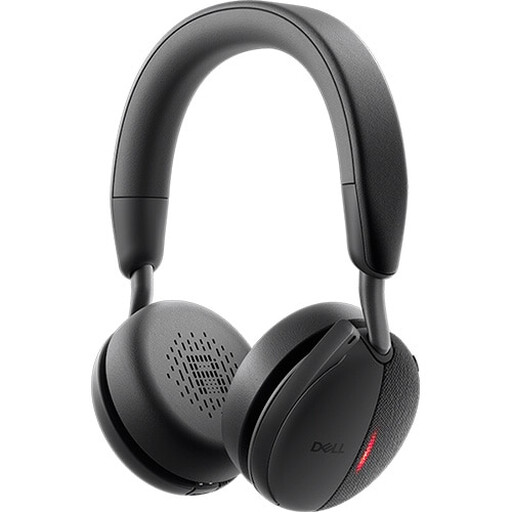
Why it suits this profile: This wireless headset with microphone is designed for professionals who attend many meetings and use multiple devices. The product information states that it is certified for Microsoft Teams and Zoom.
The specifications mention Bluetooth 5.3, five microphones, ANC and USB-A or USB-C connections. This makes the headset suitable for a fixed workstation and hybrid working.
Stated battery life of up to 78 hours, Bluetooth 5.3 and support for USB 2.0, USB-A and USB-C according to the product specifications.
We have put together a complete, up-to-date list of products that fully meet these strict selection criteria and the applicable European safety regulations.
Switch on the headphones and activate pairing mode. Then open your laptop’s Bluetooth settings, select the model and confirm the connection. With some business headsets, using the supplied USB adapter is easier. After pairing, check that the correct microphone and speaker are selected in your meeting software.
Their lifespan depends on the battery, hinges, headband and ear cushions. Store the model in a dry place, avoid extreme heat and charge it with a suitable cable. A model with replaceable ear cushions or an included cable may remain practical to use for longer. Battery life per charge is not the same as the product’s total lifespan.
The energy used for charging is generally limited. The practical cost mainly depends on how often you charge them and the charging power. Headphones that last for weeks on a single charge need to be connected to the charger less often. For intensive use, also check whether fast charging or listening via cable is possible.
Not always. In a quiet room, ordinary Bluetooth headphones may be sufficient. If you work next to a busy road, in a shared space or while travelling, active noise cancellation can help reduce distractions. For video calls, also pay particular attention to microphone quality and compatibility with your computer.
