
Vandaag of morgen in huis

Kwaliteit gegarandeerd

Welkomstaanbiedingen ontgrendelen: GRATIS bezorging | Tot 80% korting | Gratis 30 dagen JoyPlus-proefperiode
Download de app
A pair of wireless headphones may seem easy to choose at first glance. However, small differences in comfort, battery life and connectivity can make a big difference after a few weeks. A Bluetooth pair of headphones for commuting has different requirements from sports earbuds or a gaming headset for long sessions.
What is more, if you only go by terms such as “hi-fi”, “AI” or “noise cancelling”, you risk paying for features that are not well suited to how you use them. This guide compares the most important features and shows which product types are best for different situations.
Manufacturers often state the total playback time including the charging case. With wireless earbuds, the battery life of each individual earbud may be considerably lower. Therefore, check:
The stated usage time generally depends on volume, codec, connection and enabled features. Treat it as a product specification under certain conditions, rather than a fixed guarantee for everyday use.
An IPX5 or IPX7 rating says something about protection against water, but not automatically against dust, seawater or prolonged immersion. IPX5 is designed to withstand water jets and may be suitable for rain or perspiration. IPX7 generally refers to temporary immersion under defined testing conditions.
Over-ear headphones are often not water-resistant. For example, the Sennheiser MOMENTUM 4 Wireless explicitly states that the product must not be exposed to water or moisture. Water-resistant earbuds are therefore more practical for running or cycling.
Noise cancelling can refer to active noise cancellation, passive sound isolation or a marketing term for microphone noise reduction. Active noise cancellation works particularly well against constant low-frequency sounds, such as the noise of a train or aeroplane. Voices and sudden sounds may still be audible.
According to MINISO’s own information, the MS106’s adaptive noise cancellation can deliver up to -50 dB and block 99.7% of ambient noise. This is a brand claim from the product description; your real-world experience will also depend on fit, ear shape and surroundings.
Choose the design based on how long you will wear the headphones and how much you will move:
Bluetooth is convenient for smartphones, tablets and laptops. Check the Bluetooth version, but also look for features such as multipoint, dual-device connectivity and a low-latency mode. A newer Bluetooth version alone is no guarantee of better sound or a more stable connection with every device.
For gaming, a 2.4GHz dongle may offer lower latency than Bluetooth. A Bluetooth gaming headset, on the other hand, is more flexible when switching between a PC, console and smartphone. A wired backup connection can be useful when the battery runs out.
For calls in busy environments, multiple microphones and wind-noise reduction are useful specifications. Also check whether the microphone can be muted and whether the controls are located on the earbud or earcup.
Touch controls are compact, but can be activated accidentally when adjusting an earbud. Physical buttons often provide more tactile feedback. Also check whether equaliser settings are available through an app.
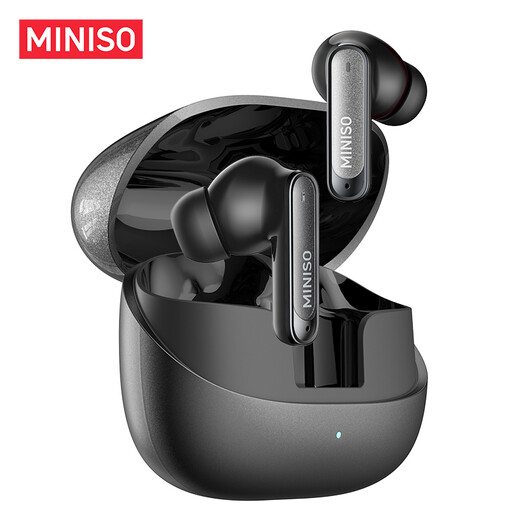
Why it suits this profile: These true wireless earbuds are compact for everyday use, studying, the office and commuting. The product description states that each earbud weighs 3.9 grams, and mentions touch controls and connectivity with two devices.
According to the product specification, the IPX5 rating makes these earbuds suitable for rain and sweat, but not for immersion. The stated battery life of up to 55 hours refers to the total including the charging case.
10mm dynamic driver, six microphones for noise reduction during calls and a quick-charge function that, according to the description, provides up to 3 hours of playback from 10 minutes of charging.
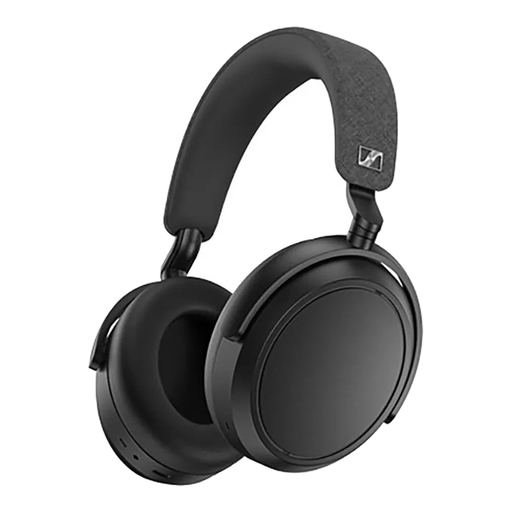
Why it suits this profile: These over-ear headphones are aimed at listeners who value comfort, extensive settings and long battery life for music, travelling and working from home.
The product information clearly states that these headphones are not water-resistant. This makes it easier to avoid accidentally using them as sports headphones.
Up to 60 hours of playback according to the specifications, 42mm transducers, adaptive noise cancelling, transparency mode, four microphones and support for a 3.5mm cable.
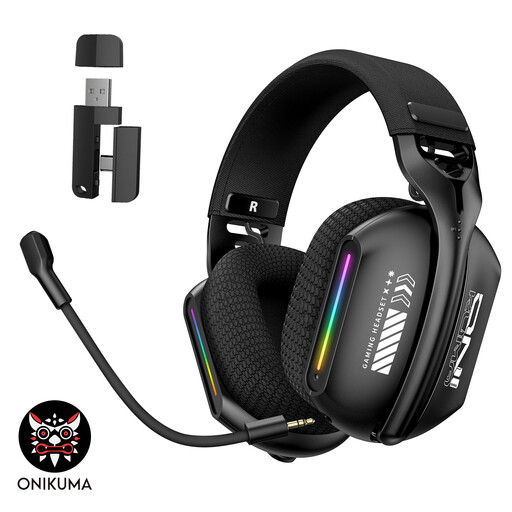
Why it suits this profile: Gamers switching between a PC, laptop and mobile devices get three connection options: Bluetooth 5.3, 2.4GHz wireless and wired use.
Choosing 2.4GHz or a cable provides an alternative when Bluetooth introduces too much latency. The microphone can be adjusted through 360 degrees, allowing you to position it as needed.
Soft memory foam ear cushions, adjustable headband, three connection modes and a rechargeable battery with a USB-C connection.
Use this quick guide:
We have compiled a complete, up-to-date list of products that fully meet these strict selection criteria and the applicable European safety regulations.
First, charge the headphones and switch them on. Then press and hold the pairing button until the indicator light flashes. Open the Bluetooth settings on your phone and select the product name. If the device has been paired before, the headphones will often reconnect automatically.
Battery life per charge varies by model and feature. Overall lifespan depends on charging cycles, storage, moisture and everyday use. Keep the device dry, charge it with a suitable cable and avoid prolonged use at maximum volume. Clean earbuds with a soft, dry cloth.
Power consumption is generally limited. You mainly charge the built-in battery, usually via USB-C. A model with long battery life needs charging less often. However, noise cancelling, high volume and an active Bluetooth or gaming connection can reduce battery life per charge.
