
Vandaag of morgen in huis

Kwaliteit gegarandeerd

Welkomstaanbiedingen ontgrendelen: GRATIS bezorging | Tot 80% korting | Gratis 30 dagen JoyPlus-proefperiode
Download de app
A wireless headset may seem straightforward to choose: set your budget, check Bluetooth and pick a colour. In practice, small differences in wearing style, battery life and water resistance can have a major impact on everyday use. A model that is comfortable on a train journey may not be suitable for running or long video calls.
So don’t focus solely on terms such as “Hi-Res”, “AI” or “noise cancelling”. Above all, check the specifications you actually need. Below, you’ll find the key points to consider, followed by a selection of carefully chosen products.
Headphones with long battery life may advertise an impressive number of hours, but that figure often applies without active noise cancellation and at a particular volume level. With earbuds, you also need to distinguish between the playback time of the earbuds and the total playback time including the charging case.
So check:
The Sony WH-CH520 lists different figures in its product information: the description mentions up to 50 hours, while the technical specifications state 40 hours. This difference shows why it’s sensible to check the key product specification on the product page before placing your order.
Active noise cancellation, often referred to as ANC, uses microphones and electronics to reduce surrounding noise. This is particularly useful on planes, trains or in a busy office. Passive isolation also comes from the fit and the material of the ear cushions or silicone ear tips.
Look out for the difference between:
According to information provided by the brands concerned, features such as adaptive ANC or AI noise cancellation can improve the listening or calling experience. Treat these claims as manufacturer product features, and also look at the concrete details, such as the number of microphones, the available modes and the controls.
An IP rating indicates the conditions against which a product is protected according to its stated classification. IP54, for example, means protection against dust and splashing water, while IPX5 indicates protection against water jets. This does not automatically make a model suitable for swimming.
Always check:
Do not use ordinary on-ear or over-ear headphones without a water-resistance rating in the rain or during exercise where you produce a lot of sweat.
An in-ear headset or set of true wireless earbuds is compact and easy to take with you. The fit is personal, though. The wrong size of silicone ear tip can reduce comfort and weaken sound isolation. Models supplied with several sizes of ear tips give you more ways to adjust the fit.
Over-ear headphones surround the ear, making them comfortable for travelling or working from home. An on-ear model rests on the ear and is usually lighter and more compact, but may create more pressure during prolonged use.
For everyday use, Bluetooth 5.0 or later and a stable connection are generally sufficient. Also look for features that suit your devices:
Bluetooth versions alone do not tell you everything about sound quality. The codec used, the device you connect to and the software also play a part.
For headphones used for music and calls, multiple microphones and good microphone placement are important. Check whether a microphone is included and whether multipoint is supported if you frequently switch between work and personal devices.
When cycling or running, an open design or transparency mode can help you remain more aware of your surroundings. Do not listen at high volume for extended periods, and do not use headphones in situations where you need to hear traffic sounds or warnings.
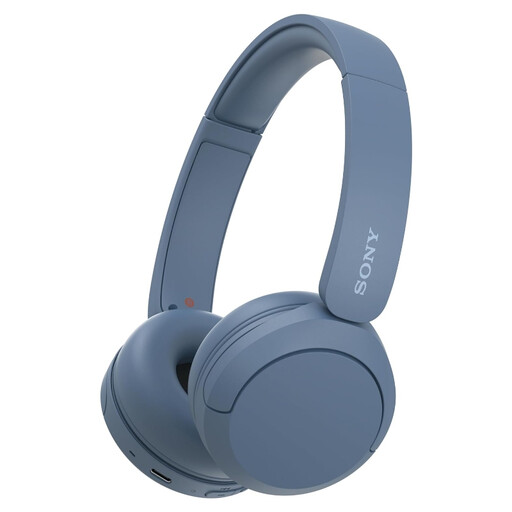
Why it suits this profile: This lightweight on-ear model is suitable for podcasts, music and calls without the bulk of over-ear headphones. Multipoint makes it easy to switch between your phone and laptop.
The Bluetooth and battery details are clearly stated. However, check the differing battery claim of 40 versus 50 hours on the product page.
147 grams, USB-C, microphone and multipoint connectivity. Not water-resistant; not intended for wet conditions.
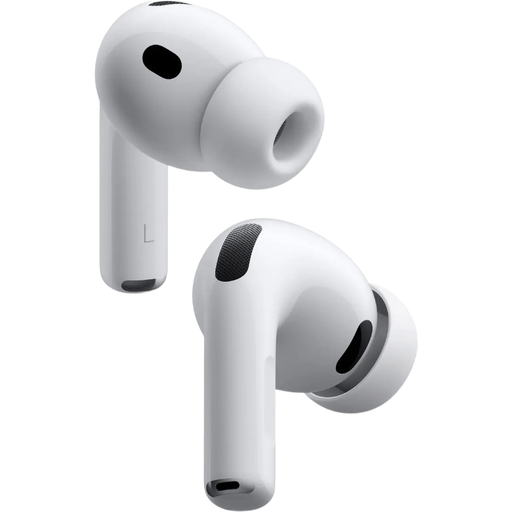
Why it suits this profile: An option for Apple users looking for ANC, spatial audio and an adjustable fit for music, films and fitness.
Five sizes of silicone ear tips help you fine-tune the fit. The IP57 rating is stated; nevertheless, follow the usage restrictions in the manual.
Bluetooth 5.3, active noise cancellation, wireless and USB-C charging, a microphone and stated playback time of up to 8 hours with ANC.
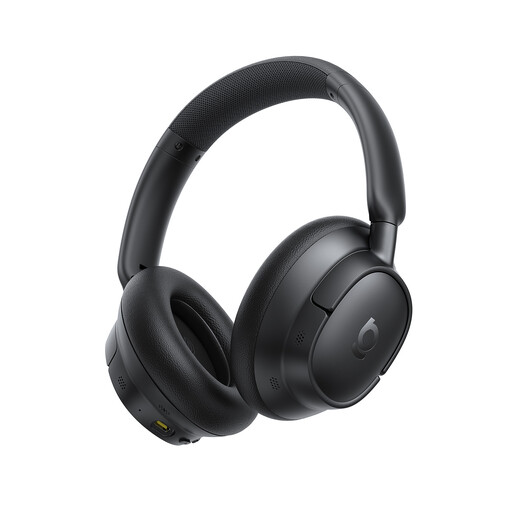
Why it suits this profile: These over-ear Bluetooth headphones are designed for long listening sessions, travelling, working from home and calls.
Battery life is stated separately for ANC on and off: 55 and 80 hours respectively, according to the product description. This makes it clear which usage scenario the claim refers to.
Over-ear design, multipoint, USB-C, LDAC support and five microphones according to the stated specifications.
We’ve put together a complete, up-to-date list of products that fully meet these strict selection criteria and the applicable European safety regulations.
Use this checklist before buying wireless headphones or wireless earbuds:
Turn on Bluetooth on your phone, put the headphones into pairing mode and select the product name from the Bluetooth list. With some models, you first need to open the charging case or press and hold a button. Remove an old pairing if the connection cannot be established.
Battery life per charge varies considerably depending on the model and settings. An on-ear model may offer dozens of hours, while in-ear earbuds often run for a few hours per charge and are then recharged via the case. Overall lifespan depends on factors including charging cycles, temperature, volume and maintenance. Store earbuds in their case and do not charge them in a damp environment.
While listening, a Bluetooth headset uses very little energy from your phone. The built-in battery does need to be recharged regularly, though. USB-C charging is generally straightforward, while wireless charging adds convenience if you already have a suitable charging station. Also check for any required apps or paid services; none of the models mentioned lists a paid service as a requirement.
