
Vandaag of morgen in huis

Kwaliteit gegarandeerd

Welkomstaanbiedingen ontgrendelen: GRATIS bezorging | Tot 80% korting | Gratis 30 dagen JoyPlus-proefperiode
Download de app
Wireless headphones may seem simple to choose: look for Bluetooth, battery life and an attractive price. However, some models prove less suitable once you start using them every day. A poor fit, unclear battery claims or limited connectivity can quickly become frustrating.
With this buying guide, you can compare the key features of Bluetooth headphones, find out which specifications really matter and see which models suit different needs.
Manufacturers often quote the longest possible playback time under specific conditions. Noise cancelling, high volume, calls and multipoint connectivity can all affect how long the battery actually lasts. So check whether the quoted battery life applies with or without active noise cancelling.
The Sony WH-1000XM5 is a good example. Its product specifications state a battery life of up to 40 hours, while playback time with active noise cancelling is up to 30 hours. That difference matters if you mainly use your headphones on the train or when flying.
Noise-cancelling headphones mainly reduce constant background sounds, such as the hum of a train or plane. Voices, sudden sounds and traffic may not be completely filtered out. Models with passive isolation alone work differently: the ear cushions partially block out surrounding noise without electronic noise cancelling.
Don’t use active noise cancelling as a substitute for staying alert. Turn it off in traffic or anywhere you need to hear the sounds around you.
Over-ear headphones fit around your ears and generally provide more physical sound isolation. On-ear headphones rest on your ears and are often lighter and more compact, but may become uncomfortable during extended use. Consider:
A lightweight model isn’t automatically more comfortable. The shape of the earcups and the clamping force matter just as much.
A newer Bluetooth version doesn’t automatically mean better sound. Check which codecs are supported too, such as SBC, AAC or LDAC, and see whether the model supports multipoint. With multipoint, for example, you can keep your laptop and smartphone connected at the same time.
A built-in microphone is important for work and calls. For gaming, a wireless gaming headset with a 2.4GHz dongle may offer lower latency than Bluetooth. Always check that the headset works with your PC, PlayStation, Nintendo Switch or smartphone.
Compare battery life under the same conditions:
Fast charging is handy if you often forget to charge your headphones. Also check whether a USB-C cable is included and whether you can use the headphones with a wired connection when the battery runs out.
A frequency range such as 20 Hz to 20 kHz doesn’t, on its own, tell you much about how the headphones will actually sound. Look at the driver type, codec and available app settings too. An app may offer an equaliser, firmware updates and sound profiles.
For phone calls, microphone quality and wind noise reduction matter more than having a large number of audio modes. For gaming, positioning, microphone quality, connectivity and latency are often more important than driver size alone.
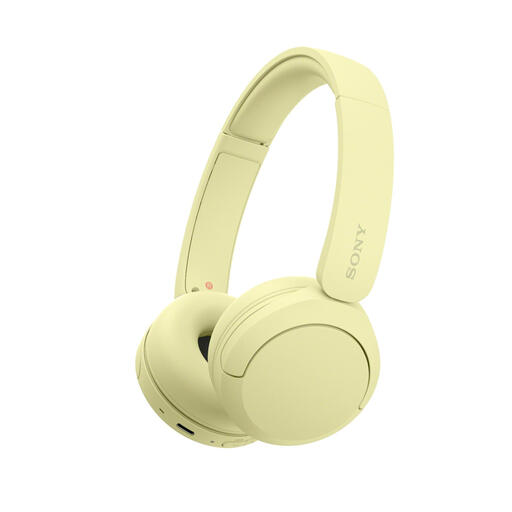
Why it suits this user: These lightweight on-ear headphones weigh 147 grams and are suitable for music, calls and everyday use. Multipoint makes switching between your smartphone and laptop easy.
The specifications list a lightweight design, an adjustable headband and soft ear cushions. Bear in mind, though, that this model doesn’t have active noise cancelling.
147 grams, Bluetooth, USB-C, microphone and multipoint connectivity. The product description states up to 50 hours of use; check the latest product specifications before buying.
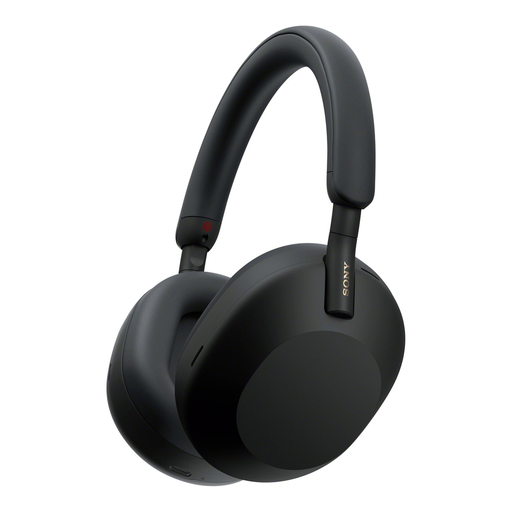
Why it suits this user: These over-ear headphones combine active noise cancelling, LDAC support, multipoint connectivity and app controls for music, work and travel.
Battery life is specified for different situations: up to 30 hours with noise cancelling and up to 40 hours without. This makes it easier to compare.
Active noise cancelling, Bluetooth 5.2, LDAC, multipoint, USB-C and an included cable.
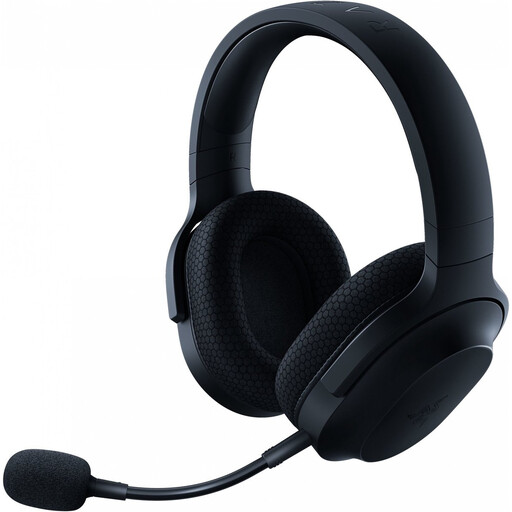
Why it suits this user: This model is designed for gamers who want one headset for PC, PlayStation, Nintendo Switch and everyday use.
As well as Bluetooth, the headset uses a USB-C dongle for a 2.4GHz connection. This gives you an alternative when low latency is important for gaming.
Up to 50 hours of battery life according to the product specifications, 40mm drivers, detachable microphone, Bluetooth 5.2 and a 3.5mm jack.
We’ve put together a complete, up-to-date list of products that meet these strict selection criteria and current European safety regulations.
Switch on the headphones and hold down the pairing button until the indicator light flashes. Then open the Bluetooth settings on your smartphone and select the name of the headphones. Some models support faster pairing on Android and Windows through Fast Pair or Swift Pair.
Battery life is often between around 20 and 100 hours, depending on the model and settings. The overall lifespan also depends on daily use, storage, charging and wear to the ear cushions. A model with replaceable cushions can be handy if you use your headphones a lot.
It depends on how you’ll use them. A basic pair of Bluetooth headphones may be enough for quiet spaces. If you often travel by train or plane, work in a busy office or want to reduce background noise, active noise cancelling, multipoint connectivity and a comfortable over-ear fit may justify the extra cost. Always compare the features you’ll actually use rather than focusing only on the brand or marketing name.
