
Vandaag of morgen in huis

Kwaliteit gegarandeerd

Welkomstaanbiedingen ontgrendelen: GRATIS bezorging | Tot 80% korting | Gratis 30 dagen JoyPlus-proefperiode
Download de app
Wireless headphones are handy for listening to music and podcasts, making calls, travelling, working and gaming. But a long list of features doesn’t always tell you what they’ll be like to use every day. For example, a model might boast impressive battery life, but last much less time in practice when active noise cancelling is switched on. A low price can also look tempting, while comfort, microphone quality or water resistance may be limited.
Joybuy’s Product Recommendation Officer has put together the key things to consider when buying. This will help you compare Bluetooth headphones, wireless earbuds and sports models using specifications you can check, rather than marketing claims.
Manufacturers often quote battery life under specific conditions. For example, the stated playback time might be measured with noise cancelling switched off, at a moderate volume and with a fully charged battery. Active noise cancelling, phone calls or a higher volume can all reduce how long the headphones last.
So, check:
Headphones with long battery life are particularly handy for travelling and working days, but check the charging time and charging method too.
Specifications such as “-45 dB” or “49 dB noise cancellation” can’t be compared directly across all brands. Measurement methods, frequencies and conditions may differ. What’s more, the ear cushions on over-ear headphones often block more ambient sound than an open design on their own.
So, check whether the product has:
According to information provided by the brands themselves, certain models can reduce background noise. Treat this as a product specification, not a guarantee that every sound will disappear completely.
Heavy over-ear headphones might be comfortable on a train journey, but less suitable for exercise. Small earbuds are lightweight, but won’t fit every ear equally well. For sports use, the IP rating is also important.
The ratings IP54, IP55 and IP68 indicate how well a product is protected against dust and water. The exact meaning varies by rating. Water resistance doesn’t automatically mean you can submerge any model or swim with it. Always check the product information, and only charge a wet device once its connections are dry.
Bluetooth versions such as Bluetooth 5.2, 5.3 or 5.4 mainly indicate compatibility and connection technology. Your experience also depends on your smartphone, laptop or tablet. Check that your preferred audio codec is supported, such as AAC, SBC or LDAC.
A multipoint connection lets you keep two devices connected at the same time. This is handy if you listen to music on a laptop and want to take incoming calls on your phone. Check that multipoint is available with your devices and the relevant app.
A larger driver doesn’t automatically mean better sound. Look at the driver type, frequency response, available equaliser settings and whether you can use a cable. If you’re looking for headphones for music and calls, the number and positioning of the microphones also matter.
Check for microphone features such as noise reduction for calls, wind filtering and voice enhancement. Brands may make their own claims about these features, but how clearly you can be heard may vary depending on your surroundings.
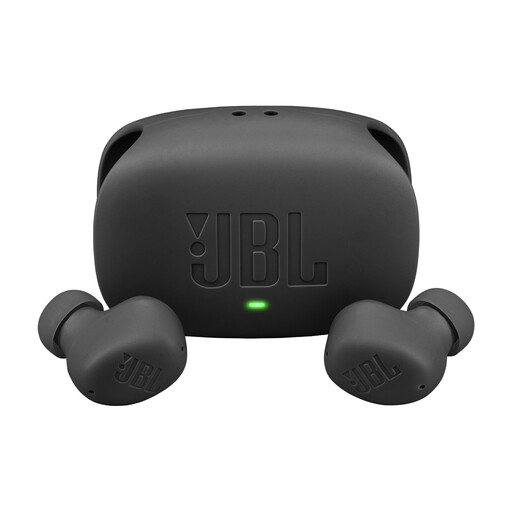
Why it suits this user: These wireless earbuds are well suited to everyday listening, calls and use with a smartphone or laptop. According to the product specifications, they offer up to 8 hours of playback, or up to 40 hours with the charging case when ANC is switched off.
The product specifications state the playback time for both the earbuds and the charging case. They also list IP54 protection for the earbuds and IPX2 protection for the case.
Active noise cancelling, multipoint connection, USB-C fast charging, and support for Google Fast Pair and Microsoft Swift Pair.
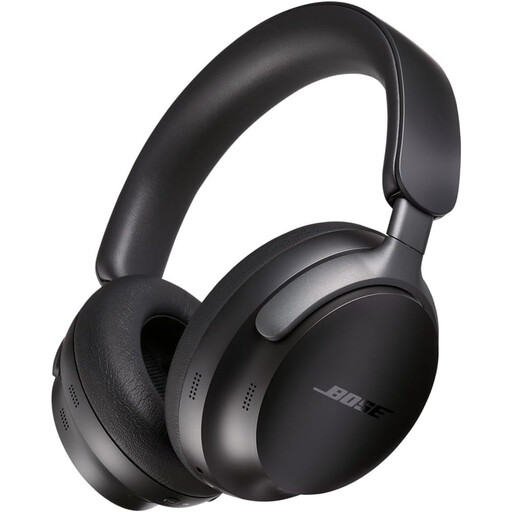
Why it suits this user: These over-ear headphones are designed for people who value comfort, active noise cancelling and the option of a wired connection for travel, work and long listening sessions.
The stated battery life is listed separately as up to 24 hours. An audio cable is also included, so listening doesn’t depend solely on Bluetooth or battery power.
Bluetooth 5.3, multipoint pairing, app control, active noise cancelling and a stated weight of 380 grams.
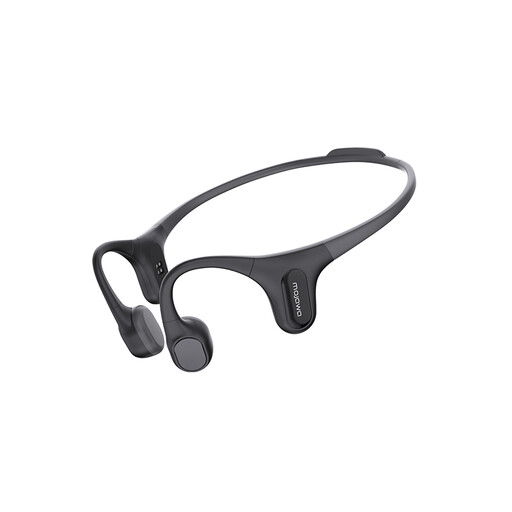
Why it suits this user: The open-ear design is intended for running, fitness and everyday use when you want to stay aware of your surroundings. The product name and listing also mention an integrated 32 GB MP3 player.
The listing states that the product has an IP68 water-resistance rating. Before swimming or using it in water for extended periods, check the full product manual and charging instructions.
Open-ear bone-conduction design, Bluetooth connection, built-in storage and a focus on sports use.
First, think about where you’ll use your headphones most. You may not need extensive ANC features for a quiet home office. Active noise cancelling can be particularly useful on train journeys. If you’re into sports, fit, the IP rating and awareness of your surroundings are likely to matter more.
Then check:
Listen at a moderate volume and take regular breaks. Don’t use headphones while cycling, driving or in other situations where you need to hear traffic and your surroundings clearly.
We’ve put together a complete, up-to-date list of products that meet these strict selection criteria and current European safety requirements.
Switch on Bluetooth on your phone, put your headphones into pairing mode and select the product name from the Bluetooth list. On some models, Google Fast Pair, Microsoft Swift Pair or a brand app can speed up setup. If you have connection problems, check that the headphones aren’t already connected to another device.
Their lifespan depends on battery use, charging habits, hinges, ear cushions and exposure to moisture. Battery capacity decreases over time. Models with replaceable ear cushions, a sturdy folding design and a wired connection option may remain useful for longer. Keep your headphones dry and avoid listening at a high volume for long periods.
Bluetooth headphones use a small rechargeable battery. The electricity cost of each charge is generally low, but battery life is affected by volume, ANC, codec and phone calls. Fast charging is mainly a convenience feature: a short charge may be enough for listening on the go.
