
Vandaag of morgen in huis

Kwaliteit gegarandeerd

Welkomstaanbiedingen ontgrendelen: GRATIS bezorging | Tot 80% korting | Gratis 30 dagen JoyPlus-proefperiode
Download de app
Wireless headphones seem simple to choose: connect via Bluetooth, charge them and listen. But small differences in fit, water resistance and battery life can often lead to disappointment. A pair that feels comfortable on a train journey may not be suitable for running. And a long battery life means little if the earbuds won’t stay in place.
As Joybuy Product Recommendation Officer, I filter product information for practical details. Watch out for these three common pitfalls:
In-ear earbuds partially seal the ear canal. This can make them compact and help reduce background noise, but choosing the right ear tip size is important. TWS earbuds usually come with several sizes of silicone tips.
On-ear headphones rest on your ears. They can be comfortable for commuting and home use, but the pressure on your ears varies from person to person. Check the adjustability, weight and padding of the ear cushions.
An open-ear design leaves the ear canal unobstructed. This can be useful when running or cycling, as you can stay more aware of your surroundings. However, sound isolation is more limited than with closed in-ear models. A sports model with an ear hook should also stay firmly in place without pinching.
The letters and numbers in an IP rating have a practical meaning:
So don’t assume that waterproof earbuds are suitable for swimming. Sweat and light rain are different from submersion. Let the charging port dry fully before connecting a USB-C cable.
A long battery life is useful for everyday listening, but compare how it’s measured. One model might offer 7.5 hours per charge, with a total of 36 hours using the case. An on-ear model, meanwhile, might play music for dozens of hours without needing to be put away in a case.
The number of microphones matters for calls, but it doesn’t guarantee clear speech. Manufacturers may use noise cancellation or ENC in different ways. According to Anker’s own information, the P30i uses four microphones for calls. If a model has ANC or ENC, check whether using these features reduces battery life.
A USB-C port is handy for charging with cables you may already use. Also check whether the device supports multipoint if you often switch between a laptop and smartphone.
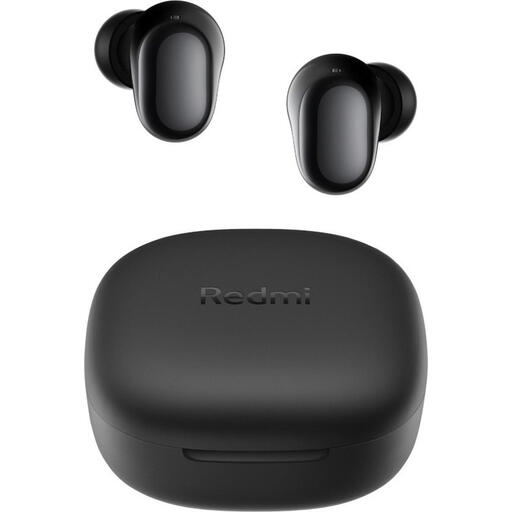
Why it suits this profile: Compact Bluetooth earbuds with a straightforward set of features for music, podcasts and everyday travel.
The specifications state the playback time per charge and with the case separately, as well as an IPX4 rating for the earbuds only. This makes it clear what you can and can’t expect.
Bluetooth 5.4, USB-C, 7.5 hours per charge and up to 36 hours with the charging case.
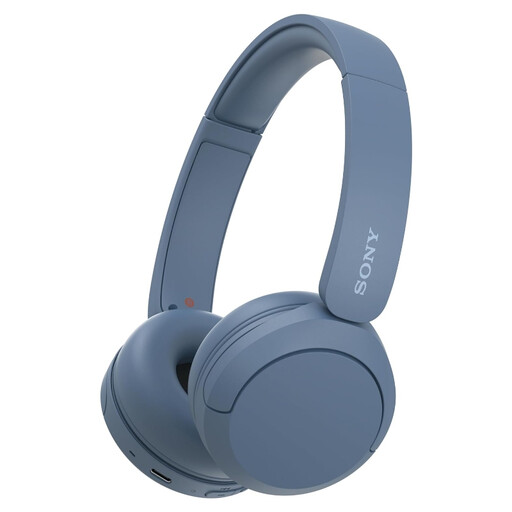
Why it suits this profile: Lightweight on-ear headphones for working from home, listening to music and using with multiple devices.
The adjustable headband and soft ear cushions make it easier to find a comfortable fit. Do check the different battery life figures in the product information.
Multipoint connectivity, a microphone, USB-C and a weight of 147 grams according to the product specifications.
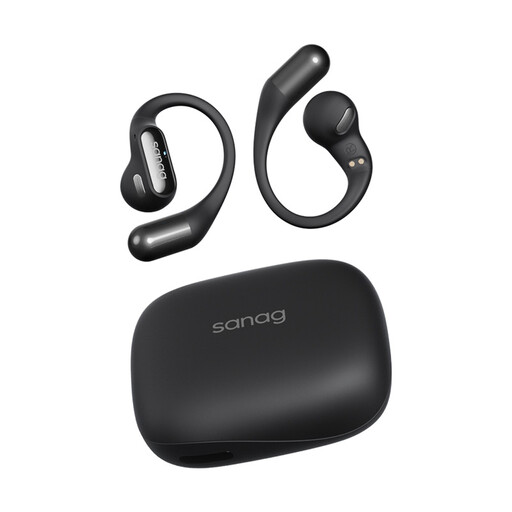
Why it suits this profile: The open-ear design with ear hooks is made for running, cycling, fitness and outdoor activities where staying aware of your surroundings is important.
The product information states IPX4, not full waterproofing. So use this model for sweat and light rain, not for submersion.
Approximately 5.6 grams per earbud, Bluetooth 5.3, touch controls and up to around 26–48 hours with the charging case, depending on use.
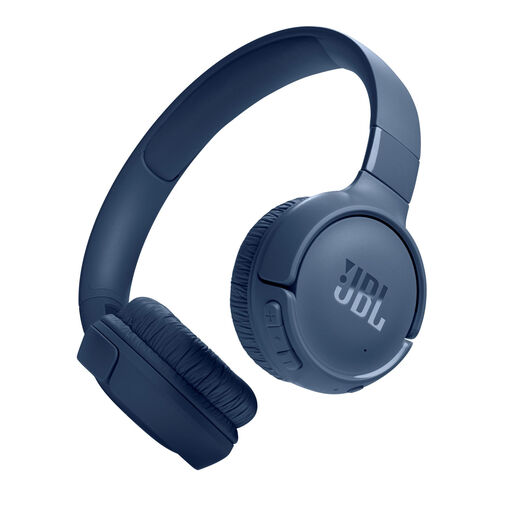
Why it suits this profile: Foldable on-ear headphones for long train journeys, travelling and everyday listening without having to recharge constantly.
The battery claim is listed as up to 76 hours with Bluetooth switched on. Treat this as a guide: volume and usage conditions can reduce playback time.
Bluetooth 6.0 according to the product specifications, two microphones, multipoint and fast charging. According to JBL, 5 minutes of charging can provide up to 5 hours of music playback.
We’ve put together a complete, up-to-date list of products that meet these strict selection criteria and current European safety regulations.
First, charge the headphones and switch on Bluetooth on your smartphone. For TWS earbuds, open the charging case as instructed in the manual, then select the product name from the Bluetooth list. If pairing doesn’t work, remove an old connection and try again. With multipoint models, you can then pair a laptop as a second device if you like.
Battery life depends on battery capacity, charging habits, volume and everyday use. A battery loses capacity over time. Don’t leave the charging case in extreme heat or cold for long periods, and use a suitable USB-C charger. Replace the headphones if the battery, casing or cable connection becomes damaged in a way that makes it unsafe.
That depends on your surroundings. Noise cancellation can be useful on a train, plane or in a busy office, but it isn’t always necessary at home. A brand’s own research or claims may state that a model reduces a certain amount of background noise; treat these figures as manufacturer information and check the fit too. Switch the feature off in traffic or anywhere you need to hear warning signals.
