
Vandaag of morgen in huis

Kwaliteit gegarandeerd

Welkomstaanbiedingen ontgrendelen: GRATIS bezorging | Tot 80% korting | Gratis 30 dagen JoyPlus-proefperiode
Download de app
A wireless headset may seem easy to choose: select a colour, check the battery life and click order. In practice, comfort, where you use them and having the right connections are what determine whether you enjoy using them every day. A Bluetooth headset for train journeys has different requirements from sports earbuds or a headset with a microphone for working from home.
So don’t focus solely on prominent marketing claims. According to the manufacturer’s or seller’s product information, features may vary between models. Always check the latest specifications, included accessories, warranty terms and suitability for your intended use.
The stated battery life is usually a maximum figure measured under specific conditions. With noise-cancelling headphones, usage time may be lower when active noise cancellation is switched on. Volume, codec, phone calls and temperature also affect battery life.
It is therefore worth looking at several figures:
An IPX4 rating does not mean that a product is waterproof. For the Sony WF-C710N, IPX4 means protection against splashing water; the charging case must remain dry. A model with IP55, such as the soundcore AeroFit 2, offers a different level of protection, but even with this rating, prolonged immersion is not automatically permitted.
With sports earbuds, therefore, check:
In-ear headphones partially seal the ear canal, which can make them compact and secure. However, not everyone finds this comfortable. On-ear headphones rest on the ear and are often lightweight, but may cause pressure after extended use. Open-ear headphones let in ambient sound, but generally provide a different listening experience from a closed-back model.
Fit is therefore at least as important as the brand name. A Sony headset, JBL model or Soundcore earbud may technically meet your requirements, but still be unsuitable if the shape does not feel comfortable.
Choose a style that suits your daily routine:
Comfortable headphones should not only feel pleasant during the first few minutes. Also consider the pressure from the headband, the cushion material and the weight.
Bluetooth 5.2, 5.3 or 5.4 mainly indicates the Bluetooth generation used; it does not automatically guarantee a flawless connection with every device. Check that your phone, laptop and tablet are compatible.
Multipoint Bluetooth is useful when switching between, for example, a laptop and a smartphone. The Sony WH-CH520, Sony WH-CH730 and Sony WF-C710N specify simultaneous connection to two devices. Do check the manual to see how automatic switching works and which functions remain available when multipoint is active.
A headset with a microphone is suitable for calls and online meetings, but call quality also depends on wind, background noise and the position of the microphones.
Active noise cancellation uses microphones and electronics to reduce ambient noise. According to the product information, the Sony WH-CH730 features Dual Noise Sensor technology and an Ambient Sound mode. The Sony WF-C710N and Soundcore Liberty 4 NC are also offered with active noise cancellation.
Be aware of the difference between:
Do not use noise cancellation in situations where you need to hear traffic, bicycle bells or other warning signals clearly.
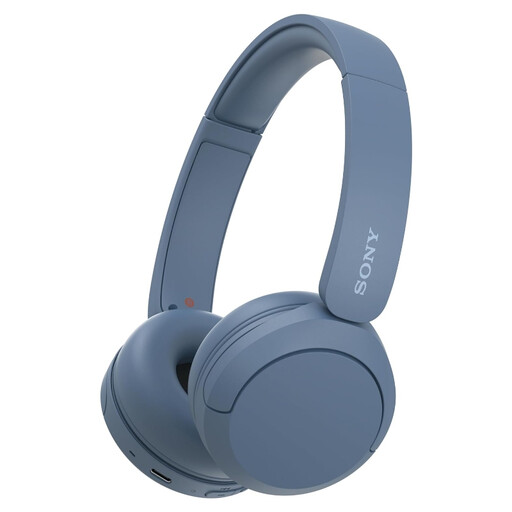
Why it suits this profile: Lightweight on-ear Bluetooth headphones for music, podcasts, working from home and everyday travel.
The key features are clearly specified: adjustable headband, soft ear cushions, microphone and multipoint. According to the product information, this model is not water-resistant.
Bluetooth 5.2, USB-C, multipoint and a stated battery life of up to 50 hours.
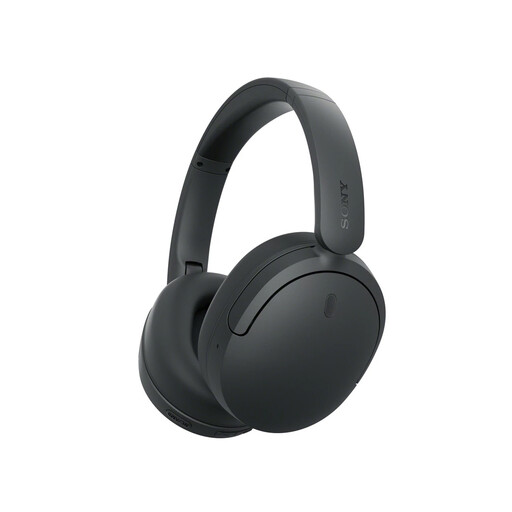
Why it suits this profile: Designed for travellers and listeners looking for active noise cancellation, a foldable design and customisable sound.
The description lists noise cancellation and Ambient Sound separately. This allows you to choose the listening mode that best suits travelling or an environment where you want to hear ambient sound.
Foldable design, ten-band equaliser via the Sony app, multipoint and, according to the product information, up to 75 hours of battery life with noise cancellation switched off.
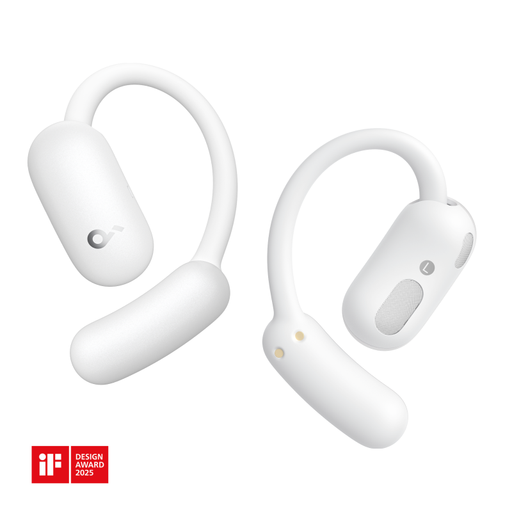
Why it suits this profile: An open-ear model for walking, sport, calls and everyday use when you want to remain aware of your surroundings.
The open-ear construction prevents you from being completely cut off from ambient sound. The IP55 rating is clearly stated, but exposure to water should still be limited according to the manual.
Bluetooth 5.4, two microphones, button controls, a stated weight of 85 grams and a charging station.
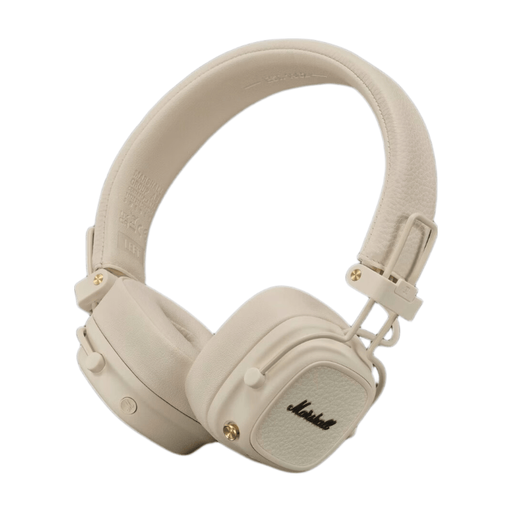
Why it suits this profile: Foldable on-ear headphones for long journeys and users who also want to retain a wired option.
Alongside Bluetooth, the product information lists an included 3.5mm cable. This means you can keep listening when the battery is empty, provided your device has a suitable connection.
According to the product information, more than 100 hours of playback, multipoint Bluetooth, Bluetooth 5.3, USB-C and wireless charging.
We’ve put together a complete, up-to-date list of products that fully meet these strict selection criteria and the applicable European safety regulations.
First, charge the headphones and activate Bluetooth on your smartphone. Put the model into pairing mode and select the product name from the Bluetooth list. With multipoint, pair a second device afterwards according to the instructions. If the connection does not work, remove the old pairing and try again.
Their lifespan depends on charging habits, hinges, ear cushions, moisture and daily use. Battery capacity decreases over time. Store the product in a dry place, avoid extreme heat and use a suitable USB-C charger. Replaceable ear cushions can extend the usable life of an over-ear or on-ear model.
A wireless model uses power and needs charging, but the energy consumption per charge is limited. The costs mainly consist of the purchase price and potentially replacing the battery when it cannot be replaced separately. Wired headphones, such as a 3.5mm in-ear model, do not incur charging costs but do require a device with a suitable connection.
