
Vandaag of morgen in huis

Kwaliteit gegarandeerd

Welkomstaanbiedingen ontgrendelen: GRATIS bezorging | Tot 80% korting | Gratis 30 dagen JoyPlus-proefperiode
Download de app
Wireless headphones may seem easy to choose at first. But models can vary greatly in comfort, battery life, microphone quality and noise isolation. A low price may be tempting, but you might not notice a poor fit or an unreliable connection until you’ve used them for a few weeks.
Marketing terms such as “spatial audio”, “long battery life” and “active noise cancellation” don’t always tell the whole story, either. First, check which features you really need, then compare the specifications you can verify.
Manufacturers often quote the maximum playback time. This figure may apply with noise cancelling switched off, at a particular volume or under specific test conditions. So headphones with long battery life aren’t automatically the most practical choice.
Check the difference between:
According to the product information, the Sony WH-CH520 is advertised with up to 50 hours of playback and a fast-charging feature. However, the specifications table also lists a battery life of 40 hours. Always check the current product page before ordering.
Noise-cancelling headphones use microphones and electronics to reduce background noise. The results vary depending on the situation. Low, constant sounds such as train engines are generally different from voices, traffic or sudden noises.
According to Sony’s product description, the WH-1000XM5 uses multiple microphones and processors for active noise cancellation. Bose says its QuietComfort range offers different listening modes, including noise-cancelling and transparency modes. These are the brands’ claims about how the headphones work; your experience may vary depending on the fit, your surroundings and how you use them.
Over-ear headphones surround your ears and can be comfortable during long listening sessions. However, they’re larger and heavier. On-ear headphones rest on your ears and are often more compact, but some people may find they cause pressure more quickly.
Check:
Almost all wireless headphones use Bluetooth, but the version alone doesn’t determine the full user experience. Check whether they support multipoint, too. This lets you connect to, for example, a laptop and smartphone at the same time, then switch between the two devices.
According to the product specifications, the Sony WH-CH520 has a microphone and multipoint connectivity. This is useful when working from home: you can listen to music from your laptop and answer a call on your phone without having to pair the headphones again.
A stated range of around 9 to 10 metres usually assumes there are no thick walls or other sources of interference. The practical range may be shorter in your home.
Headphones with a microphone are suitable for phone calls, online meetings and voice features. Don’t just look at the number of microphones; check their placement and how background noise is handled, too.
For working from home, clear speech matters more than impressive bass. Also check whether the microphone works only over Bluetooth or is available with a USB or cable connection, too.
Bluetooth codecs such as AAC, SBC, LC3 and aptX Lossless determine how audio is transmitted. To benefit from a codec, your audio source, smartphone and headphones must all support it. So a higher theoretical audio quality doesn’t automatically mean you’ll hear a difference in every situation.
Frequency ranges such as 20 Hz to 20 kHz are technical measurements. On their own, they say little about the sound’s tuning, clarity or balance. So consider how you plan to use the headphones and which features you need: music, films, podcasts, calls or gaming.
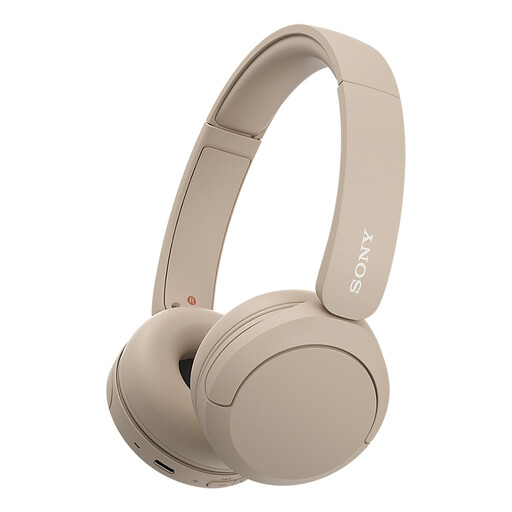
Why it suits this profile: With a stated weight of 147 grams, these compact on-ear headphones are suitable for everyday use, commuting and straightforward phone calls.
The product specifications list USB-C, multipoint and a built-in microphone. So you get more than just a basic Bluetooth connection.
147 grams, multipoint connectivity, USB-C and up to 50 hours of battery life under the stated conditions, according to Sony.
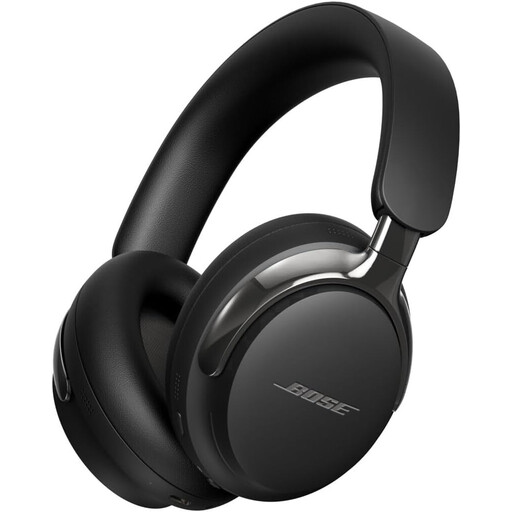
Why it suits this profile: According to Bose, these over-ear headphones are designed to offer active noise cancellation, spatial audio and a comfortable fit for listening to music and watching films.
You can use Bluetooth or a cable, so you’re less reliant on the battery during a long journey.
Bluetooth 5.4 according to the specifications, active noise cancellation, USB-C and 3,5mm connections, and a stated charging time of 180 minutes.
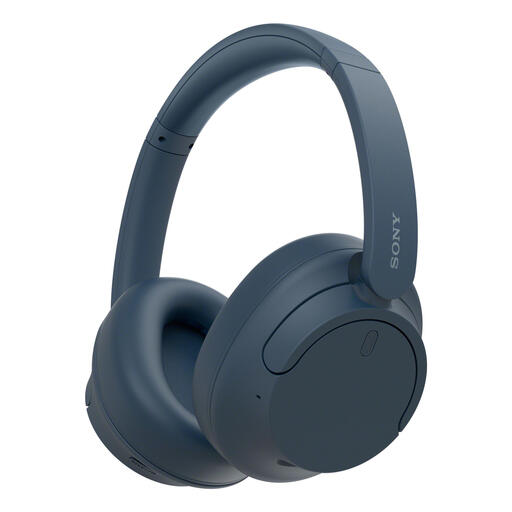
Why it suits this profile: These over-ear headphones are designed for people who travel, work from home or spend longer periods listening to music and podcasts.
Battery life is listed separately with noise cancelling switched on and off. According to Sony, you get up to 35 hours with noise cancellation and up to 50 hours without it.
Active noise cancellation, multipoint, a stated weight of 192 grams and fast charging, which according to Sony provides around one hour of use from a three-minute charge.
We’ve put together a full, up-to-date list of products that meet these strict selection criteria and current European safety regulations.
Switch on Bluetooth on your smartphone, turn on the headphones and press and hold the pairing button. Then select the model name from the Bluetooth list. Some models use Fast Pair or Swift Pair to help with the first connection. Check the manual if the headphones don’t appear.
It depends on battery use, hinges, ear cushions and day-to-day care. Keep your headphones dry, charge them with a suitable cable and protect them from heat and moisture. A model with replaceable ear cushions may remain practical for longer, even if the battery loses capacity over time.
Usually, yes. Active noise cancellation uses microphones and electronic processing. Always compare battery life with noise cancelling switched on and off. Taking a cable as a backup can be useful for a long train journey, especially if the battery isn’t fully charged.
