
Vandaag of morgen in huis

Kwaliteit gegarandeerd

Welkomstaanbiedingen ontgrendelen: GRATIS bezorging | Tot 80% korting | Gratis 30 dagen JoyPlus-proefperiode
Download de app
A pair of wireless headphones can seem like an easy choice on paper. Bluetooth, long battery life and noise cancellation often feature prominently on the packaging. But these terms don’t tell you everything about everyday use. An on-ear model, for example, may be lightweight but block out less background noise. A gaming headset may offer plenty of connection options but feel heavier on your commute.
Use these checks to compare Bluetooth headphones, wireless headphones or wireless earbuds based on features that are genuinely useful in everyday life.
Manufacturers usually quote the maximum playback time under specific conditions. Noise cancellation, volume, codec and phone calls can all affect actual battery life. So check:
For example, the Sony WH-CH720N is listed as offering up to 50 hours without noise cancellation and up to 35 hours with it switched on. That difference matters if you mainly use your headphones on the train or at work.
Terms such as “high fidelity”, “spatial audio” and “deep bass” don’t automatically tell you how music, voices or games will sound to you. It’s better to check the specifications and intended use. Headphones for music and calls, for example, need a decent microphone, while a gaming headset may benefit most from low latency and a stable USB or 2.4GHz connection.
Claims about sound enhancement come from the manufacturer. For example, according to its own product information, Sony lists DSEE support on various models. Treat this as a feature to compare, not as a guaranteed improvement that every listener will hear.
Over-ear headphones surround your ears and can be comfortable during long listening sessions, but they’re generally larger and warmer. On-ear headphones are often more compact but rest on your ears. In-ear earbuds are small and easy to carry, although fit varies considerably from person to person.
Also check water resistance. A model without an IP rating or explicit water-resistance information isn’t automatically suitable for rain or exercise. IPX5 and IP57 ratings also have their limits: they don’t mean a product is suitable for swimming.
Bluetooth 5.0, 5.2, 5.3 or 6.0 mainly tells you which Bluetooth generation is used. Your experience also depends on your phone, laptop and codec. Check whether the headphones have:
Wireless headphones with Bluetooth only aren’t always the best choice for competitive gaming. A 2.4GHz connection or wired option may be more practical.
Don’t just compare the highest number of hours. Check the conditions under which that figure applies, too. Long battery life is especially useful if you travel often, work in an office or don’t want to charge your headphones every day.
According to the product information, the Marshall Major V comes with Bluetooth 5.3 and multipoint, and is quoted as offering more than 100 hours of playback. The Sony WH-CH520 is lighter at 147 grams and is listed as having long battery life, but the available specifications show different battery-life figures. So always check the current product page before buying.
For everyday use, weight, adjustability and ear cushions matter more than a flashy marketing label. A 300-gram pair of over-ear headphones may feel different during long sessions from an on-ear model weighing around 150 grams. Also check whether the ear cups swivel or fold, and whether the controls are easy to reach when you’re travelling.
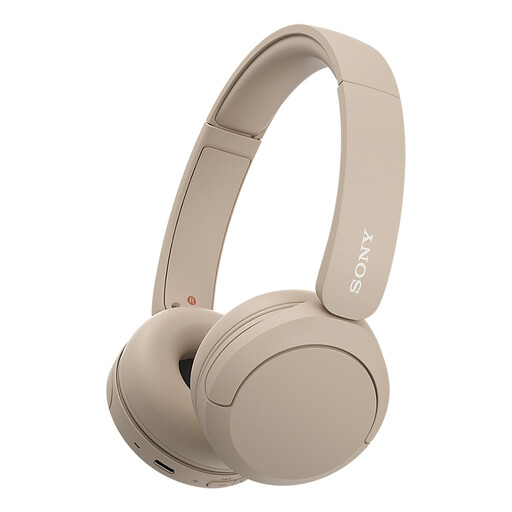
Why it suits this profile: This lightweight on-ear model is designed for everyday listening and calls, and lets you use two devices thanks to multipoint.
The specifications list a weight of 147 grams and USB-C charging. Bear in mind that the product information gives different battery-life figures.
On-ear design, microphone, multipoint and Bluetooth connectivity.
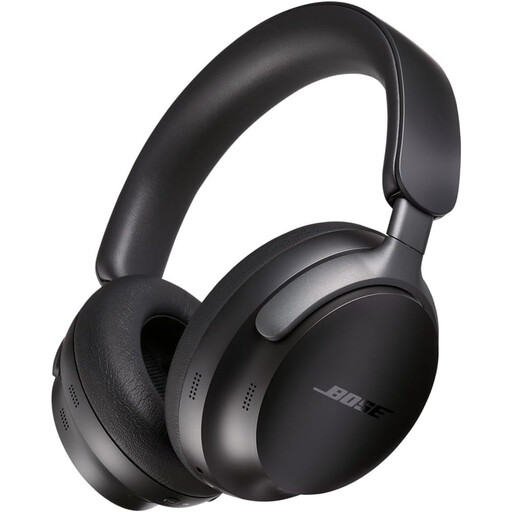
Why it suits this profile: An over-ear model with active noise cancellation, app controls and an audio cable included for listening to music and travelling.
The product details list both wireless and wired listening options, so you don’t have to rely solely on the battery.
Active noise cancellation, Bluetooth 5.3, multipoint and a quoted battery life of 24 hours.

Why it suits this profile: This gaming headset combines Bluetooth with a 2.4GHz USB receiver and can be used with PCs and consoles.
The detachable microphone and included 3.5mm cable offer practical alternatives when you don’t want to listen wirelessly.
50mm drivers, virtual 7.1 functionality, 22 hours of battery life and a detachable microphone.
We’ve put together a complete, up-to-date list of products that meet these strict selection criteria and current European safety regulations.
Switch on the headphones and hold down the pairing button until the indicator light flashes. Then open the Bluetooth settings on your phone and select the product name. Some models offer Fast Pair or Swift Pair to make setup quicker. For multipoint models, check the manual for instructions on connecting a second device.
It depends on the battery, charging habits, hinges, ear cushions and how you use them. The quoted battery life doesn’t guarantee how long the product itself will last. Charge with a suitable USB-C cable, keep the headphones away from heat and store them somewhere dry. A model with a 3.5mm socket may still be usable when the battery is flat.
It depends on your surroundings. Active noise cancellation can be useful on trains and planes, or in a busy office. A simpler pair of Bluetooth headphones may be enough at home or for calls. Before paying more, compare the transparency mode, microphone quality, battery life with ANC on and the weight.
