
Vandaag of morgen in huis

Kwaliteit gegarandeerd

Welkomstaanbiedingen ontgrendelen: GRATIS bezorging | Tot 80% korting | Gratis 30 dagen JoyPlus-proefperiode
Download de app
A pair of wireless headphones may seem simple to choose at first glance. However, models can differ significantly in comfort, battery life, sound isolation and call quality. A low price does not automatically mean lower running costs, while a long list of features does not necessarily mean a headset will suit the way you use it every day.
Pay particular attention to these common pitfalls:
Start by choosing between the main types:
Low weight is not the only criterion. Also consider the pressure from the headband, the shape of the ear cushions and whether you can use different ear tips.
A Bluetooth headset should be compatible with your smartphone, tablet and laptop. Bluetooth 5.3 or 5.4 mainly indicates the connectivity generation being used; on its own, it does not guarantee better sound quality in every situation.
You should therefore also check:
Look at the playback time per charge as well as the total duration with the charging case. A model with long battery life is practical for travelling, but fast charging can be just as important if you often forget to recharge.
For calls, the number of microphones is a useful product specification, but it does not guarantee clear speech in every environment. Read the description of headphones with a microphone carefully and check whether calling is explicitly listed as a use case.
The IP rating helps you assess the level of protection:
None of these ratings means you can fully submerge the device. Sweat and rain may also affect it differently from water under laboratory conditions.
The choices below are linked to verifiable product specifications and different usage scenarios.
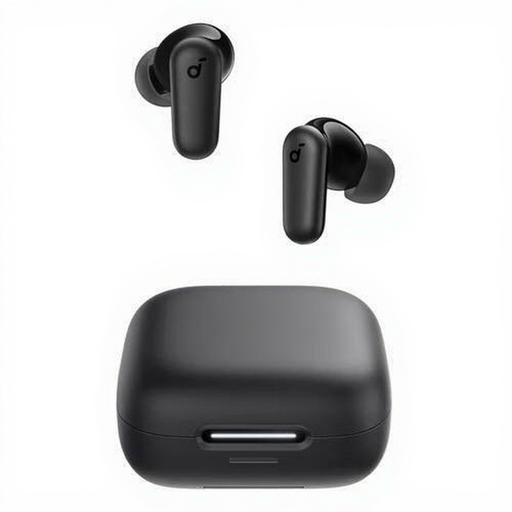
Why it suits this profile: These Bluetooth earbuds are compact and designed for calls and music. The charging case makes them easy to take with you.
The specifications state Bluetooth 5.4, four microphones, IP54 and up to 10 hours of playback. This lets you compare features rather than relying on marketing terms alone.
In-ear design, touch controls, charging case and USB-C. The IP54 rating is relevant for everyday use.
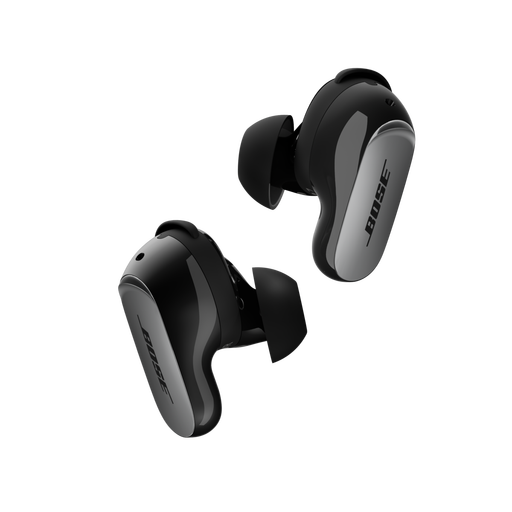
Why it suits this profile: If you are looking for compact wireless earbuds with active noise cancellation, these combine ANC, Aware mode and multipoint connectivity.
The product information clearly states up to 6 hours of playback per charge and IPX4. This shows that a compact design does not automatically mean exceptionally long standalone battery life.
Bluetooth 5.3, CustomTune according to the brand description, active noise cancellation and a charging case that can also be charged wirelessly.
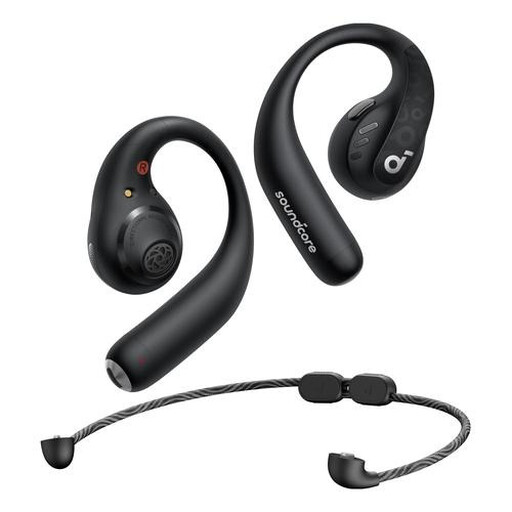
Why it suits this profile: The ear hook and IPX5 rating make it well suited to sports, walking and everyday movement where a secure fit is important.
This model uses physical buttons and states 14 hours of continuous playback. That makes both the controls and usage time clear and easy to verify.
Bluetooth 5.3, AAC, LDAC and SBC support, IPX5 and a storage pouch included.
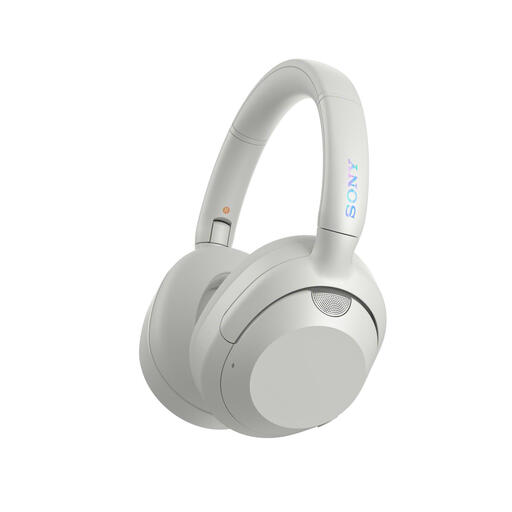
Why it suits this profile: The over-ear design, active noise cancellation and multipoint connectivity are practical for train journeys, working and switching between a laptop and smartphone.
The stated battery life distinguishes between use with and without noise cancellation. According to the product description, it offers up to 30 hours with noise cancellation.
Over-ear design, microphone, 3.5 mm connection, USB-C and simultaneous connection to two devices.
We have put together a complete, up-to-date list of products that fully meet these strict selection criteria and the applicable European safety regulations.
Switch on the headphones and activate Bluetooth on your Android phone or iPhone. Open the Bluetooth settings, select the device name and confirm the pairing. When connecting for the first time, you may need to remove the headphones from the charging case or press and hold the pairing button. If in doubt, refer to the manual for the specific model.
This depends on battery usage, charging cycles, storage and maintenance. Playback time per charge will generally decrease over time. Keep the device dry, charge it using the supplied or a suitable USB-C cable, and avoid prolonged exposure to heat. An IP rating does not protect against every type of moisture or damage.
Active noise cancellation can reduce distracting background noise when listening to music or travelling. The effect varies by model and type of sound. For calls, the microphone arrangement is particularly important. Do not use noise cancellation in situations where you need to hear traffic noise or warnings, such as when cycling or driving.
