
Vandaag of morgen in huis

Kwaliteit gegarandeerd

Welkomstaanbiedingen ontgrendelen: GRATIS bezorging | Tot 80% korting | Gratis 30 dagen JoyPlus-proefperiode
Download de app
A wireless headphone is handy for music, calls, working from home, travelling and gaming. However, not every model is suitable for every use. A low price can be appealing, while the comfort, microphone or connection might disappoint. Terms like “surround sound”, “noise cancelling” and “long battery life” also don’t tell the whole story.
With these practical checkpoints, you can compare a Bluetooth headphone, wireless headset or gaming headset based on verifiable specifications.
A manufacturer typically states the maximum playback time. The actual result depends on factors such as volume, the connection used, lighting and noise cancelling. With a gaming headset, the battery life via 2.4 GHz can differ from that via Bluetooth.
Also watch out for conflicting information. With the Sony WH-CH520, the product description mentions up to 50 hours, while the technical specifications state 40 hours. So always check the specification table and the current information on the product page before you order.
Passive noise isolation comes from the ear cushions and the fit. Active noise cancelling, often abbreviated as ANC, uses microphones and electronics to reduce ambient noise. This doesn’t work equally well for every sound source and is no guarantee of complete silence.
According to the product description of the Baseus EH10 NC, hybrid active noise reduction can reduce background noise to a specified level. That’s a claim from the brand; treat it as a product specification, not a universal measurement result. For train journeys and working in a busy office, ANC can be useful, but fit and comfort remain important.
Bluetooth can cause noticeable lag on some devices. For competitive gaming, a 2.4GHz connection via a USB receiver is often more practical. A wired headphone with a 3.5mm jack avoids charging and can be widely compatible.
Also check whether the headset works with your platform. A model that’s suitable for a PC won’t automatically work wirelessly with a PlayStation or Xbox.
An over-ear headphone completely encloses the ear. This can be comfortable during long listening sessions and helps to passively block out ambient noise. The ear cups can feel warmer, though, and the model is usually larger.
An on-ear headphone rests on the ear. The Sony WH-CH520 weighs 147 grams according to the specifications and is therefore compact to carry around. This type is handy for daily use, but generally blocks out less ambient noise than an over-ear model.
In-ear earphones are small and easy to carry, but the fit varies greatly from person to person. For long working days, a headphone with soft ear cushions can be more comfortable.
Look out for these connections:
A feature like Bluetooth Multipoint lets you keep two devices connected at the same time. The Sony WH-CH520, for example, mentions Multipoint for switching between phone and laptop. Do check whether your devices support this feature.
For a headphone with long battery life, look at the playback time with and without ANC. The Baseus EH10 NC states up to 80 hours without ANC and up to 55 hours with ANC, according to the product description. The Sennheiser MOMENTUM 4 Wireless states up to 60 hours. These values are maximum manufacturer claims and can vary in practice.
For calls and working from home, a headphone with a microphone is important. A separate microphone arm is often easier to position for gaming than a small built-in microphone. Also check whether the microphone is detachable, foldable or only electronically muteable.
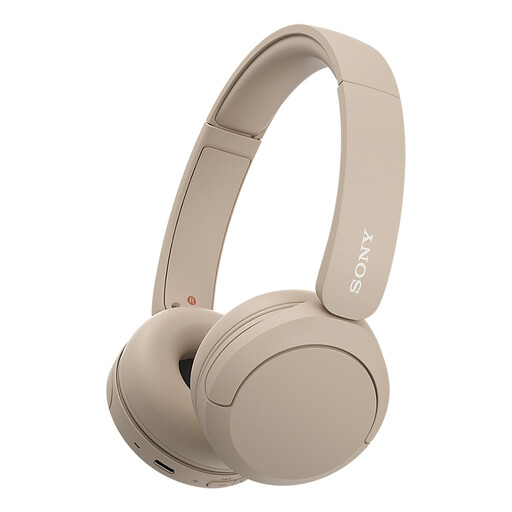
Why this fits the profile: A lightweight on-ear Bluetooth headphone for music, podcasts, calls and daily travel.
The specifications clearly state weight, Bluetooth, microphone and Multipoint. Be aware of the mentioned differences in battery life between the description and the specification table.
147 grams according to the product specifications, USB-C charging and Multipoint connection.
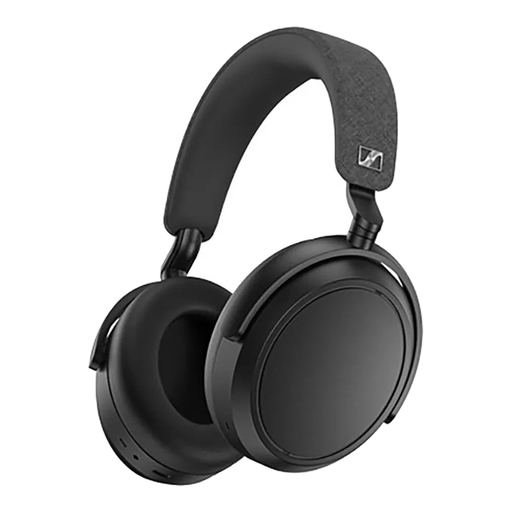
Why this fits the profile: An over-ear headphone for music lovers who want comfort, customisable settings and active noise cancelling.
The headphone offers both noise cancelling and a transparency mode. This lets you adjust the listening mode for travel, the office or home.
Up to 60 hours of battery life according to the product information, four microphones and an app with equaliser settings.

Why this fits the profile: For gamers who want to switch between 2.4 GHz, Bluetooth and a wired connection.
The dual wireless connection makes the model more flexible than a headset that only uses Bluetooth. Do check your console’s support beforehand.
Up to 22 hours of battery life, 50mm drivers, detachable microphone and compatibility with PC, PS4 and PS5 according to the product information.

Why this fits the profile: A wired gaming headset for PC, PlayStation, Xbox, Switch and mobile devices with a 3.5mm jack.
You’re not dependent on a battery or Bluetooth latency. The 7.1 feature does require software and an activation code, according to the product information.
240 grams, 50mm drivers and a unidirectional microphone according to the product specifications.
We’ve put together a full, up-to-date list of products that fully meet these strict selection criteria and comply with current European safety regulations.
Turn on the headphone and activate pairing mode. Then open the Bluetooth settings on your phone, tablet, laptop or television and select the correct model. With Multipoint, connect the first device first and then the second. Consult the manual if automatic switching doesn’t work.
The usage time depends on battery capacity, charging habits and daily use. A battery ages over time. So choose a model with USB-C and, if possible, a fast-charging feature. A wired headset, like the Razer BlackShark V2 X, doesn’t need an internal battery and therefore avoids battery wear as a purchase criterion.
It can be, but check the number of microphones and how background noise is processed. An ANC system mainly focuses on sound you hear yourself; the microphone uses separate processing for your voice. For lots of video calls, a quiet room remains important. Also pay attention to a comfortable fit, a clear mute function and compatibility with your laptop or smartphone.
