
Vandaag of morgen in huis

Kwaliteit gegarandeerd

Welkomstaanbiedingen ontgrendelen: GRATIS bezorging | Tot 80% korting | Gratis 30 dagen JoyPlus-proefperiode
Download de app
A wireless headphone might seem like a quick choice on paper. Yet many buyers find themselves disappointed after a few weeks by limitations: the battery life turns out to be shorter under heavy use, the connection doesn't work with every console, or the ear cushions become uncomfortable during a long train journey. Terms like “7.1 surround sound”, “noise cancelling” and “long battery life” only mean something once you check the technical details.
In this buying guide, you'll learn what to look for in a Bluetooth headphone, wireless headset or pair of wireless earbuds. After that, we'll cover some popular choices for different use cases.
A stated playtime usually depends on volume, connection type, lighting and noise cancelling. A gaming headset with RGB lighting can therefore run for less time than the same headset without lighting. Also check how long charging takes and whether you can continue using the headphone with a wired connection.
Bluetooth is handy for smartphones, tablets and laptops. For gaming, a 2.4GHz USB dongle can be a more suitable connection because of the direct link to a PC or console. Make sure the dongle is compatible with your PlayStation, Xbox, Nintendo Switch or computer. Some models don't support Bluetooth directly on a games console.
Active noise cancelling uses microphones and electronics to reduce ambient noise. The result depends on fit, ear cushions and the environment. Passive noise isolation comes from the physical seal of the ear cups. An over-ear headphone can therefore block out some ambient noise even without active technology.
Alongside weight, pay attention to the adjustability of the headband, swivelling ear cups and the shape of the cushions. A model weighing 300 grams can actually be more comfortable than a lighter model with an unsuitable fit.
Look at the stated usage time for the feature you'll actually be using. The Sennheiser MOMENTUM 4 Wireless, for example, claims up to 60 hours of playback, while active features like noise cancelling and heavy call use can affect the real-world duration. The Sony WH-CH520 is described on the product page with a battery life of up to 50 hours; the technical specifications state 40 hours. That difference shows why you shouldn't rely solely on marketing copy.
A USB-C connection is practical because many modern devices use the same cable. Also check whether a headset remains usable while charging and whether a 3.5mm socket is present.
If you make a lot of calls or game, you'll need a headphone with a microphone. A detachable microphone is handy if you also use the headset for music. For online gaming, it's not just sound quality that matters, but also the delay between picture and audio. A 2.4GHz connection can be more suitable for this than Bluetooth, depending on the device.
When checking a gaming headset:
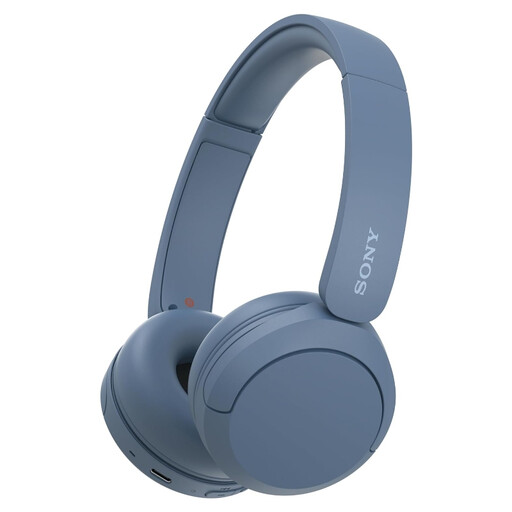
Why this fits the profile: This lightweight on-ear Bluetooth headphone is designed for daily use with a phone or laptop. Multipoint makes switching between two devices easier.
The product specifications list a weight of 147 grams, a microphone and multipoint. Do check the conflicting battery claims of 40 and up to 50 hours.
147 grams, Bluetooth 5.2 according to the specifications, USB-C and multipoint support.
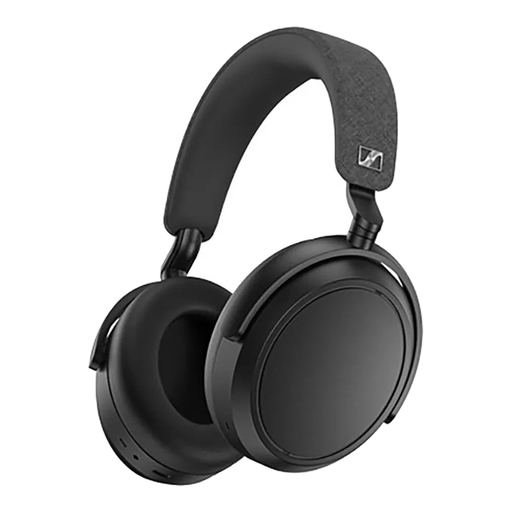
Why this fits the profile: An over-ear headphone for listening to music, travelling and long-term use, with adjustable audio via the companion app.
The stated 60-hour battery life is combined with a wired 3.5mm option. This means you're less reliant on a flat battery.
Up to 60 hours stated playback time, four microphones, active noise cancelling and an adjustable equaliser.

Why this fits the profile: This wireless headset is designed for PC and console use, but can also be connected to a smartphone via Bluetooth.
The headset supports 2.4GHz, Bluetooth and a cable. This gives you multiple connection options when one method doesn't work.
50mm drivers, virtual 7.1 sound, detachable microphone and up to 22 hours stated playtime.
We've put together a full, up-to-date list of products that fully meet these strict selection criteria and comply with current European safety regulations.
Turn on the headphone and hold down the Bluetooth or power button until pairing mode is active. Then open the Bluetooth settings on your phone and select the product name. If you've paired before, the headphone will often reconnect automatically.
The lifespan depends on the battery, hinges, ear cushions and daily use. Store the headphone in a dry place, avoid extreme heat and charge it with a suitable USB-C cable. A model with a replaceable cable or separately available ear cushions can be more practical for long-term use.
It can be, but first check the compatibility. For PC and consoles, a 2.4GHz dongle, low latency and a good microphone are often more important than Bluetooth alone. If you're looking for one model for both music and gaming, look for a combination of Bluetooth, wireless radio connection and a 3.5mm cable.
