
Vandaag of morgen in huis

Kwaliteit gegarandeerd

Welkomstaanbiedingen ontgrendelen: GRATIS bezorging | Tot 80% korting | Gratis 30 dagen JoyPlus-proefperiode
Download de app
A wireless headphone makes listening to music, following podcasts and taking calls on the go much easier. Yet a long list of features doesn’t automatically mean a model suits your daily use. If you only look at the Bluetooth version, battery claims or the name of a well-known brand, you could end up with a headphone that’s uncomfortable, handles calls poorly or runs out of battery quickly when you’re out and about.
As a Joybuy Product Recommendation Officer, I therefore focus on verifiable specifications and the practical situation in which you’ll use the product. Below you’ll find the most common pitfalls, key parameters and a few suitable choices.
A manufacturer often states the maximum battery life. That figure may apply with noise cancelling switched off, at a certain volume or with a specific codec. For the Sony WH-CH720N, for example, up to 50 hours without noise cancellation is quoted, and 35 hours with active noise cancellation. For the Sony WH-1000XM5, it’s up to 40 hours without noise cancelling and 30 hours with this feature turned on.
So don’t just compare the highest number. Also look at:
A wireless headphone with noise cancelling uses microphones and electronic processing to reduce ambient noise. The result varies depending on the situation. Low, constant sounds like train or aeroplane engines are generally a different scenario from voices, keyboards or sudden noises.
According to Sony’s product information, the WH-1000XM5 uses four microphones and two processors per earcup for noise cancellation. That’s a verifiable technical description, not a guarantee of total silence. Also look out for a transparency mode, so you can hear ambient noise at a station or in the office.
A headphone may have an equaliser, a high Bluetooth version or a particular audio codec, but still not be comfortable to wear. An on-ear headphone rests on the ear and is often compact, whereas an over-ear headphone encloses the ear. The latter can be more comfortable for longer listening sessions, but takes up more space and can feel warmer.
Also check the weight, the adjustability of the headband, the shape of the ear cushions and whether spare parts are available. For earbuds, multiple sizes of ear tips are important for a stable fit.
Choose an on-ear headphone if you want a light, compact model for travel, home or short listening sessions. The Sony WH-CH520 weighs 147 grams according to the product specifications and has an adjustable headband.
An over-ear headphone covers the ear completely. This can help with passive sound isolation and provides room for larger ear cushions. Models like the Bose QuietComfort and Sony WH-1000XM5 are designed with this in mind.
Wireless earbuds take up little space and are handy for commuting or sport. Pay attention to the IP rating. The JBL Wave Buds 2 have IP54 for dust and splash protection according to the product information. That doesn’t mean you can submerge them. Always check the exact limits from the manufacturer.
Bluetooth 5.0, 5.2 or 5.4 mainly says something about the connection technology used; it doesn’t solely determine sound quality. Look particularly at compatibility with your phone, laptop and apps. Multipoint can be useful when you want to stay connected to a smartphone and laptop at the same time.
The Sony WH-CH520 supports multipoint and a range of around 10 metres according to the product specifications. In a home, walls and other wireless devices can affect the actual range.
If you work from home a lot, you need more than just a good-sounding speaker. Check whether there’s a headphone with a microphone, how many microphones are used and whether the manufacturer provides information about ambient noise during calls. Also read whether the microphone is in the earcup or on an adjustable arm.
For business calls, a wired model like the Jabra EVOLVE 30 II MS Stereo could be of interest. This model uses a 3.5mm connection and comes with a USB controller. So it’s not a Bluetooth headphone, but it can be practical when reliability and plug-and-play matter more than wireless convenience.
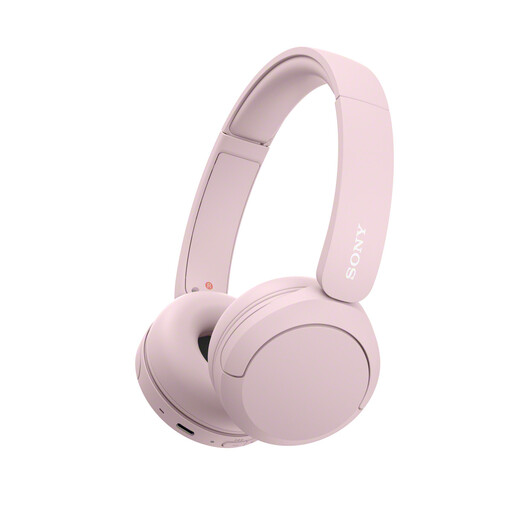
Why this fits the profile: A lightweight on-ear model for music, podcasts and phone calls without paying for extra features you don’t need.
The product specifications list weight, USB-C, microphone and multipoint. This means you can check the practical features rather than relying solely on marketing language.
147 grams, AAC and SBC codec, USB-C, multipoint and up to 50 hours battery life under the stated conditions according to Sony.
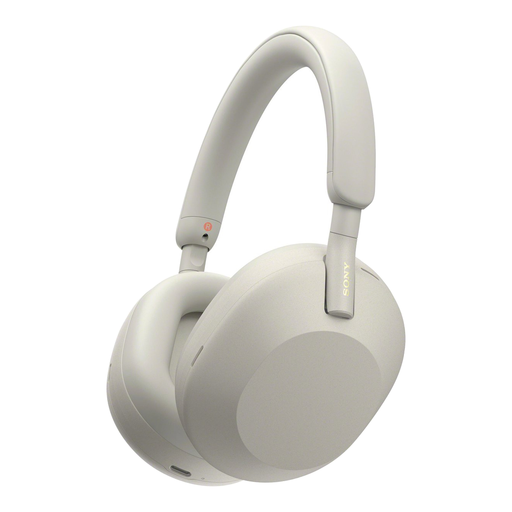
Why this fits the profile: Ideal for travellers and home workers who value over-ear comfort, app settings and active noise cancellation.
The battery life is stated separately for noise cancelling on and off. This gives you a clearer idea of what to expect during a long journey.
Over-ear design, Bluetooth 5.2, LDAC according to the product information, multipoint and up to 30 hours with noise cancelling according to Sony.
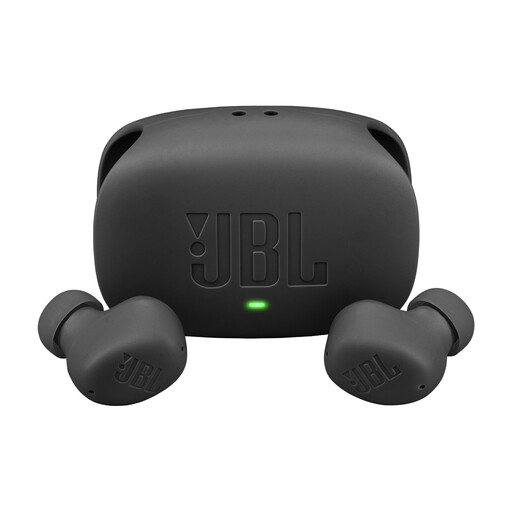
Why this fits the profile: Handy for on-the-go, daily use and light outdoor activities when a compact set of wireless earbuds is what you need.
The IP54 rating, microphones and battery values are in the product specifications. Just make sure you don’t submerge the earbuds.
Active noise cancellation, multipoint, USB-C and up to 40 hours total playback time with ANC off according to the product information.
We’ve put together a full, up-to-date list of products that fully meet these strict selection criteria and comply with current European safety regulations.
For consumers in the European Union, legal protection applies for faulty products. Many of the models mentioned in this overview state a minimum legal warranty of two years. Keep your proof of purchase and check who the seller is and how repairs or returns are handled.
Also pay attention to these points:
Turn on Bluetooth on your phone, put the headphone into pairing mode and select the product name from the Bluetooth list. With some models, Google Fast Pair, Microsoft Swift Pair or a brand app can help with the initial connection. If pairing doesn’t work, remove an old connection and try again.
The usage time per charge varies by model and settings. The product’s lifespan also depends on charging cycles, hinges, ear cushions and maintenance. Store the headphone in a dry place, avoid extreme heat and charge with suitable accessories. A replaceable ear cushion can be practical if you want to use the product for a longer period.
A Bluetooth headphone needs power and sometimes an app or firmware update. The electricity costs are generally limited, but a battery does have a limited lifespan. A wired model like the Jabra EVOLVE 30 II MS Stereo doesn’t need charging. The choice therefore depends on how much you value freedom of movement, microphone quality, comfort and maintenance.
