
Vandaag of morgen in huis

Kwaliteit gegarandeerd

Welkomstaanbiedingen ontgrendelen: GRATIS bezorging | Tot 80% korting | Gratis 30 dagen JoyPlus-proefperiode
Download de app
A wireless headphone can seem like a quick choice on paper. You see terms like ANC, Hi-Res audio, multipoint connection and a long battery life. Yet those words don't always tell you how comfortable a model actually is in practice. An uncomfortable headband, a disappointing microphone or limited compatibility can mean your purchase ends up gathering dust in the cupboard.
This buying guide helps you assess specifications in a practical way. Whether you listen to music, work from home, travel, exercise or need a gaming headset: pay particular attention to the connection, fit, battery performance and the features you'll actually use.
A manufacturer often states the maximum playback time, but the actual duration depends on factors such as volume, the codec used and noise cancelling. ANC can increase power consumption. So check whether the stated battery life applies with ANC on or off. A fast-charge function is handy when you often forget to charge.
A noise cancelling headphone uses electronics to reduce ambient noise. An over-ear headphone with well-sealing ear cushions also offers passive sound isolation. An on-ear headphone usually doesn't seal the ear as completely. Also pay attention to the transparency mode if you need to hear ambient sounds in traffic, at a station or in the office.
Brand information about the level of noise reduction should be read as a claim from the product description. According to Baseus's own information, the EH10 NC can reduce background noise by up to 45 dB; the actual experience may vary depending on the environment and user.
Bluetooth works with phones, tablets and laptops, but gaming can have different requirements. For quick reactions during gameplay, a 2.4GHz dongle or a cable can sometimes be more suitable than a standard Bluetooth connection. Also check whether features such as surround sound, an app or multipoint connection are available on your platform.
A wired gaming headset with a 3.5mm connection can actually be advantageous for PC, PlayStation, Xbox, Nintendo Switch and mobile devices. You do lose the freedom of a wireless headphone though.
Choose an over-ear headphone if you want to fully enclose your ears. This can be comfortable during travel or long listening sessions, but the model is often larger and warmer. An on-ear headphone rests on your ears and is usually more compact. A comfortable headphone has an adjustable headband, soft cushions and not too much clamping force.
Weight is a useful point of comparison, but it doesn't tell you everything. The Sony WH-CH520 weighs 147 grams according to the product data. The CMF Headphone Pro weighs 283 grams and has over-ear cushions. The weight distribution and the shape of the cushions also determine wearing comfort.
Pay attention to these points:
Bluetooth 5.x does not automatically mean better sound quality. The codec used, source quality and your device's compatibility are at least as relevant. Hi-Res audio and LDAC can be interesting for audio enthusiasts, but your phone or laptop must also support these features.
For calls and online meetings, the microphone is more important than a large number of speaker features. Look at the number of microphones, their placement and the ability to mute the microphone. For gaming, also check latency, platform support and the connection.
A 3.5mm cable generally provides a direct connection. With a wireless gaming headset, you need to check whether the dongle works with your console or PC. Surround sound via software is also not always available on every device.
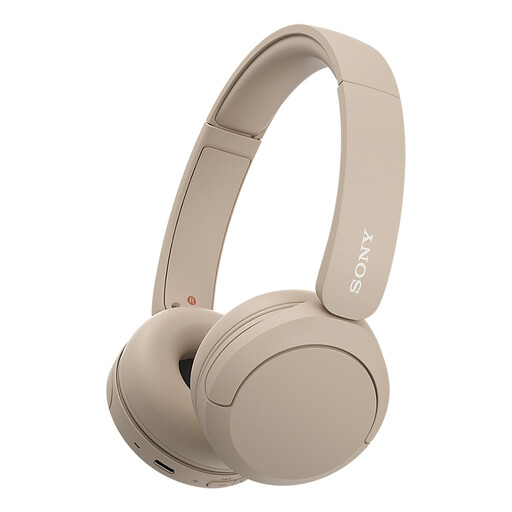
Why this fits the profile: A lightweight on-ear headphone for daily use, commuting and calls. The button controls and multipoint support make switching between devices simple.
The product data states a weight of 147 grams and a Bluetooth connection. Do check the current battery specification in the listing, as the description and specification list mention different playback times.
147 grams, multipoint connection, USB-C and built-in microphone.
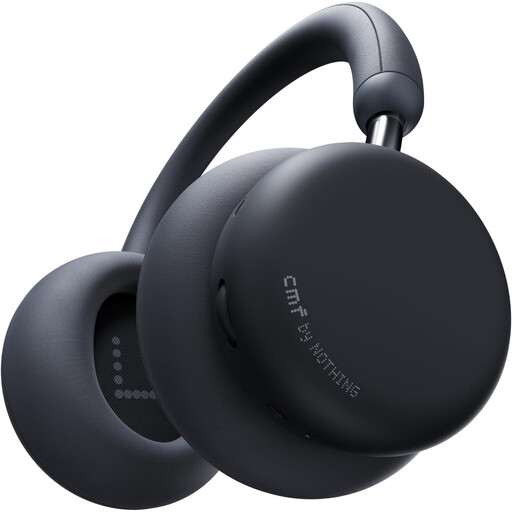
Why this fits the profile: For those looking for an over-ear headphone with ANC, LDAC and use at the office, at home or on the go.
The product description lists separate battery life figures with ANC on and off. This allows you to better compare the claim against your own usage scenario.
40mm drivers, LDAC, multipoint and replaceable ear cushions; IPX2 splash-proof rating.

Why this fits the profile: For gamers who value low reliance on batteries and a direct 3.5mm connection over wireless use.
You don't need to assess battery life or Bluetooth compatibility. The headset uses an analogue 3.5mm connection; check the included splitter for PCs with separate jacks.
50mm drivers, cardioid microphone, 240 grams and multi-platform compatibility.
We've put together a full, up-to-date list of products that fully meet these strict selection criteria and comply with current European safety regulations.
Turn on the headphone and activate pairing mode. Then open the Bluetooth settings on your phone and select the product name. With multipoint, you usually need to pair the second device separately according to the manual. If the connection is unstable, remove the old pairing and try again.
The lifespan depends on battery capacity, charging habits, hinges, ear cushions and daily use. Store the model in a dry place, avoid heat and charge with a suitable USB-C cable. A headphone with replaceable ear cushions can remain usable for longer. The statutory warranty in the EU is separate from battery wear and additional manufacturer conditions.
Not without caution. Noise cancelling can reduce ambient sounds. When cycling, only use a mode and volume at which you can still clearly hear traffic, and follow local traffic regulations. A headphone should never replace your awareness of your surroundings.
