
Vandaag of morgen in huis

Kwaliteit gegarandeerd

Welkomstaanbiedingen ontgrendelen: GRATIS bezorging | Tot 80% korting | Gratis 30 dagen JoyPlus-proefperiode
Download de app
A wireless headphone makes listening to music, taking calls and gaming much easier. However, a long list of features doesn’t automatically mean a model is right for how you’ll use it. A Bluetooth headphone for the train has different requirements to a gaming headset for a PC or wireless earbuds for exercise.
Pay particular attention to these three common pitfalls:
Battery claims without a clear usage mode
A stated battery life sometimes only applies without lighting, with a certain connection or at a low volume. So always check whether the usage time refers to music, calls, gaming and noise cancelling.
Confusing noise cancelling with sound isolation
A closed over-ear headphone reduces ambient noise through its fit. Active noise cancelling (ANC) uses electronics to reduce certain background sounds. Neither makes every sound completely silent. When cycling, crossing roads or in traffic, staying aware of your surroundings remains important.
Connectivity that doesn’t work with every device
Bluetooth is practical for smartphones, tablets and laptops, but not every console supports Bluetooth audio directly. A gaming headset with 2.4 GHz and a USB dongle may be more suitable for a PlayStation. Also check whether a USB-C cable is only for charging or also carries audio.
In-ear earbuds are compact and fit easily into a jacket pocket. The fit depends heavily on the ear tips supplied. For sport, models with a secure fit or a neckband are practical.
An on-ear headphone rests on the ears and is often lighter. This makes it suitable for daily use and travel, but ambient noise may remain more audible. An over-ear headphone encloses the ears and generally offers more passive isolation. Do pay attention to weight, clamping force and heat during longer listening sessions.
Don’t just look at “long battery life” – check the full specification:
With the ONIKUMA GT806, for example, the product description states up to 60 hours of music and video playback without lighting and up to 40 hours of gaming via 2.4 GHz. The description also notes that RGB lighting consumes more power. That’s relevant information if you’re looking for a headphone with long battery life.
For calls, a headphone with a microphone is sufficient, but the quality depends on the number of microphones, their placement and the noise reduction used. Brands may promote features such as “clear calls” or “noise reduction”. Treat this as a manufacturer’s claim; the actual experience can vary depending on your environment and device.
For sport, an IP rating is more useful than a general term like “water-resistant”:
An IP rating does not mean you can submerge the product. Also check whether sweat, rain and moisture are permitted according to the product information.
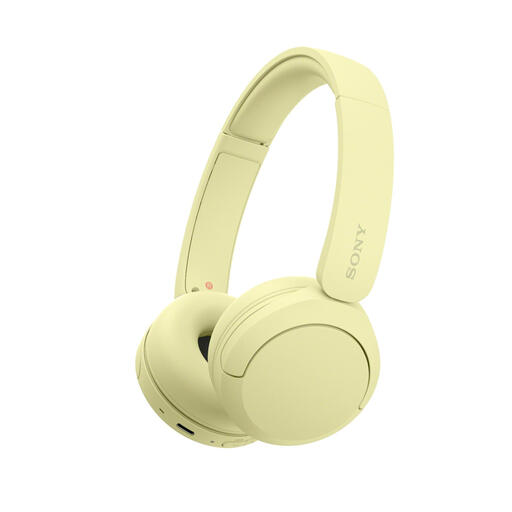
Why this fits the profile: This lightweight on-ear model is designed for daily use, with Bluetooth, a microphone and multipoint connection for, say, a phone and laptop.
The product information mentions USB-C, multipoint and a light weight of 147 grams. The stated battery life varies in the listing by specification, so check the current product page before buying.
Bluetooth 5.2 according to the product specifications, multipoint connection, microphone and USB-C charging.
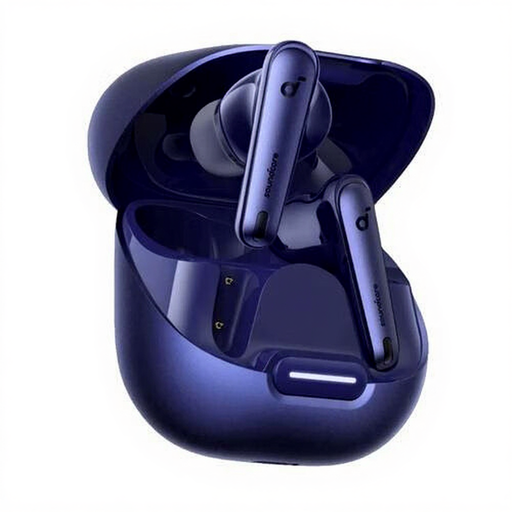
Why this fits the profile: These in-ear wireless earbuds are aimed at music and calls, combining ANC, Bluetooth 5.3 and a charging case.
The product specifications list IPX4, USB-C and a charging case. This makes the difference between earbuds and case clear: moisture protection does not automatically apply to both.
ANC, six microphones according to the product description, Bluetooth 5.3, USB-C and up to 10 hours of playback per charge according to the listing.
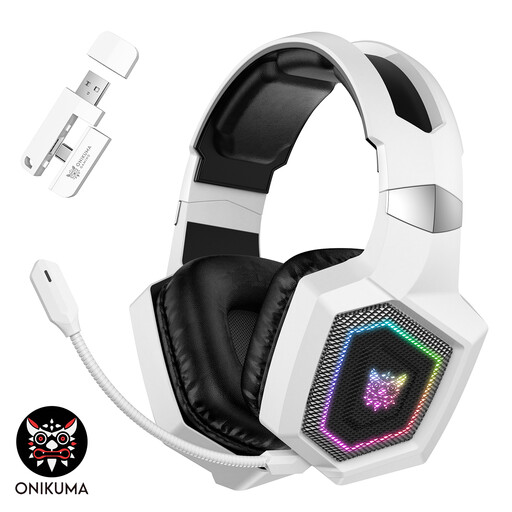
Why this fits the profile: This over-ear gaming headset is designed for gamers who want to switch between 2.4 GHz, Bluetooth and wired Type-C mode.
The product information explicitly states that Bluetooth does not work directly with PS4, PS5 or PC without a separate adapter. For consoles, the included 2.4 GHz transmitter is the designated connection.
50mm drivers according to the description, detachable microphone, less than 30 ms stated latency and up to 40 hours of gaming via 2.4 GHz.
We’ve put together a full, up-to-date list of products that fully meet these strict selection criteria and comply with current European safety regulations.
Switch on the headphone and activate pairing mode. Then open the Bluetooth settings on your smartphone, tablet or laptop and select the product name. With wireless earbuds, pairing usually happens through the charging case. A gaming headset with a USB dongle often uses a different connection to Bluetooth.
That varies by model and usage. ANC, high volumes, RGB lighting and 2.4 GHz gaming can shorten the usage time. So look at the battery life per mode and check whether the stated hours are per charge or include the charging case.
It can be, provided the fit and IP rating match your use. IPX4 is designed for splashing water and sweat, while the charging case may not have any water protection. For running, an open-ear model or neckband may be more comfortable than a heavy over-ear headphone. Do not use a headphone in situations where you need to hear traffic sounds or other warnings clearly.
