
Vandaag of morgen in huis

Kwaliteit gegarandeerd

Welkomstaanbiedingen ontgrendelen: GRATIS bezorging | Tot 80% korting | Gratis 30 dagen JoyPlus-proefperiode
Download de app
A wireless gaming mouse gives you greater freedom of movement, but not every model is automatically suitable for competitive gaming. Particularly in FPS and MOBA games, high latency, an awkward shape or a flat battery can noticeably affect your gaming experience. Marketing terms such as “ultralight”, “8K” and “professional” do not tell the whole story either.
As a Joybuy Product Recommendation Officer, I filter product information according to verifiable specifications. This helps you see which features are genuinely relevant and which claims should be viewed in context.
A 42000 DPI gaming mouse sounds impressive, but most players use a much lower setting in practice. DPI determines cursor sensitivity; on its own, it does not indicate how accurately the sensor performs in your game. Also consider tracking speed, acceleration, adjustability and the software used to save profiles.
According to the product information, a gaming mouse with an 8K polling rate reports to the computer up to 8000 times per second. This can refine movement rendering, but it requires more system resources than 1000 Hz. The mouse must also be in the correct connection mode. On some models, the highest polling rate only works via 2.4GHz or a wired connection, not via Bluetooth.
Therefore, check:
An ultralight gaming mouse weighing around 50 to 60 grams can support fast movements, but weight is a matter of personal preference. The shape, height and positioning of the thumb buttons are just as important. An ambidextrous gaming mouse is convenient for left- and right-handed use, but does not always offer the same thumb support as a distinctly right-handed model.
For modern games, an optical sensor with adjustable DPI is usually a practical choice. According to its product description, the AJAZZ AJ159 APEX uses a PAW3950 APEX sensor with up to 42000 DPI, 750 IPS and 50G acceleration. These figures come from the brand’s specifications; they do not guarantee that every user will experience the same performance.
The Logitech G PRO X Superlight 2c lists a HERO 2 sensor, up to 44000 DPI, 888 IPS and 88G acceleration. If you use a high resolution, pay particular attention to whether the driver and in-game settings can be fine-tuned sufficiently.
A polling rate of 1000 Hz is already sufficient for many users. 8000 Hz may be interesting for players who make very fast movements and have configured their PC accordingly. Bear in mind that a higher polling rate is not the same as guaranteed better gaming performance. Screen refresh rate, frame times, the wireless environment and the connection being used also play a role.
A tri-mode wireless mouse typically supports:
A gaming mouse with charging dock can be convenient if you place the mouse on a magnetic base after use. However, check whether the dock also contains the wireless receiver, how much desk space it takes up and whether the lighting can be switched off. RGB is primarily a visual feature; it does not change sensor performance.
Compact models are often easier to control for small to medium-sized hands. Pay attention to the dimensions in millimetres rather than relying solely on the description “ergonomic”. An ergonomic gaming mouse is generally shaped for one hand, while an ambidextrous gaming mouse has a more neutral body.
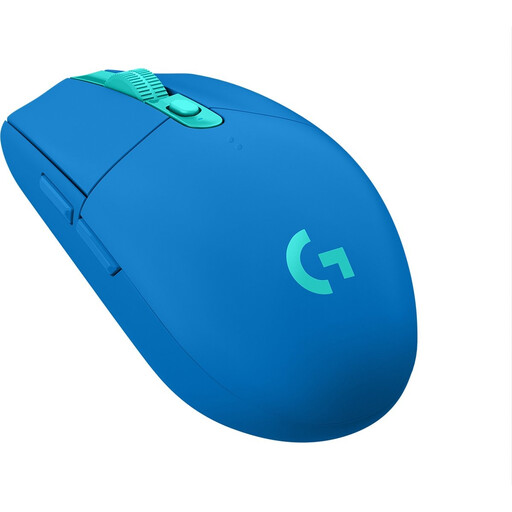
Why it suits this profile: This model combines a 2.4GHz RF connection with an optical sensor offering up to 12000 DPI. It runs on an AA battery, which is useful if you would rather not stop to recharge while playing.
The specifications are geared more towards everyday gaming than extreme DPI or polling-rate claims. Bear in mind the 99-gram weight and right-handed shape.
12000 DPI, adjustable sensitivity, a stated battery life of 250 hours and a 1 ms response time according to the product information.
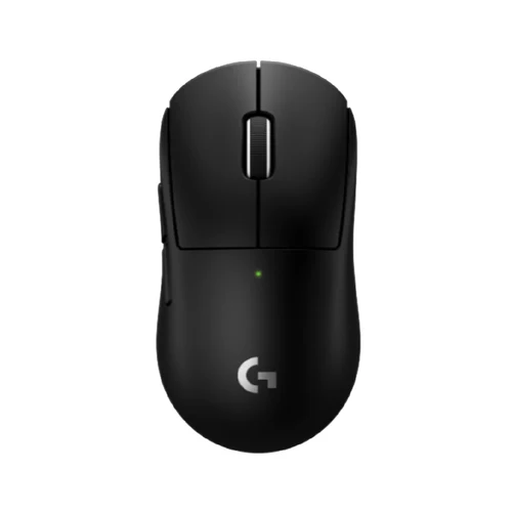
Why it suits this profile: The compact 53-gram body, LIGHTSPEED connection and stated polling rate of up to 8 kHz suit players looking for a lightweight FPS mouse with minimal cable movement.
The compact dimensions help buyers who want to avoid an overly large mouse. There is no RGB lighting, so the choice focuses primarily on shape and performance.
HERO 2 sensor, up to 44000 DPI, 8K polling rate according to the product specification and a stated battery life of up to 95 hours.
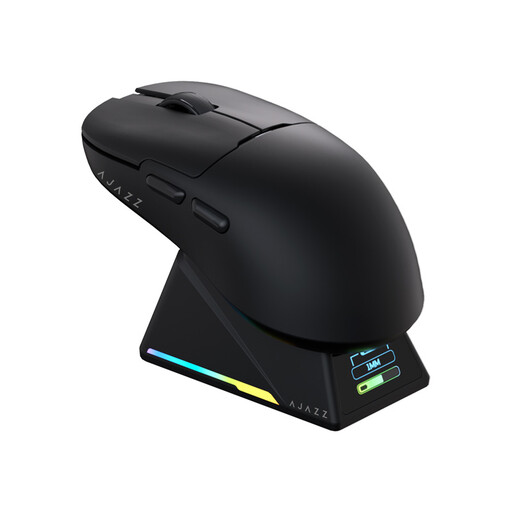
Why it suits this profile: This model is designed for FPS and MOBA gaming, combining a low stated weight with tri-mode connectivity, RGB lighting and a magnetic dock with an integrated receiver.
The connection options and charging method are clearly specified. Use 2.4GHz for gaming and Bluetooth for office work; check beforehand that your system supports 8K mode.
56 grams, PAW3950 APEX sensor, up to 42000 DPI and 8000 Hz in wireless mode according to the product description.
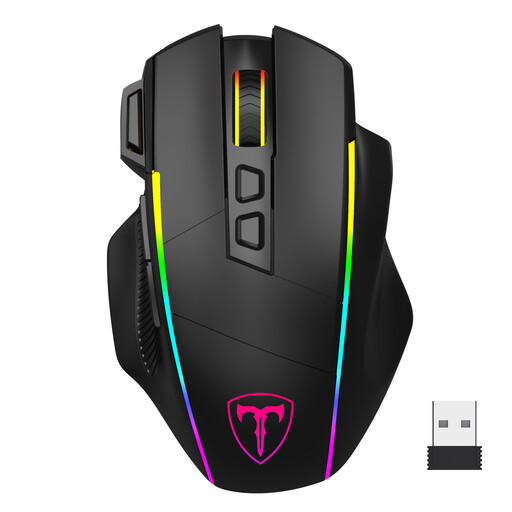
Why it suits this profile: With eight programmable buttons, RGB and three connection methods, this model is aimed at users who want to combine gaming with everyday tasks.
The settings are limited and clearly stated: six DPI levels up to 10000 and polling rates up to 1000 Hz. According to the product information, the software only works in wired mode.
Tri-mode connectivity, eight programmable buttons, seven RGB effects and a stated acceleration of 20G.
We have put together a complete, up-to-date list of products that fully meet these strict selection criteria and the applicable European safety regulations.
Where possible, plug the 2.4GHz receiver directly into the PC or use the included extension cable. Avoid a USB hub if you experience interference. Fully charge the mouse according to the manual and check in the driver that the DPI, polling rate, lift-off distance and button functions are configured correctly.
Use Bluetooth mainly for office work when a slightly simpler connection is sufficient. For competitive gaming, 2.4GHz is usually the sensible choice. Keep a USB-C cable nearby as a temporary solution if the battery runs flat.
That depends on your screen, system, game and playing style. A higher polling rate can refine reporting, but it does not automatically deliver more FPS or better aim. Also check power consumption and software compatibility.
Battery life varies depending on the model and settings. RGB, 2.4GHz and a high polling rate can all use more power. The stated battery life is a product specification measured under certain conditions and may differ in practice. A charging dock or USB-C cable makes regular recharging easier.
Yes, provided the mouse offers a stable connection, adjustable DPI and a suitable button layout. For FPS games, weight and fast tracking are often important. For MOBA games, additional programmable buttons can be useful. You should also choose a shape that suits your hand size and grip.
