
Vandaag of morgen in huis

Kwaliteit gegarandeerd

Welkomstaanbiedingen ontgrendelen: GRATIS bezorging | Tot 80% korting | Gratis 30 dagen JoyPlus-proefperiode
Download de app
A wireless gaming mouse gives you greater freedom of movement and a cleaner desk. However, not every wireless gaming mouse is suitable for fast-paced PC games. A high DPI value alone says little about the overall user experience. Battery type, connectivity, weight, shape and software all determine how well a wireless gaming mouse performs in practice.
As a Joybuy Product Recommendation Officer, I filter the most important product specifications of popular models. This helps you identify which features are relevant to your playstyle and which marketing claims are worth checking before you place an order.
A gaming mouse with a high DPI can make the cursor move faster, but many players deliberately use lower sensitivity in FPS games. A sensor rated at 26,000 or 40,000 DPI is therefore not automatically more useful than one rated at 4,800 or 12,000 DPI.
Pay particular attention to:
A 4K or 8K polling rate means that the mouse sends data to the computer more frequently each second. This can make cursor movement feel smoother, but it also requires more system resources. According to Rapoo’s product information, a polling rate of 4000 Hz can increase CPU usage. If you experience frame drops, 1000 Hz may be the more practical setting.
For casual gaming and everyday use, 1000 Hz is often sufficient. A 4K gaming mouse is most interesting when you combine a powerful PC, a high-refresh-rate display and a competitive playstyle.
“Up to” a certain number of hours generally refers to a maximum achieved under specific settings. RGB lighting, a higher polling rate and the selected connection mode can all affect power consumption.
Therefore, check:
A lightweight gaming mouse weighing around 50 to 75 grams is well suited to fast direction changes and low sensitivity. A heavier model may feel more stable during office work or for users with larger hands. Do not consider weight alone: also look at the dimensions, hand orientation and grip style.
A honeycomb shell can reduce weight, but it leaves more openings around the electronics. Regular cleaning with a dry cloth or compressed air helps limit dust buildup.
For gaming, 2.4 GHz with a USB receiver is generally preferable to Bluetooth, as this mode is designed for low latency in many models. Bluetooth is convenient for a laptop, tablet or secondary computer, but check in advance whether the mouse supports the functions you need in that mode.
A tri-mode model offers USB-C, 2.4 GHz and Bluetooth connectivity. This is practical when switching between a desktop PC and laptop, but software features such as macros may be limited to Windows or wired mode. Always check the product description.
A programmable gaming mouse is useful for MOBA and RTS games, as well as for productivity. Pay attention to the number of buttons, the position of the side buttons and the available software. More buttons are not automatically better if they are difficult to reach while playing.
RGB lighting is primarily a design choice. With an RGB gaming mouse, check whether the lighting can be switched off and whether the effects can be configured through software.

Why it fits: An accessible choice for PC and laptop gamers looking for a lightweight mouse with RGB lighting and programmable buttons.
The specifications list adjustable DPI from 800 to 4800 and a polling rate of up to 1000 Hz, keeping the configuration straightforward.
73 grams according to the product specifications, six programmable buttons, USB-C charging and a stated battery life of up to 80 hours.
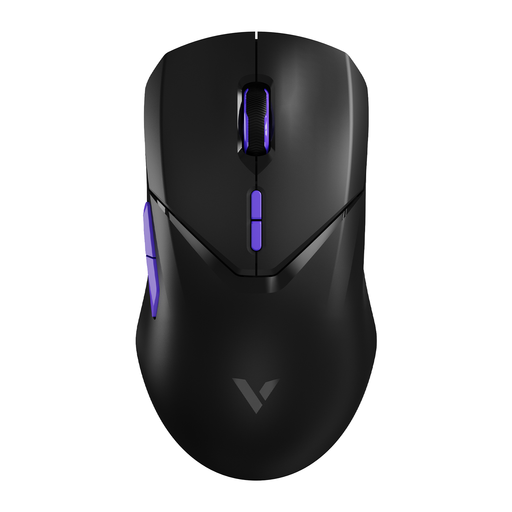
Why it fits: Designed for players who want to combine low wireless latency, a high polling rate and low weight.
The product information states that 4000 Hz may require more CPU resources. You can switch back to 1000 Hz if this makes your system less stable.
68 grams, a stated sensor resolution of up to 26,000 DPI, ten programmable buttons and a quoted battery life of up to 180 hours.

Why it fits: Suitable for intensive use when you want to charge as infrequently as possible and switch between Windows, Mac and different devices.
The software is required to configure programmable functions and macros. Check in advance whether your operating system is supported.
53 grams, native wireless 8K polling according to Rapoo and a stated battery life of up to 750 hours at 1000 Hz.
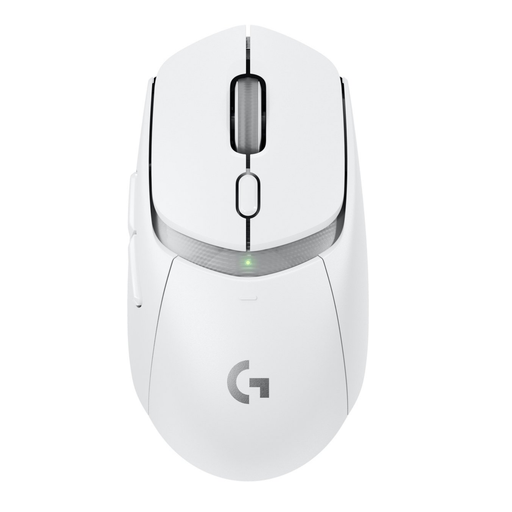
Why it fits: A practical option for right-handed PC gamers who want to combine 2.4 GHz and Bluetooth without relying solely on a built-in battery.
There is no RGB lighting. That means you do not pay for effects you do not need, but it also makes this model less suitable for an illuminated setup.
The product specifications list 68 grams with the Powerplay system and more than 300 hours with an AA battery; up to six buttons are also programmable.
Explore our current selection of mice with verified specifications for gaming, working from home and everyday use.
It can be, particularly with a 2.4 GHz connection using a USB receiver and a suitable polling rate. Also check software support, shape and weight. Bluetooth is mainly convenient for everyday use and devices where you do not want to connect a USB receiver.
That depends on the model and settings. Product specifications may list figures of up to 80, 180, 300 or 750 hours, for example. These are stated maximums. Higher polling rates and RGB lighting can increase power consumption. A USB-C cable that lets you continue playing while charging prevents interruptions.
Not necessarily. A 4K gaming mouse can be worthwhile for competitive players with a powerful PC and a high-refresh-rate display. For most PC and laptop gamers, 1000 Hz is a practical starting point. Choose 4K or 8K only if you consider the additional system load and potential price premium acceptable.
