
Vandaag of morgen in huis

Kwaliteit gegarandeerd

Welkomstaanbiedingen ontgrendelen: GRATIS bezorging | Tot 80% korting | Gratis 30 dagen JoyPlus-proefperiode
Download de app
A wireless gaming mouse gives you greater freedom of movement, but not every wireless model is automatically suitable for competitive gaming. A high DPI rating, RGB lighting or a well-known brand name alone says little about how comfortable the mouse will be to use every day.
Fit, weight, connection and battery life are particularly important for FPS games and long gaming sessions. Below, you’ll find the key points to check before buying a wireless gaming mouse, plus the models that suit different playing styles.
A gaming mouse with a high DPI rating can be set to be extremely sensitive, but you rarely need the highest setting. Many players use a lower DPI combined with larger mouse movements. So check whether the DPI can be adjusted and whether the software supports multiple profiles.
A 30,000 or 35,000 DPI sensor mainly gives you a broad range of settings. It does not guarantee that you’ll play more accurately.
The stated battery life depends on the connection mode, polling rate and conditions of use. According to the product information, a Logitech G309 LIGHTSPEED can run for more than 300 hours on a single AA battery, while Trust states that the Trust GXT 929 Helox lasts up to 80 hours with its built-in battery.
Also consider the type of power supply. A replaceable AA battery can be swapped quickly. A built-in battery needs to be recharged, but the mouse can often continue working via USB while it charges.
A lightweight gaming mouse weighing between 54 and 75 grams can be comfortable for fast movements, but its shape must suit your hand and grip. An ergonomic gaming mouse designed for right-handed use feels different from a compact, symmetrical model. So check the dimensions, number of buttons and hand orientation.
For gaming, a 2.4GHz connection with a USB receiver is usually the practical choice. This mode is designed to provide low latency and a consistent connection. Bluetooth is useful for laptops, office work or devices without a spare USB port, but check whether the mouse supports the same functions and polling rate over Bluetooth.
A three-mode model such as the AJAZZ AJ159 V2 MC can be used via 2.4 GHz, Bluetooth and USB cable. A cable connection is also useful when the battery runs out.
The sensor determines how movement is recorded. Look out for:
A polling rate of 1,000 Hz is sufficient for many PC gamers. According to the product specifications, some Razer models support higher rates such as 4,000 or 8,000 Hz. However, you’ll need a compatible receiver, software and a system capable of handling the additional load.
For FPS players, a low weight and straightforward button layout are often practical. For MMOs, strategy games and productivity tasks, extra programmable buttons can be particularly valuable.
Look beyond the weight:
RGB lighting is primarily a style choice. It can enhance the look of your desk, but it has no direct impact on sensor precision or response time.
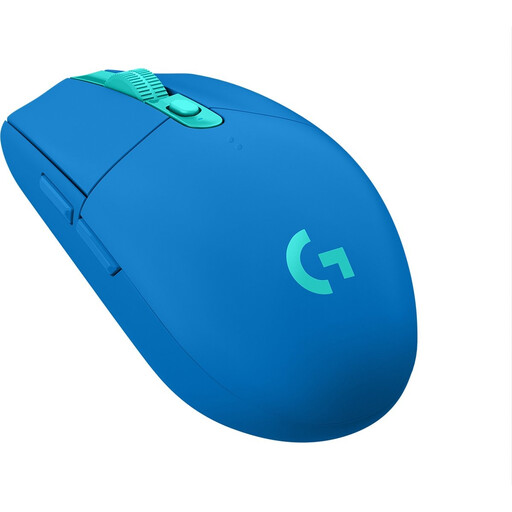
Why it suits this profile: This model combines a 12,000 DPI optical sensor with a weight of 99 grams and power from a single AA battery. It’s a straightforward choice for anyone moving on from a standard mouse.
The specifications clearly show what you’re getting: adjustable DPI, a 1 ms response time according to the product information, and a replaceable AA battery.
RF wireless and Bluetooth; up to 250 hours of battery life according to the product information; six buttons.

Why it suits this profile: With a stated weight of 54 grams, a Focus Pro 35K sensor and support for wireless and USB-C use, this model is well suited to players who value fast, controlled movements.
Its low weight means you’re not relying on DPI alone; the shape and weight are at least as relevant for FPS gaming.
35,000 DPI; up to an 8,000 Hz polling rate according to the product specifications; rechargeable battery.

Why it suits this profile: Its ergonomic shape, 11 programmable buttons and tactile scroll wheel are designed for players who want to control many functions from the mouse.
You’re not choosing it for RGB lighting alone: the extra buttons, ergonomic shape and three connection options determine its practical value.
35,000 DPI; 11 programmable buttons; Razer Chroma RGB lighting according to the product description.

Why it suits this profile: Its right-handed ergonomic shape and stated weight of 63 grams make it suitable for players who enjoy long FPS sessions and value rapid repositioning.
The choice is about weight, shape and connection rather than the sensor rating alone. However, check that the right-handed shape suits your grip.
30,000 DPI; up to 90 hours of battery life according to the product information; five programmable buttons.
We’ve put together a complete, up-to-date list of products that fully meet these strict selection criteria and the applicable European safety regulations.
Bluetooth is useful for general use and laptops, but check the polling rate and connection mode. For competitive gaming, many players choose a 2.4GHz USB receiver because it provides a dedicated low-latency connection.
It varies by model and settings. For example, product information states up to 80 hours for the Trust GXT 929 Helox, up to 90 hours for the Razer DeathAdder V3 Pro and more than 300 hours for the Logitech G309 with an AA battery. Treat these figures as product specifications under certain conditions of use, rather than a fixed guarantee.
For FPS games, two side buttons are often enough for actions such as melee attacks, reloading or using an ability. Extra buttons can be useful, but only if you can reach them without changing your grip. For MMOs, strategy games and productivity, more programmable buttons are generally more useful.
