
Vandaag of morgen in huis

Kwaliteit gegarandeerd

Welkomstaanbiedingen ontgrendelen: GRATIS bezorging | Tot 80% korting | Gratis 30 dagen JoyPlus-proefperiode
Download de app
A wireless gaming mouse gives you more freedom of movement and keeps your desk tidy. However, not every wireless gaming mouse is automatically suited to fast-paced gameplay. A high DPI figure might sound impressive, but it means little if the shape doesn’t suit your hand. A short battery life, unstable connection or software that only works in wired mode can also be frustrating.
As Joybuy Product Recommendation Officer, I filter out the most important specifications and marketing claims so you can compare products more easily. Here’s what to look for in a wireless gaming mouse for your PC or laptop.
A high-DPI gaming mouse can move the cursor across the screen very quickly. That doesn’t necessarily mean a better gaming experience. Many gamers actually prefer lower sensitivity for more control in FPS games. So don’t just look at the maximum DPI figure. Check these points too:
A sensor with 18,000 or 24,000 DPI is most useful if you want to fine-tune the sensitivity. For everyday gaming, a lower range is often more than enough.
“Up to” a certain number of hours refers to the manufacturer’s maximum estimate. RGB lighting, a high polling rate and intensive use can all affect actual battery life. Check whether the mouse:
A gaming mouse with long battery life is practical, but a replaceable AA or AAA battery may be more convenient for some users than waiting for a recharge.
A 2.4GHz gaming mouse usually uses a USB receiver. This connection is designed for a fast response and generally works without Bluetooth pairing. Bluetooth is useful for laptops and multiple devices, but check in advance whether the gaming features you want are available in both modes.
Also consider how many USB ports you have free. Bluetooth can be useful with a laptop that has few ports, while a desktop PC will often be better suited to a 2.4GHz receiver.
An ultralight gaming mouse weighing around 50 to 75 grams can feel comfortable for fast movements. A heavier model may feel more stable. The right weight depends on your grip and play style:
A honeycomb shell can reduce weight, but may let in more dust. Clean the sensor and openings regularly with a dry cloth.
The polling rate indicates how often the mouse reports its position to the computer. 1000 Hz means up to 1000 reports per second. Higher rates are also available, but they put more demand on your computer and can drain the battery faster. For many PC gamers, 1000 Hz is a good starting point.
A gaming mouse with programmable buttons is useful for MMO, MOBA and RTS games, but not everyone needs six or eight buttons. Check:
RGB lighting doesn’t affect tracking. A gaming mouse with RGB lighting may complement your desk setup, but check whether you can switch the lighting off. When it comes to ergonomics, hand orientation is particularly important. A right-handed model won’t suit left-handed use, even if its shape looks comfortable.

Why it suits this type of user: This wireless gaming mouse combines a 2.4GHz receiver with a rechargeable battery and six programmable buttons. It gives new PC and laptop gamers room to experiment with settings without having to choose a complex model straight away.
The product specifications list adjustable sensitivity from 800 to 4800 DPI, a 1000 Hz polling rate and the ability to keep playing while charging via USB-C. Battery life is stated as up to 80 hours; this is the manufacturer’s estimate.
73 grams, optical sensor, 2.4GHz connection, USB-C and RGB lighting through the shell.

Why it suits this type of user: This model is designed for users looking for a compact, lightweight mouse with low wireless latency for competitive FPS games.
According to the product specifications, the mouse weighs 53 grams and uses a LIGHTSPEED receiver. The stated battery life of up to 95 hours is the manufacturer’s estimate and may vary depending on how you use it.
HERO 2 sensor up to 44,000 DPI, maximum 8000 Hz polling rate and rechargeable battery.
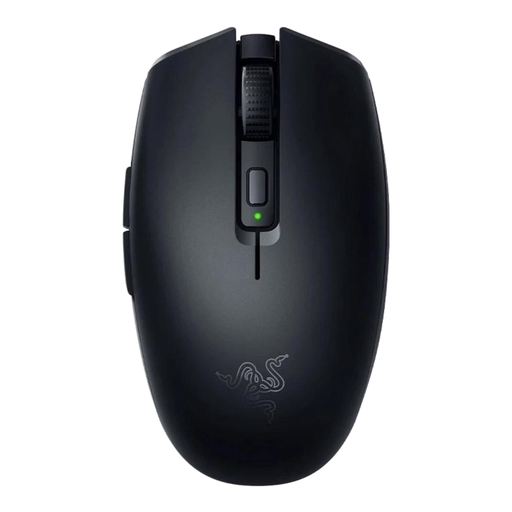
Why it suits this type of user: Compact and equipped with both Razer HyperSpeed Wireless and Bluetooth, this mouse is ideal for gamers who also want to use it with a laptop or on the go.
You’re not reliant on a built-in battery: this model uses one AA or AAA battery. According to Razer’s product specifications, battery life is up to 450 hours via HyperSpeed and up to 1000 hours via Bluetooth.
60 grams, up to 18,000 DPI, six programmable buttons and a symmetrical shape.

Why it suits this type of user: This mouse is aimed at users who want to switch between a PC, laptop and other devices, and value plenty of buttons and lighting.
You can choose between 2.4GHz, Bluetooth and USB-C. However, according to the product description, the programming software only works in wired mode and on Windows.
Up to 10,000 DPI, eight programmable buttons, RGB lighting and three connection modes.
We’ve put together a complete, up-to-date list of products that meet these strict selection criteria and the applicable European safety regulations.
For a 2.4GHz mouse, plug the USB receiver directly into a free USB port. If you’re having connection problems, avoid placing the receiver behind a metal PC case. Switch on the mouse and only install the associated software from the brand’s official website.
If you’re using Bluetooth, turn on Bluetooth on Windows or macOS and select the mouse from the list of available devices. After pairing, check the DPI, button layout and polling rate. Not every setting is supported in every connection mode.
Yes, it can be. Look for a stable 2.4GHz connection, an optical sensor and a polling rate of, for example, 1000 Hz. Your overall experience also depends on your computer, surface, settings and personal grip.
It varies by model and how you use it. Manufacturers often state the maximum battery life. RGB lighting, high polling rates and intensive use can all affect actual battery life. A rechargeable mouse with USB-C is handy if you want to keep playing while it charges. A model with an AA or AAA battery is practical if you want to swap batteries quickly.
Usually, yes, but check the connection options. A USB receiver works with devices that have a suitable USB port. A Bluetooth gaming mouse can pair directly with many laptops. Tri-mode models often also offer a wired USB-C mode, but the programming software may be limited to Windows or a particular connection mode.
