
Vandaag of morgen in huis

Kwaliteit gegarandeerd

Welkomstaanbiedingen ontgrendelen: GRATIS bezorging | Tot 80% korting | Gratis 30 dagen JoyPlus-proefperiode
Download de app
A wireless gaming mouse gives you more freedom of movement than a wired model. However, wireless does not automatically mean that every mouse is suitable for competitive gaming. A high DPI rating may sound impressive, while the shape may not suit your hand. A high polling rate can also put extra strain on your PC.
If you are looking for a wireless gaming mouse, lightweight gaming mouse or an FPS gaming mouse, it is therefore worth looking beyond the marketing copy. Below, you will find the key points to consider, along with some popular choices based on verifiable product specifications.
DPI indicates how far the cursor moves in response to a particular physical mouse movement. A high-DPI gaming mouse mainly offers plenty of adjustment options. That does not mean you need 26,000 or 44,000 DPI while gaming. Many gamers use lower sensitivity for more accurate aiming.
So check:
A gaming mouse with an 8K polling rate sends position data to your computer more frequently per second. This can increase the input frequency, but according to the product information for some models, it also requires more CPU capacity. With lower-specification or older PC configurations, this can lead to frame-rate issues.
A practical approach:
A high polling rate is therefore a feature, not a guarantee of better gaming performance.
A lightweight gaming mouse weighing around 53 to 68 grams can feel comfortable during fast FPS movements. However, weight is only one factor. The length, width, height and position of the thumb buttons determine whether a mouse suits your grip.
Pay attention to the difference between:
A compact model may suit smaller hands, but it can be less comfortable if you have large hands or use a palm grip.
A good wireless connection usually uses a 2.4GHz receiver for low latency. Bluetooth is convenient for general laptop use, but is less commonly chosen for competitive gaming. Also check whether the receiver can be positioned directly beside your mouse mat or via the supplied extension cable.
The models listed offer different levels of performance:
An optical sensor is common in esports mice and gaming mice for FPS and MOBA games. Do not only look at the maximum DPI figure. Consider the available adjustments and the accompanying software as well.
Examples from the product information:
Independent X/Y DPI can be useful if you want to set horizontal and vertical movement differently. For most players, a reliable sensor with well-adjustable sensitivity is more important than the biggest number on the box.
A gaming mouse with long battery life is particularly practical if you travel frequently, stream or play long sessions. Pay attention to the conditions under which the battery life is specified. For many models, the long runtime applies at 1000 Hz and without additional lighting or intensive features.
The product information includes the following examples:
Also check whether the mouse can still be used while charging, which type of cable is included and whether wireless charging requires a separate accessory. The VT9Pro mentions a separate P3 Wireless Charging Module. For built-in lithium batteries, use the recommended cable and charging adapter, and follow the manufacturer’s safety instructions.
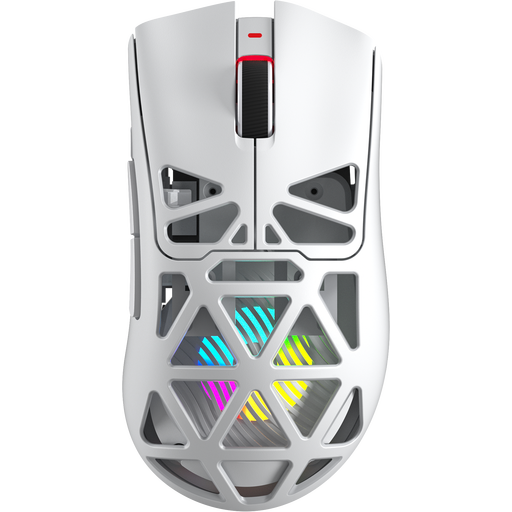
Why it suits this profile: This model combines Bluetooth, 2.4G and USB-C, and specifies a weight of 67 grams, 7 programmable buttons and up to 12,000 DPI. That provides flexibility for PC and laptop use.
The specifications mention not only DPI, but also connectivity options, weight and button layout. Do check whether the 400 mAh battery capacity suits your gaming routine.
Three connection options, 7 programmable buttons and a specified polling rate of up to 8KHz.
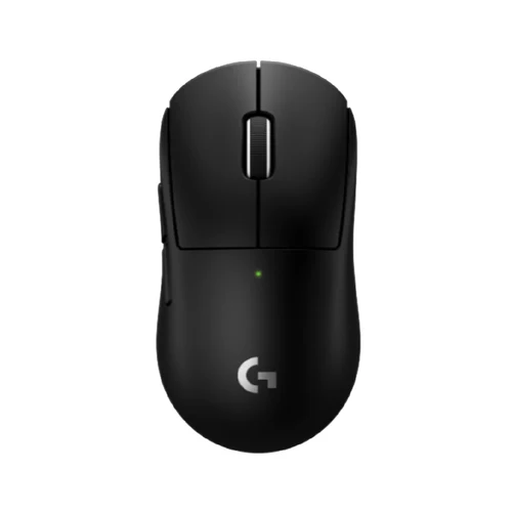
Why it suits this profile: The compact 53-gram body is designed for users with smaller hands or a particular grip style. The HERO 2 sensor, programmable thumb buttons and LIGHTSPEED connection are well suited to FPS and esports use.
The compact dimensions make it easier to assess the shape than a general ergonomic claim. The stated battery life is 95 hours, so regular charging remains part of using the mouse.
53 grams, up to 44,000 DPI, a polling rate of up to 8000 Hz and a 2-year warranty according to the product details.
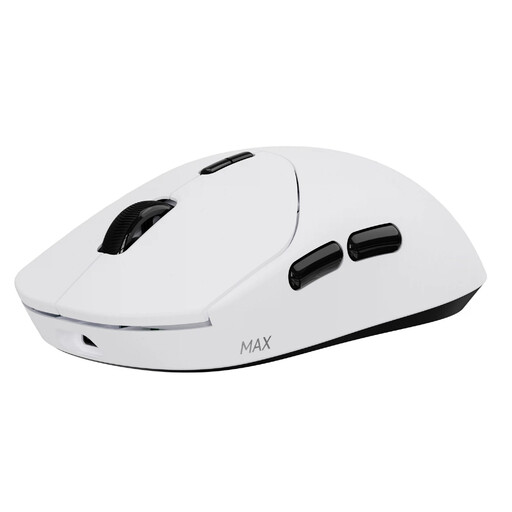
Why it suits this profile: According to the product information, this mouse combines a weight of 53 grams, 10 programmable buttons, up to 30,000 DPI and up to 750 hours of battery life at 1000 Hz.
The stated long battery life means fewer charging sessions. Install the latest A HUB driver to make use of the specified energy-saving mode and programmable functions.
Native 8000 Hz wireless polling, optical switches with a stated lifespan of 120 million clicks and independent X/Y DPI.
We have put together a complete, up-to-date list of products that fully meet these strict selection criteria and the applicable European safety regulations.
Yes, provided the mouse has a stable 2.4GHz connection, adjustable DPI and a shape that suits you. For FPS games, weight, grip and consistent tracking are generally more important than an extremely high DPI rating.
This varies considerably between models and settings. The stated figures in this selection range from 95 to 750 hours. Polling rate, lighting, power-saving features and usage time all affect the actual result.
Only if your PC and monitor can process this input frequency effectively and you will actually use the feature. For many players, 1000 Hz is already sufficient. So compare the sensor, shape, buttons, battery life and software before choosing 8K solely for its headline specification.
