
Vandaag of morgen in huis

Kwaliteit gegarandeerd

Welkomstaanbiedingen ontgrendelen: GRATIS bezorging | Tot 80% korting | Gratis 30 dagen JoyPlus-proefperiode
Download de app
A wireless gaming mouse gives you more freedom of movement than a wired model, but not every wireless mouse is suitable for competitive gaming. A high DPI value on the packaging means little if the sensor is inaccurate. A high polling rate can also put extra strain on your PC, while a small shell or awkward button layout can quickly become tiring.
Use these practical checkpoints to compare gaming mice based on the features that really matter in everyday home setups.
DPI determines how quickly the cursor moves in response to a particular hand movement. A high-DPI gaming mouse is not automatically more accurate. Many players actually use lower sensitivity in FPS games for more controlled movements. So check whether the DPI can be adjusted in small increments and whether the mouse uses an optical sensor.
An 8K polling rate mouse theoretically sends position data to the computer more often per second than a mouse running at 1,000 Hz. This can be relevant mainly for fast movements and displays with a high refresh rate. According to Rapoo’s product information, 4,000 Hz can increase CPU load; 1,000 Hz is recommended if you experience frame drops.
A higher polling rate therefore requires not only a suitable mouse, but also a PC capable of handling the additional processing. For everyday use, MOBA games and office work, 1,000 Hz is often the most practical setting.
A lightweight gaming mouse weighing between 53 and 60 grams can feel comfortable during fast FPS movements, but weight is only one factor. Also consider the length, width, height and the grip style you use. A small symmetrical mouse may suit a claw or fingertip grip, but be less suitable for a large hand that completely encloses the mouse.
For gaming, a 2.4GHz connection via a USB receiver is usually the preferred wireless mode. Bluetooth is useful for a laptop, Mac or second device, but check whether the highest polling rate is available only over 2.4GHz. A mouse with tri-mode connectivity often offers 2.4GHz, Bluetooth and USB-C.
Also check:
Claimed battery life depends on the polling rate, lighting and usage. According to Rapoo’s own product information, the stated battery life of up to 750 hours applies at 1,000 Hz and after activating an energy-saving mode through the driver.
An optical sensor gaming mouse tracks movement using light. Check the maximum DPI, tracking speed and adjustment options, but use these figures mainly to compare models with one another. The maximum value is not necessarily the setting you will use in games.
A good practical combination includes:
Mac users should pay particular attention to the software. According to the product description, the Rapoo A HUB driver is available for Windows and Mac, while certain software features on some other models work only under Windows.
The number of buttons should suit the type of games you play. FPS players often need only five to seven buttons, while MOBA and RTS players may benefit from having more programmable buttons. Check whether macros are permitted in the games you play and whether the software is easy to configure.
An ergonomic gaming mouse should suit your hand and grip. Pay attention to the position of the thumb buttons, the resistance of the scroll wheel and the difference between left- and right-handed models. Claims about comfort or reduced strain are marketing claims, so focus mainly on the dimensions, weight and shape.
Why it suits this profile: This compact mouse combines wireless gaming with Bluetooth and a wired USB-C mode, making it suitable for everyday computer use as well.
The product information states that the DPI can be adjusted up to 24,000, with a maximum of 1,000 Hz, without focusing on a higher polling rate that could place additional strain on your PC.
54 grams, PAW3311 optical sensor, two replaceable 300 mAh batteries and three connection modes.

Why it suits this profile: A right-handed 60-gram model with LIGHTSPEED wireless connectivity, USB-C charging and a HERO 2 sensor for users who want a clean, competitive setup.
The product specifications state specific values for weight, sensor, polling rate and USB-C charging, so you do not have to choose based solely on RGB or DPI.
60 grams, up to 4,000 Hz according to the product data, HERO 2 sensor and rechargeable battery.

Why it suits this profile: The combination of 53 grams, programmable buttons, 8K wireless and a long claimed battery life is aimed at players who spend many hours playing FPS or MOBA games.
The description explicitly states that 8K can put a strain on the CPU. You can therefore switch back to 1,000 Hz if your PC does not have sufficient spare capacity.
8,000 Hz wireless, up to 30,000 DPI, 10 programmable buttons and up to 750 hours of battery life at 1,000 Hz according to Rapoo.

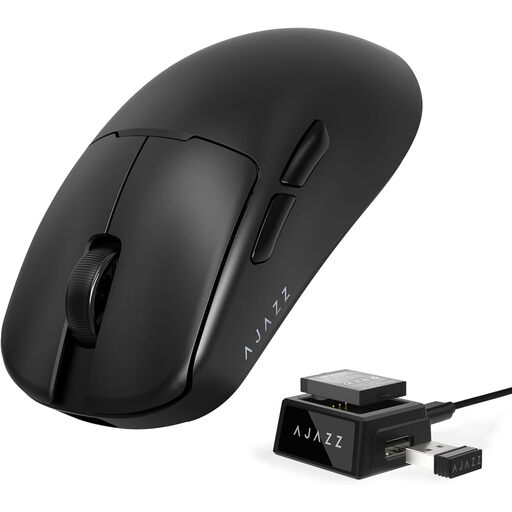
Why it suits this profile: The charging dock and three connection modes make this model suitable for a desk where you combine gaming, work and multiple devices.
The receiver built into the magnetic charging dock reduces the number of loose accessories on your desk. Bluetooth, 2.4GHz and USB-C are listed separately in the product information.
56 grams, PAW3950 sensor, up to 42,000 DPI, 8K polling rate and a magnetic RGB charging dock with TFT display.
We have put together a complete, up-to-date list of products that fully meet these strict selection criteria and the applicable European safety regulations.
Yes, provided you choose a stable 2.4GHz connection, a suitable receiver and an adjustable polling rate. Also check whether the mouse can operate in wired mode while charging. Bluetooth is mainly practical for office work and devices where the very lowest latency is less important.
This varies according to the model and settings. RGB lighting, a high polling rate and intensive use reduce battery life. Manufacturers’ stated figures are guidelines based on specific conditions. A model with USB-C, a charging dock or a replaceable battery helps ensure you are not left without a mouse for long.
For most players, an adjustable range is more important than the maximum figure. FPS players often choose lower sensitivity for greater control, while a higher DPI can be suitable for large screens or quickly switching between applications. Try different settings and, if necessary, save them as game profiles.
