
Vandaag of morgen in huis

Kwaliteit gegarandeerd

Welkomstaanbiedingen ontgrendelen: GRATIS bezorging | Tot 80% korting | Gratis 30 dagen JoyPlus-proefperiode
Download de app
A wireless gaming mouse gives you greater freedom of movement at your desk, but not every model is suitable for competitive gaming, working from home or everyday use. A high DPI value may sound appealing, while weight, connectivity and shape often have a greater impact on your experience.
As a Joybuy Product Recommendation Officer, I therefore start by looking at verifiable product specifications. This helps you avoid paying for features you do not use or buying a mouse that becomes uncomfortable after just a few weeks.
A high-DPI gaming mouse can move the cursor extremely quickly, but that does not automatically mean the sensor will work accurately in every situation. Also consider the sensor, adjustable increments and polling rate. For FPS gaming, many players actually use lower sensitivity for more controlled movements.
A mouse with 24,000 or 42,000 DPI mainly offers a wide adjustment range. Your monitor resolution, game settings and personal grip determine which value is practical for you.
There are three common connection types:
Check beforehand that your computer has a suitable USB port. A USB-A receiver will not fit directly into every modern laptop without an adapter.
A lightweight gaming mouse weighing around 50 to 60 grams can feel comfortable during fast movements, but very low weight is no guarantee of a good grip. The shape should suit your hand size and preferred grip: palm grip, claw grip or fingertip grip.
An ergonomic mouse with a clear thumb rest can be comfortable during long sessions, while a symmetrical model offers greater flexibility for left- and right-handed users. Also check the dimensions. A small mouse can cause additional strain if you have large hands.
Look at the combination of sensor and settings rather than focusing on one impressive marketing figure. An optical sensor with multiple DPI levels is sufficient for most users. For competitive games, IPS, acceleration and the maximum polling rate are also relevant.
A polling rate of 1,000 Hz records the position up to 1,000 times per second. According to the product specifications, models with 8,000 Hz can offer a higher reporting frequency, but they use more energy and may require additional software or system support. The difference is mainly relevant to players with a fast monitor and a competitive playing style.
Always compare battery life with the connection mode being used. Manufacturers sometimes state a maximum usage time at a specific polling rate or with the lighting switched off. A rechargeable mouse with USB-C is convenient, but check:
Claims such as ‘up to 750 hours’ or ‘up to one month’ refer to information in the brand’s product description. Actual battery life may vary depending on the polling rate, RGB lighting and intensity of use.
A programmable mouse can be useful for macros, shortcuts and different game profiles. However, check whether the software is only available for Windows. On some models, DPI and button settings are managed through a web app or driver, while other mice are plug-and-play.
RGB lighting is primarily a matter of style. With a mouse with RGB lighting, the lighting can reduce battery life. Check whether you can switch off the effects or adjust the brightness.
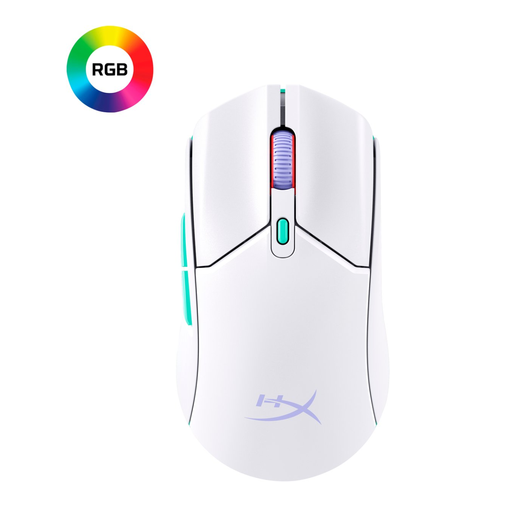
Why it suits this profile: This dual-mode mouse combines Bluetooth and 2.4GHz connectivity with a weight of approximately 70 grams. That makes it suitable for beginner gamers who are also looking for a mouse for their PC and laptop.
The specifications state 12,000 DPI, 1,000 Hz and two wireless modes. The AAA battery is not the same as a built-in rechargeable battery, so bear replacement in mind.
Symmetrical shape, six buttons, adjustable DPI and RGB lighting via HyperX NGENUITY, according to the product description.

Why it suits this profile: With a stated weight of 54 grams, a right-handed shape, 35,000 DPI and up to 8,000 Hz, this model is aimed at players who value low weight and extensive adjustment options.
Wireless performance is linked to the HyperPolling specification. Check that the required receiver and software are compatible with your setup.
According to the product information, the mouse has a rechargeable battery offering up to 95 hours of use and six programmable buttons.

Why it suits this profile: This tri-mode model is designed for users who want to combine 2.4GHz gaming, Bluetooth for everyday work and USB-C as a backup connection.
The different connection modes provide a backup when Bluetooth is not suitable for gaming. The magnetic dock combines charging with the 2.4GHz receiver.
According to AJAZZ’s own information, this model has a PAW3950 sensor, up to 42,000 DPI, an 8,000 Hz polling rate and a weight of 56 grams.
We have put together a complete, up-to-date list of products that fully meet these strict selection criteria and the applicable European safety regulations.
For gaming, a 2.4GHz mouse with a USB receiver is usually more practical because of its higher polling capabilities and direct connection. Bluetooth is more energy-efficient and convenient for laptops or tablets. A tri-mode mouse gives you both options.
This depends on battery capacity, polling rate, RGB lighting and usage. Manufacturers state a maximum usage time under specific conditions. Charge the mouse with a suitable USB cable and stop using it if the battery becomes visibly damaged, unusually hot or swollen.
Yes, especially when the model combines Bluetooth and 2.4GHz. For office work, consider noise levels, ergonomics and the ability to connect multiple devices. For extended periods of work, a heavier ergonomic mouse may be more comfortable than an extremely lightweight gaming mouse.
