
Vandaag of morgen in huis

Kwaliteit gegarandeerd

Welkomstaanbiedingen ontgrendelen: GRATIS bezorging | Tot 80% korting | Gratis 30 dagen JoyPlus-proefperiode
Download de app
A wireless gaming mouse gives you more freedom of movement at your desk, but not every model is suited to both competitive gaming and everyday use. A high DPI rating might sound appealing, but weight, connectivity, hand size and software often have a bigger impact on your experience.
This buying guide will help you compare wireless gaming mice using specifications you can check. That way, you won’t pay extra for features you don’t use.
A sensor with 30,000 or 40,000 DPI might sound impressive. In practice, many gamers use a lower setting, for example between 800 and 3200 DPI. A high DPI is most useful if you want to set different sensitivity levels or use a large screen.
Also look at the tracking speed, sensor type and how precisely you can adjust the DPI. A gaming mouse with a high DPI isn’t automatically better suited to FPS games.
The polling rate tells you how often the mouse sends data to your computer each second. At 1000 Hz, that’s 1000 times per second; at 8000 Hz, it’s 8000 times. A higher polling rate can make cursor movement smoother, but it also requires more processing power and is most relevant when using a high refresh rate.
Also check whether 8K is supported wirelessly or only via cable. This can vary between models. According to product information from brands including AJAZZ, Rapoo and Logitech, some models support 8K wirelessly, but always check which receiver is included and what software you’ll need.
A lightweight gaming mouse weighing around 50 to 60 grams can feel comfortable for quick movements. A heavier model may feel more stable and offer more buttons or a larger palm rest. For small to medium-sized hands, a compact, symmetrical design is often practical. A large ergonomic gaming mouse may be a better fit for a palm grip and larger hands.
Also consider the shape, the position of the thumb buttons and the height of the mouse. A low weight won’t make up for a shape that doesn’t suit your grip.
A good tri-mode gaming mouse will typically offer:
Bluetooth is handy for everyday use, but 2.4 GHz is usually the obvious choice for competitive gaming. Check whether the receiver is included in the box and whether you can use the mouse in wired mode while it charges.
Check the minimum and maximum DPI, the number of adjustable steps and the supported polling rates. A model with programmable profiles can be useful if you switch between an FPS game, a MOBA and office software.
Claims such as ‘pixel-perfect’ or ‘zero latency’ are marketing terms. Instead, assess the stated sensor, polling rate, connection and software support. According to the brands’ own product information, some models feature PAW3950, PAW3311, HERO 2 or Razer Focus Pro sensors. These are product specifications, not a guarantee of a particular gaming result.
A rechargeable gaming mouse means you won’t have to keep buying disposable batteries. Compare:
Actual battery life depends on the polling rate, RGB lighting, connection and how intensively you use the mouse. A model with RGB lighting may use more power than the same model without lighting.

Why it suits this profile: This model combines 2.4 GHz, Bluetooth and USB-C with 8 programmable buttons and RGB lighting. That makes it suitable for gaming and everyday computer use.
The settings are clearly specified: 1200 to 10,000 DPI, four polling rates up to 1000 Hz and software for button mapping. Please note: according to the product information, the software only works on Windows and in wired mode.
Tri-mode connectivity, 8 programmable buttons, RGB with multiple effects and a rechargeable USB-C battery.
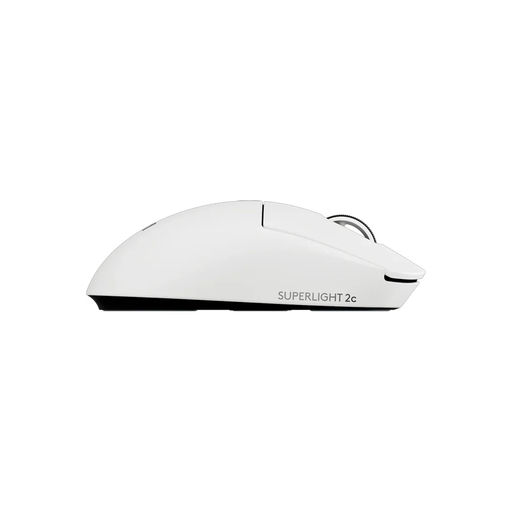
Why it suits this profile: According to the product information, its compact, symmetrical shape is designed for smaller hands and different grips. The mouse is aimed at FPS gaming.
The specifications clearly state a weight of 53 grams, a HERO 2 optical sensor, up to 44,000 DPI and 8K polling. There’s no Bluetooth, so this is mainly a choice for PC gaming using the included wireless receiver.
Low weight, rechargeable battery, programmable buttons, PTFE feet and a stated battery life of up to 95 hours.

Why it suits this profile: According to the product description, this model is designed for FPS and MOBA gaming, with a low weight, symmetrical shape and magnetic RGB charging dock.
The product information lists tri-mode connectivity, USB-C, Bluetooth and 2.4 GHz. According to the description, the 8K receiver is built into the charging dock. Check beforehand that you have enough desk space for it.
56 grams, PAW3950 APEX sensor, up to 42,000 DPI, 8K polling and software for macros, buttons and LOD settings.
We’ve put together a complete, up-to-date list of products that meet these strict selection criteria and the applicable European safety regulations.
Yes, provided you use a stable 2.4 GHz connection and position the receiver correctly. Models with a high polling rate may appeal to players with a high-refresh-rate monitor. For most users, consistent sensor performance, shape and grip are just as important as the maximum polling rate.
It varies by model and how you use it. RGB lighting, 8K polling and a constant wireless connection can all affect battery life. Check the stated battery life and, if you use the mouse intensively, choose a model with USB-C connectivity while in use, a charging dock or a replaceable battery.
RGB doesn’t affect tracking or click registration. It’s mainly a matter of appearance and personal preference. If you don’t need lighting, you can often choose a simpler model with similar sensor and connectivity specifications.
