
Vandaag of morgen in huis

Kwaliteit gegarandeerd

Welkomstaanbiedingen ontgrendelen: GRATIS bezorging | Tot 80% korting | Gratis 30 dagen JoyPlus-proefperiode
Download de app
A wireless gaming mouse gives you greater freedom of movement, but not every model is suitable for competitive gaming, everyday use or a particular hand grip. This is especially noticeable in FPS games, where connection dropouts, excessive weight or an unsuitable shape can quickly affect your performance.
Marketing terms such as “esports-grade”, extremely high DPI and “almost zero latency” sound appealing. However, these claims only mean something when you also examine the underlying specifications. Below, we explain what to look for and which popular choices suit different usage profiles.
A high-DPI gaming mouse may offer 30,000 or even 42,000 DPI. In practice, however, many users play at a much lower setting. A high maximum value is mainly useful when the sensor also tracks consistently at low and medium settings.
So don’t just check the DPI. Also look at:
According to Rapoo’s product descriptions, several VT models offer independent X/Y DPI adjustment. This can be useful with wide screens or specific in-game settings, but its practical value depends on your playing style.
A wireless gaming mouse with an 8K polling rate reports the mouse position more often per second than a 1,000Hz model. This can make movement feel smoother, particularly at high refresh rates. However, the difference is not equally noticeable to every user.
A higher polling rate can also use more processing power. The product information for the Rapoo VT9Pro 4K specifically warns that a 4K polling rate may increase CPU usage. If you experience frame drops, switching back to 1,000Hz may be a practical solution.
Also check whether 8K wireless is actually supported. Some models only achieve their highest polling rate when wired or with a separate receiver.
A lightweight gaming mouse weighing around 53 to 59 grams may be quick to move, but weight is not the only factor affecting comfort. The shape, width, height and position of the thumb buttons all determine whether the mouse remains comfortable to hold for long periods.
An ergonomic shape designed for right-handed use is not automatically suitable for a left-handed player. Also consider whether you usually use a palm, claw or fingertip grip. A mouse that is too small can feel unstable in larger hands, while one that is too large may restrict fast movements.
An optical sensor uses images of the surface to track movement. An optical sensor gaming mouse works most reliably on a suitable mouse mat. Brands may state that a sensor works on a wide range of surfaces; according to the brand’s own research, this is a product claim rather than a guarantee for every surface or usage situation.
For gaming, stable tracking, adjustable DPI and a consistent lift-off distance are often more important than the highest DPI value printed on the packaging. For everyday work, Bluetooth may be sufficient, while 2.4GHz is usually the logical choice for low-latency gaming.
Polling rate is measured in hertz:
A tri-mode gaming mouse typically offers 2.4GHz, Bluetooth and USB-C. This is useful if you use the same mouse with a desktop computer, laptop and tablet. However, check whether programmable functions are available in every connection mode. For example, the product information for the ET Wireless Gaming Mouse states that the software is only available for Windows and in wired mode.
The stated battery life depends on the polling rate, RGB lighting, connection mode and software settings. A gaming mouse with long battery life may be appealing to streamers or people who often work or play on the go, but you should also consider the charging method.
A USB-C cable often lets you continue playing while the mouse is charging. Some models work with a charging dock, while others use a replaceable battery. Avoid allowing a built-in lithium battery to run completely flat unnecessarily, and use a suitable, certified charging cable. Stop using the mouse if you notice visible damage, unusual heat or swelling.
A programmable gaming mouse can provide additional functions for MMO, MOBA and RTS games, but more buttons are not automatically better. Pay attention to their positioning and accessibility. Also check:
If you mainly play FPS games, a lightweight, straightforward shape is usually more useful than eleven buttons. For productivity or strategy games, extra buttons can save time.

Why it suits this profile: A straightforward wireless mouse for PC and laptop gamers looking for low weight, RGB lighting and basic settings without needing 8K functionality.
The specifications clearly state 75 grams, up to 4,800 DPI, a 1,000Hz polling rate and up to 80 hours of battery life.
2.4GHz connection, six programmable buttons, USB-C charging and RGB lighting.
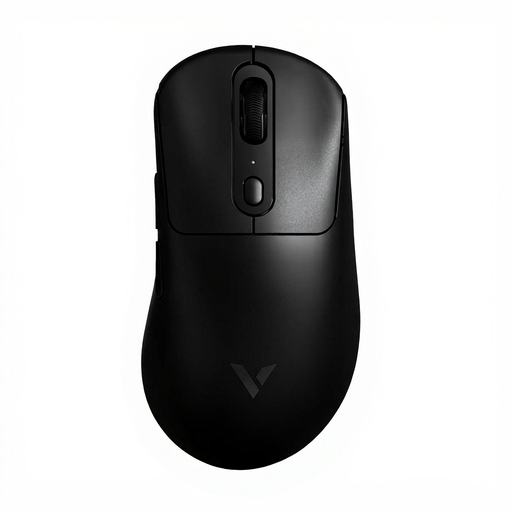
Why it suits this profile: Designed for competitive FPS and MOBA players who want to combine a lightweight shape, high polling rate and extensive DPI settings.
The product information lists a weight of 59 grams, a PAW 3950 optical sensor, 8K wireless and independent X/Y DPI adjustment.
30,000 DPI according to the product specifications, eight programmable buttons and stated battery life of up to 200 hours.

Why it suits this profile: Suitable for players who game for long periods and want to minimise charging, while still using a lightweight wireless mouse.
The stated battery life is linked to 1,000Hz; according to Rapoo, a driver update is required for the low-power mode mentioned.
53 grams, native 8K wireless, 30,000 DPI with independent X/Y adjustment and stated battery life of up to 750 hours at 1,000Hz.

Why it suits this profile: Ideal for users who game on a PC and also want to work via Bluetooth or a wired connection with multiple devices.
The connection modes and software limitations are clearly specified, so you can check in advance which functions work with your device.
Tri-mode 2.4GHz, Bluetooth and USB-C, up to 10,000 DPI, eight programmable buttons and adjustable RGB lighting.
We’ve put together a complete, up-to-date list of products that fully meet these strict selection criteria and the applicable European safety regulations.
Yes, provided the model offers a stable 2.4GHz connection, a suitable sensor and low latency. Also check whether the receiver can be positioned properly and whether your PC can handle the selected polling rate. Bluetooth is generally more practical for office work than competitive gaming.
This varies considerably between models and settings. RGB lighting, high polling rates and intensive use reduce battery life. The stated number of hours should therefore be treated as a guideline. Also check whether you can continue playing while the mouse is charging or whether a charging dock is included.
That depends on your monitor, PC and playing style. A higher polling rate may be worthwhile for competitive players with a fast monitor. For office work, casual gaming or systems with limited CPU capacity, 1,000Hz is often sufficient. Only choose the feature if the rest of the mouse – its shape, sensor and buttons – also suits the way you use it.
