
Vandaag of morgen in huis

Kwaliteit gegarandeerd

Welkomstaanbiedingen ontgrendelen: GRATIS bezorging | Tot 80% korting | Gratis 30 dagen JoyPlus-proefperiode
Download de app
A wireless gaming mouse gives you more freedom of movement than a wired model. However, not every wireless mouse is automatically suitable for fast-paced FPS games, long gaming sessions or everyday use with a PC or laptop. A high DPI, RGB lighting and lots of buttons may sound appealing, but they don’t tell you everything about how easy a mouse is to use.
As Joybuy Product Recommendation Officer, I focus on specifications you can verify: connectivity, polling rate, sensor, weight, battery life, shape and customisation options.
A gaming mouse with a high DPI can move the cursor very quickly. However, the maximum DPI isn’t a guarantee of better performance. Many players actually use lower sensitivity in games, for more controlled movements in an FPS, for example.
So, as well as DPI, look at:
A polling rate of 4,000 Hz or 8,000 Hz means the mouse sends data to your computer more times per second. This can make movement tracking more precise, but it also uses more system resources. According to some manufacturers’ product information, a high polling rate can increase CPU load.
For many users, 1,000 Hz remains a practical setting. If you have a powerful PC and a high refresh rate monitor, you may benefit more from a 4K or 8K gaming mouse. Just check that the receiver and software support this setting.
A lightweight gaming mouse weighing around 50 to 70 grams feels nimble, especially when making large movements in FPS games. However, an ultra-light design may not be the best choice if you need a broad palm rest, thumb rest or several buttons.
So don’t just look at the weight. Consider:
A 2.4GHz connection via a USB receiver is usually designed to minimise latency while gaming. Bluetooth is handy for laptops and devices with few USB ports, but check whether the mouse supports the same polling rate in Bluetooth mode.
A tri-mode mouse typically combines 2.4 GHz, Bluetooth and USB-C. This is useful if you switch between gaming, office work and using a laptop. Also consider where you position the receiver: a USB extension cable can help if your PC is under a desk.
PixArt PAW sensors come in several versions. For example, according to the product information, the GravaStar Mercury M1 has a PAW3395 sensor, a maximum of 26,000 DPI and a specified speed of 650 IPS. The Rapoo VT3 Pro Max lists a PAW3950 sensor and a maximum of 30,000 DPI.
These figures are mainly useful for comparing models. On their own, they don’t determine whether a mouse feels comfortable to use. Once you’ve bought one, try different DPI levels and adjust the sensitivity in your game too.
A gaming mouse with programmable buttons is handy for MMO and MOBA games, simulations and productivity. Five or six buttons are often enough for an FPS mouse, while MMO players may find extra side buttons useful for abilities and shortcuts.
RGB lighting is mainly a design choice. Check whether you can switch it off and whether the software works with your operating system. Macros, profiles and onboard memory are more useful if you use the mouse with several computers.

Why it suits this user: The combination of 2.4GHz and USB connectivity, eight programmable buttons and up to 50 hours of battery life makes it a good fit for casual gaming and everyday PC use.
The specifications list not only 16,000 DPI, but also the available polling rates of 250, 500 and 1,000 Hz.
PAW3335 sensor, 117 grams, RGB lighting and a 700mAh battery, according to the product information.
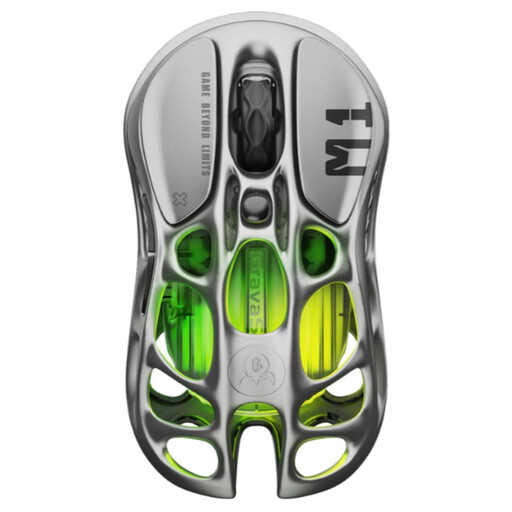
Why it suits this user: The magnesium frame, tri-mode connectivity and option to use 4,000Hz with a separate 4K receiver will appeal to users who want plenty of control over their settings.
The product information clearly states that 4,000Hz requires a separate 4K receiver, so this feature isn’t included as standard.
88 grams, PAW3395 sensor, up to 26,000 DPI, five programmable buttons and five RGB modes.
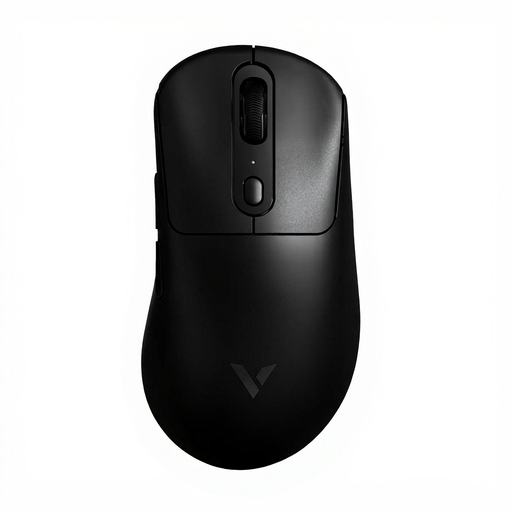
Why it suits this user: Its low weight and high polling rate are designed for users who play a lot of FPS or MOBA games and want to fine-tune their settings.
The product information lists both the 8,000Hz setting and battery life of up to 200 hours under the stated usage conditions.
59 grams, PAW3950 sensor, up to 30,000 DPI and a stated battery life of up to 200 hours.
We’ve put together a complete, up-to-date list of products that meet these strict selection criteria and current European safety regulations.
Yes, a 2.4GHz mouse with a stable receiver can be suitable for FPS games. Consider the polling rate, sensor settings and shape. Bluetooth is especially handy for general use, but it isn’t always the best connection for competitive gaming.
It varies by model and settings. RGB lighting, a higher polling rate and intensive use can all affect battery life. Check whether the stated battery life applies at 1,000Hz, over Bluetooth or in another mode. With some models, you can keep playing while charging via a USB-C cable.
It depends on your PC, monitor and playing style. A higher polling rate may be worthwhile if you have a high refresh rate screen and a powerful computer. For office work, casual games and many standard gaming set-ups, 1,000Hz is often a practical choice. Also consider the cost of any separate receiver and the extra power consumption.
