
Vandaag of morgen in huis

Kwaliteit gegarandeerd

Welkomstaanbiedingen ontgrendelen: GRATIS bezorging | Tot 80% korting | Gratis 30 dagen JoyPlus-proefperiode
Download de app
A wireless gaming mouse gives you more freedom of movement and a tidier desk. However, not every model is automatically suitable for fast-paced PC games or FPS gaming. Marketing often focuses on high DPI numbers, RGB lighting and extremely low latency, while fit, battery life and software are at least as important.
With this practical buying guide, you can compare a wireless gaming mouse on verifiable features. That way, you avoid paying for functions you barely use.
A gaming mouse with high DPI can technically offer many sensitivity levels, but most players only use a limited range in games. A sensor with 30,000 or 44,000 DPI is mainly interesting if you like to fine-tune very precisely. What matters more is whether the sensor tracks stably at your resolution, on your mouse mat and with your play style.
Also pay attention to the adjustment options. Some models support separate X and Y DPI settings. That can be useful with wide monitors, but it isn’t a necessary feature for everyone.
A gaming mouse with an 8K polling rate sends up to 8,000 position updates per second. That can make movements feel smoother, but according to RAPOO’s product information, 4K can already cause higher CPU usage. If you experience frame drops, switching back to 1,000 Hz may be necessary.
So check whether your computer has enough performance to spare. For a gaming mouse for a laptop, 1,000 Hz is often a practical setting, especially when the laptop also needs to manage heat and battery consumption.
The stated battery life varies depending on connection mode, polling rate, lighting and software settings. An RGB gaming mouse typically uses more power when the lighting stays active. A higher polling rate can also affect the battery life.
So don’t just look at the highest number of hours. Check whether charging while in use is possible, what type of cable is included and whether the mouse also works via Bluetooth.
An ultra-light gaming mouse weighing around 53 to 68 grams can be comfortable for low sensitivity and large arm movements. A heavier model can feel more stable for some users. Weight alone doesn’t tell you anything about the fit.
Pay attention to the dimensions and grip:
An ergonomic gaming mouse isn’t automatically suitable for every hand. So check the width, length, height and the position of the thumb buttons.
For gaming, a 2.4GHz connection with a USB receiver is usually designed for low latency. Bluetooth is handy for a laptop, tablet or office work, but can have different performance and power characteristics. A tri-mode model often combines 2.4GHz, Bluetooth and wired use via USB-C.
A polling rate of 1,000 Hz is sufficient for many players. 4K and 8K are mainly interesting for users with a powerful PC, a high refresh rate monitor and a preference for very fast input. Also check whether the required driver or dongle is included.
A gaming mouse with programmable buttons can be useful for MMO, MOBA and RTS games, but also for shortcuts in productivity. Check:
More buttons don’t automatically mean more ease of use. Side buttons that are too close together can be pressed accidentally during FPS gaming.

Why this fits the profile: This mouse combines 2.4GHz, Bluetooth and USB-C. With 8 programmable buttons, RGB and up to 10,000 DPI, it’s suitable for casual gaming, laptop use and daily work.
The three connection modes reduce reliance on a single connection. However, according to the product description, the programming software only works in wired mode and on Windows.
Tri-mode connection, six DPI levels, 8 programmable buttons and switchable RGB lighting.

Why this fits the profile: This compact model weighs 53 grams according to the product information, features a HERO 2 sensor up to 44,000 DPI and supports LIGHTSPEED with a polling rate up to 8 kHz.
The specifications mention no lighting, so RGB doesn’t unknowingly affect battery life. The compact shape does require you to check your hand size.
53 grams, usable by left- and right-handed users, up to 95 hours battery life and programmable buttons.

Why this fits the profile: According to the product description, this 53-gram model offers native 8K wireless polling, up to 30,000 DPI, 10 programmable buttons and up to 750 hours battery life at 1,000 Hz.
The stated battery life is linked to 1,000 Hz; at 8K the battery life may therefore differ. The optical switches are also an alternative to mechanical switches.
53 grams, native 8K connection, 120 million stated clicks and separate X/Y DPI setting.
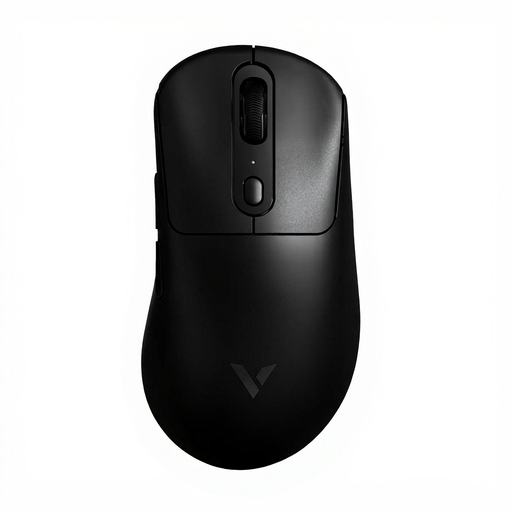
Why this fits the profile: The product information states 59 grams, a PAW 3950 optical sensor up to 30,000 DPI, 8K wireless polling and a battery life of up to 200 hours.
The relevant FPS specifications are listed together: weight, sensor and polling rate. Bear in mind that 8K isn’t necessary on every PC.
Lightweight design, 8K wireless, 30K DPI, separate X/Y adjustment and 200 hours stated battery life.
We’ve put together a full, up-to-date list of products that fully meet these strict selection criteria and current European safety regulations.
Yes, provided the connection, shape and sensor suit your use. Choose a 2.4GHz connection with a USB receiver if possible, and check whether the polling rate is adjustable. For many players, 1,000 Hz is sufficient. A wireless mouse for FPS gaming should also move comfortably at low sensitivity and with large arm movements.
That varies widely. In the range, stated values run from around 80 to 750 hours, depending on the model and settings. RGB, Bluetooth, polling rate and usage patterns all have an influence. A mouse with a long battery life is practical, but always check under what test conditions the manufacturer states the value.
With several models, you can do this via the USB cable. Check this in the product description before you order. Use the included or a suitable certified cable, and avoid liquids, extreme heat and opening the built-in battery yourself.
