
Vandaag of morgen in huis

Kwaliteit gegarandeerd

Welkomstaanbiedingen ontgrendelen: GRATIS bezorging | Tot 80% korting | Gratis 30 dagen JoyPlus-proefperiode
Download de app
A wireless gaming mouse gives you more freedom of movement at your desk, but not every wireless model is suited to competitive gaming. A high DPI rating may sound appealing, but weight, connectivity and shape often have a greater impact on your day-to-day experience.
When comparing models, watch out for these common pitfalls:
DPI determines how far the cursor moves in response to a particular hand movement. Many FPS players actually use lower in-game sensitivity, so control can matter more than an extremely high maximum DPI.
A sensor offering 24,000 to 44,000 DPI gives you plenty of adjustment options, but also check:
A wireless mouse for FPS gaming with a 1,000 Hz polling rate can already be a practical choice for many players. Higher rates are mainly worth considering if you’re deliberately opting for an extremely fast response and your whole system is set up to support it.
The models in this selection range from around 48 to 112 grams. A lighter mouse can make quick flicks and repositioning easier. A heavier model may feel more stable and offer better support for a palm grip.
Check the dimensions against your hand size. A compact mouse such as the Logitech G PRO X Superlight 2c may suit smaller hands or a claw grip. An ergonomically shaped mouse, such as the Razer DeathAdder V3 Pro, is particularly worth considering if you’re right-handed and want more support for your hand.
For gaming, 2.4GHz is usually more practical than Bluetooth. Bluetooth is still useful if you want to use the same Bluetooth gaming mouse with a laptop or tablet.
Also consider:
More buttons aren’t automatically more convenient. For FPS gaming, five or six buttons may be easier to manage. For MMOs, simulations or productivity, a gaming mouse with programmable buttons can offer extra functionality.
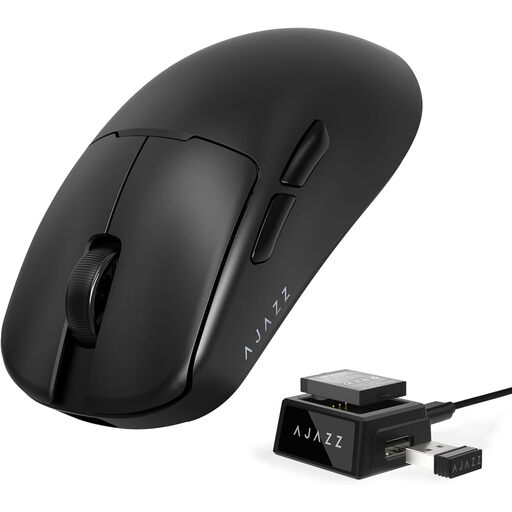
Why it suits this profile: Tri-mode connectivity and a low weight of around 54 grams make this model a flexible choice for gaming and everyday computing.
The specifications list 2.4GHz, Bluetooth and wired connectivity. That means you don’t have to rely on Bluetooth for gaming.
PAW3311 sensor up to 24,000 DPI, 1,000Hz polling rate, two interchangeable 300mAh batteries and seven programmable functions, according to the product information.
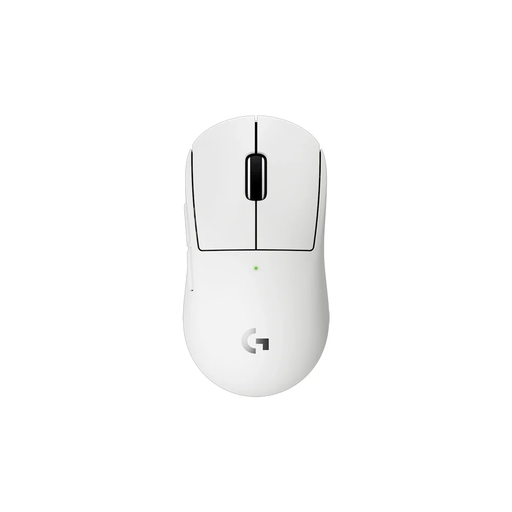
Why it suits this profile: This compact model is designed for players looking for a low weight, fast wireless connectivity and a symmetrical shape.
At 53 grams, it’s a reminder not to choose a mouse based on maximum DPI alone. Its compact dimensions also make hand size and grip an important part of your decision.
HERO 2 sensor up to 44,000 DPI, LIGHTSPEED up to 8 kHz according to the product specifications, and up to 95 hours of battery life.

Why it suits this profile: Its ergonomic shape and generous number of buttons suit users who use macros and shortcuts as well as gaming.
You’re choosing more than just DPI here: hand support and control options matter too. That makes this model a more logical choice for longer sessions and versatile use.
11 programmable buttons, 35,000 DPI, 2.4GHz, Bluetooth and wired connectivity, plus Razer Chroma RGB, according to the product information.
We’ve put together a full, up-to-date list of products that meet these strict selection criteria and the applicable European safety regulations.
Yes, as long as you use the mouse with its 2.4GHz receiver and its polling rate and sensor settings are suited to your PC. Check the shape and weight too. An ultra-light gaming mouse can feel comfortable for quick movements, while an ergonomic model offers more support.
It varies by model, connection, lighting and polling rate. The stated battery life for the models in this selection ranges from around 90 to over 300 hours. RGB lighting and a higher polling rate can affect power consumption. So always check whether the battery life applies to Bluetooth, 2.4GHz or a specific usage setting.
Bluetooth is convenient for laptops, tablets and office work. For competitive gaming, the included 2.4GHz dongle is usually the more sensible choice, thanks to its dedicated wireless connection. Also check whether you can position the dongle next to your mouse, either directly or using an extension cable.
