
Vandaag of morgen in huis

Kwaliteit gegarandeerd

Welkomstaanbiedingen ontgrendelen: GRATIS bezorging | Tot 80% korting | Gratis 30 dagen JoyPlus-proefperiode
Download de app
A wireless gaming mouse gives you more freedom of movement than a wired model. However, a high DPI rating or eye-catching RGB lighting doesn’t automatically mean a mouse is right for your play style. Small differences in connectivity, weight and shape can make a noticeable difference, especially in FPS, MOBA and MMO games.
Joybuy’s Product Recommendation Officer has picked out the most important specifications and listed the most common buying mistakes.
A gaming mouse with a high DPI rating may sound appealing, but its maximum DPI is only one aspect of the sensor. Most players don’t use the highest setting all the time. Adjustable DPI levels, consistent tracking and an easily accessible DPI button are more important.
A mouse with 18,000 or 44,000 DPI gives you plenty of adjustment options, but that doesn’t automatically make it a better choice than a model with 4,800 or 12,000 DPI. Focus on whether the settings suit your sensitivity and game genre.
Bluetooth is handy for laptops, office work and connecting to multiple devices. For competitive gaming, many users prefer a gaming mouse with a 2.4GHz connection and a USB receiver. This connection is designed to provide a direct wireless link to your computer.
Also check whether the receiver is included, which USB connection you need and whether the software only works with Windows. A Bluetooth gaming mouse can be practical, but features and polling rates in Bluetooth mode vary between models.
Advertised battery life usually depends on the connection mode, lighting and conditions of use. If you choose a model with replaceable batteries, remember to factor in the cost of AA or AAA batteries and replacing them.
A rechargeable gaming mouse saves you from buying replacement batteries. Check the charging port, whether you can keep playing while it charges, and whether a cable or charging dock is included. According to Trust and Logitech’s own figures, their models can last up to 80 and 95 hours respectively. Check the latest product information for the exact conditions of use.
There are three main options for gaming:
The polling rate tells you how often the mouse reports its position to your computer. 1,000Hz means up to 1,000 reports per second. A higher rate can be useful for fast movements, but may use more power and require software support. So, consider the connection, sensor and battery life together.
A lightweight gaming mouse weighing around 53 to 75 grams can be comfortable for fast arm movements and low sensitivity settings. Some users, on the other hand, find heavier models feel more stable. There’s no one weight that suits everyone.
Consider:
An ergonomic gaming mouse should above all suit your hand and grip. A right-handed design, such as the Trust GXT 929 Helox, is less suitable if you only play left-handed. A symmetrical mouse, such as the Razer Orochi V2, offers more flexibility.
A programmable gaming mouse lets you assign buttons to shortcuts, abilities or macros. Check whether software is required and which operating systems it supports. On some models, settings only work in wired mode.
RGB is mainly a visual feature. An RGB gaming mouse can complement your desk, but lighting typically uses extra power. Check whether you can turn off the effects and adjust the colours in the software.

Why it suits this profile: A straightforward entry-level option for PC and laptop gamers who want to play wirelessly without needing lots of extra features.
The specifications list 2.4GHz, a USB receiver, adjustable DPI from 800 to 4,800 and a built-in rechargeable battery. This means you don’t need Bluetooth for gaming.
73 grams, six programmable buttons, a 1,000Hz polling rate and USB-C charging. According to Trust, the battery lasts up to 80 hours.

Why it suits this profile: Designed for players who value low weight, a high polling rate and a compact shape for fast-paced games.
The mouse uses LIGHTSPEED via a receiver and doesn’t have Bluetooth. This makes it a clear choice for users looking for a dedicated gaming connection.
53 grams, a HERO 2 sensor with up to 44,000 DPI, programmable buttons and an advertised battery life of up to 95 hours.
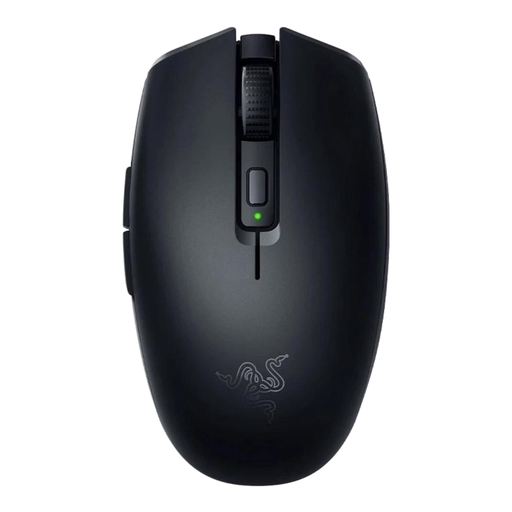
Why it suits this profile: A compact option for gamers who carry their mouse between different workspaces or want to use Bluetooth as well as 2.4GHz.
The two connection options make it suitable for gaming and laptop use. Bear in mind that this model isn’t rechargeable and runs on an AA or AAA battery.
60 grams, a symmetrical design, six programmable buttons and up to 18,000 DPI. According to Razer, the advertised battery life is up to 450 hours via HyperSpeed.
We’ve put together a complete, up-to-date list of products that meet these strict selection criteria and current European safety requirements.
For competitive games, 2.4GHz via a USB receiver is often the more practical choice, as this mode on gaming mice is designed to provide a fast connection. Bluetooth is especially useful for laptops, tablets and lower power consumption. Check which features and polling rates are available in each mode for the model you’re considering.
Lifespan depends on the battery, switches, charging cycles, cable and how you use the mouse. A rechargeable model saves you the cost of buying batteries, while a model with an AA or AAA battery can be quickly powered up again when you’re out and about. The statutory EU guarantee is separate from the advertised battery life, so keep your proof of purchase.
Start with a moderate DPI setting and adjust it to suit your mouse mat, screen resolution and play style. A high maximum DPI is most useful if you want plenty of adjustment options. More important is that the sensor performs consistently and the mouse remains comfortable during large movements.
