
Vandaag of morgen in huis

Kwaliteit gegarandeerd

Welkomstaanbiedingen ontgrendelen: GRATIS bezorging | Tot 80% korting | Gratis 30 dagen JoyPlus-proefperiode
Download de app
A wireless gaming mouse gives you greater freedom of movement, but not every model suits every hand, game or PC setup. A high DPI rating alone says little about how easy a mouse is to use in practice. Battery type, connectivity, shape and software also determine whether it will still feel comfortable after a few weeks.
In this buying guide from the Joybuy Product Recommendation Officer, you’ll learn what to look for and which models suit different user profiles.
A gaming mouse with a high DPI rating can be set to be extremely sensitive, but most players use a much lower setting in practice. More important factors include a stable optical sensor, adjustable sensitivity and a polling rate that suits your PC and game.
Also check whether the stated DPI is the sensor’s maximum resolution or the default setting. A value of 30,000 or 44,000 DPI is primarily a technical upper limit; it does not automatically mean you’ll aim more accurately.
A wireless gaming mouse can connect via a 2.4GHz receiver, Bluetooth or both. Many competitive FPS players choose a dedicated 2.4GHz connection because of its low latency. Bluetooth is convenient for laptops, office work and devices without a spare USB port, but always check compatibility.
Pay attention to where the USB dongle is connected. A receiver behind a metal PC case or positioned far from your mouse can put unnecessary strain on the connection. An extension cable or receiver holder can be useful in this situation.
Manufacturers usually state battery life under specific conditions. RGB lighting, a higher polling rate and intensive use can affect runtime. A model with a replaceable AA battery works differently from a mouse with a built-in lithium-ion battery.
So check the following:
For quick movements in FPS games, a lightweight gaming mouse can feel more comfortable. Models weighing around 53 to 65 grams generally require less effort during large movements. A heavier mouse may feel more stable and offer more buttons or a broader palm rest.
Measure your hand and check the mouse dimensions. Also consider your grip:
An ergonomic gaming mouse is not automatically suitable for every hand. Also check whether the model is designed only for right-handed use. Symmetrical models can be more flexible for left- and right-handed users.
An optical sensor tracks movement across the surface. Look for adjustable DPI, tracking capabilities and software support. For normal gaming, a range of a few thousand DPI is already more than sufficient. A higher maximum DPI can be useful if you use different profiles, but it cannot replace a good mouse mat and suitable settings.
The polling rate indicates how often the mouse sends data. 1,000Hz is a common setting for many PC games. Higher values, such as 4,000 or 8,000Hz, may require more processing power. So check whether your PC and game support them.
A gaming mouse with Bluetooth is useful for multiple devices, while a 2.4GHz dongle is generally intended for a fast gaming connection. A wired backup connection is practical when the battery runs out.
Also consider the number of buttons. A programmable gaming mouse with five or six buttons is often straightforward to use in FPS games. MMO players may benefit from more buttons for shortcuts. Before buying, check that the software works with your operating system and whether profiles can be saved to the mouse’s onboard memory.
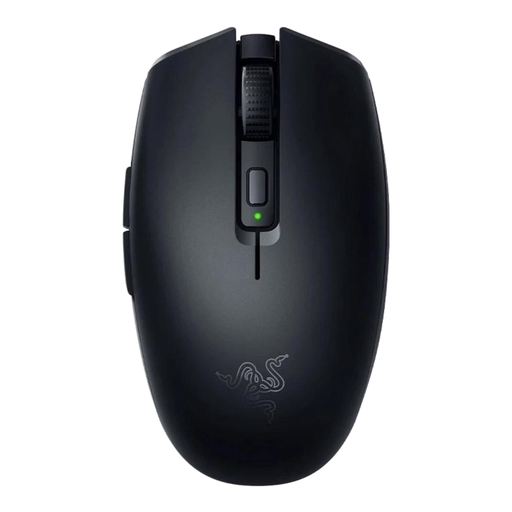
Why it suits this profile: A compact mouse with Bluetooth and Razer HyperSpeed Wireless for gaming and everyday use.
The two connectivity options make it easy to choose the right setup. Please note: the battery is not rechargeable and the mouse uses one AA or AAA battery.
60 grams, six programmable buttons, 18,000 DPI and a symmetrical shape for left- and right-handed use.

Why it suits this profile: Designed for players looking for a lightweight, rechargeable mouse with a fast LIGHTSPEED connection.
The built-in battery charges via USB-C. Bear in mind that, according to the specifications, this model does not have Bluetooth.
60 grams, a HERO 2 sensor with up to 32,000 DPI according to the product description, and USB-C charging.

Why it suits this profile: A right-handed, ergonomic choice for FPS and esports players who want to combine wireless freedom of movement with a low weight.
The rechargeable battery eliminates the need to replace loose batteries. However, check beforehand that the pronounced right-handed shape suits your grip.
According to the product information, the model weighs 64 grams, features a sensor with up to 30,000 DPI and offers up to 90 hours of battery life.
We’ve put together a complete, up-to-date list of products that fully meet these strict selection criteria and the applicable European safety regulations.
Bluetooth can be suitable for casual gaming, everyday use and laptops. For FPS games or esports, a 2.4GHz receiver is often more practical when you want the most stable connection possible. Also check your computer’s Bluetooth version and support.
This varies by model and settings. According to the product information, the Razer Orochi V2 offers up to 1,000 hours via Bluetooth and up to 450 hours via HyperSpeed Wireless, while the Razer DeathAdder V3 Pro has a built-in battery with a stated runtime of up to 90 hours. RGB lighting, polling rate and intensity of use can affect the actual battery life.
No. DPI mainly determines how quickly the cursor moves in response to the same physical mouse movement. Choose an adjustable sensor and set the value to suit your screen, game and grip. For accurate aiming, a stable sensor is more important than the highest stated DPI value.
