
Vandaag of morgen in huis

Kwaliteit gegarandeerd

Welkomstaanbiedingen ontgrendelen: GRATIS bezorging | Tot 80% korting | Gratis 30 dagen JoyPlus-proefperiode
Download de app
A wireless gaming mouse can be just as practical for competitive gaming as it is for everyday use with a laptop or PC. However, you may sometimes be paying mainly for impressive-looking figures on the packaging. A high DPI setting, for example, does not automatically mean you’ll play more accurately.
Focus on three things instead: the actual connection method, sensor performance and how the battery is charged. Read on to find out which specifications matter and which pitfalls you can avoid.
A gaming mouse with 26000 DPI can be set to a very high sensitivity, but most players use a much lower setting in practice. DPI mainly determines how far the cursor moves in response to a particular hand movement. The sensor, firmware, mouse mat and your chosen sensitivity also affect control.
So don’t look at DPI alone. Check which sensor model is used, whether the mouse has onboard memory and whether you can adjust the sensitivity in small increments.
According to its product specifications, a wireless gaming mouse with a 4K polling rate sends up to 4000 reports per second to the computer. This can refine cursor movement and input at high refresh rates. However, a higher polling rate also uses more system resources.
The safety information for the RAPOO VT9Pro states that 4000 Hz can increase CPU usage. If you experience dropped frames, it’s worth switching back to 1000 Hz. A 4K gaming mouse is therefore most useful when your PC, monitor and game settings can handle the extra load.
The stated battery life depends on the polling rate, lighting, connection and frequency of use. The RAPOO VT9Pro lists a battery life of up to 180 hours. This is a manufacturer’s product specification, not a guarantee that you’ll get the same battery life in every situation.
Also check the charging options. A USB-C cable is included with this model. According to the product information, you’ll need to buy a P3 Wireless Charging Module separately for wireless charging. Don’t connect the cable while charging wirelessly, as this could cause damage.
According to the product description, the RAPOO VT9Pro uses a PixArt PAW 3398 sensor. Its specifications include up to 26000 DPI, 650 IPS and 50G acceleration. These figures give you an idea of the sensor’s technical capabilities, but they don’t tell you on their own how comfortable the mouse will feel in everyday use.
Also consider:
A 1000Hz connection is sufficient for many users. A 4K polling rate may appeal to players with a high-refresh-rate monitor and a PC with enough processing power. Check whether 4K mode works wirelessly and whether a compatible receiver is included.
A stable connection matters more than a high theoretical speed that your system can’t handle properly. So also consider where to place the receiver and whether you can switch between wireless and wired modes.
An ultralight gaming mouse can feel comfortable when making wide arm movements at a low sensitivity setting. According to the product information, the RAPOO VT9Pro weighs 68 grams. Its symmetrical shape is designed for left- and right-handed use, but always check that the buttons are in positions that feel right for you.
This model has 10 programmable buttons and onboard memory. These can be useful for MMOs, creative software or productivity shortcuts. You may not need all the buttons for simple shooters.
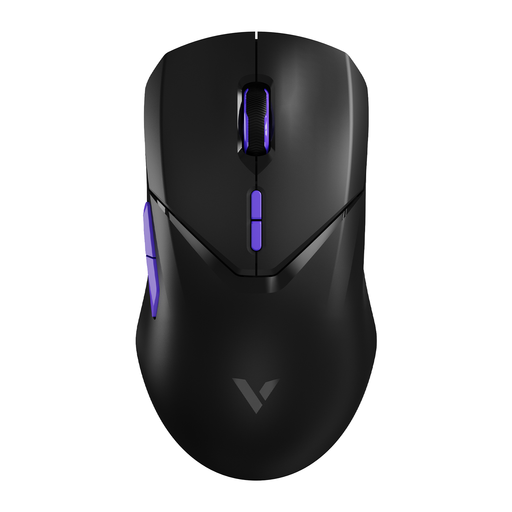
Why it suits this user: If you’re looking for one mouse for gaming, studying and everyday computer use, this one offers adjustable sensitivity, a wireless connection and an included USB-C cable.
The product information lists more than just 26000 DPI: it also gives the sensor model, weight and battery capacity. You can also switch the 4K mode back to 1000 Hz.
68 grams, PAW 3398 sensor according to the product description, 10 programmable buttons and onboard memory.
Why it suits this user: For players who want to combine high settings with a low weight and a fast wireless connection.
The high 4K polling rate comes with a clear warning about CPU usage. This lets you adjust the setting to suit your PC’s capabilities.
4000Hz polling rate according to the product information, 26000 DPI and a weight of 68 grams.
Why it suits this user: The combination of multiple buttons, onboard memory and a stated battery life of up to 180 hours makes it a good fit for long gaming sessions and users who want to save shortcuts.
The battery life is presented as a product specification. In practice, it can vary depending on the polling rate, lighting and charging habits.
Up to 180 hours according to the product description, an 800mAh Li-Po battery and 10 programmable buttons.
We’ve put together a complete, up-to-date list of products that meet these strict selection criteria and the current European safety requirements.
Not necessarily. A higher polling rate can increase the frequency of inputs, but the difference depends on your monitor, game, PC and personal sensitivity settings. If you experience performance issues, 1000 Hz may be a more practical setting.
It varies by model and how you use it. The RAPOO VT9Pro lists up to 180 hours, but the manufacturer’s claim depends on the settings and conditions of use. Recharge the mouse before the battery runs completely flat to put less strain on the built-in lithium battery.
Most players don’t. A high DPI setting mainly gives you more flexibility to adjust the sensitivity. Choose a setting that gives you comfortable cursor control, and also consider the sensor, weight, shape and quality of the wireless connection.
