
Vandaag of morgen in huis

Kwaliteit gegarandeerd

Welkomstaanbiedingen ontgrendelen: GRATIS bezorging | Tot 80% korting | Gratis 30 dagen JoyPlus-proefperiode
Download de app
A wireless gaming mouse gives you more freedom of movement, but not every model is right for every player. A high DPI figure, for example, tells you little about how comfortable a mouse feels in practice. A low price may also look tempting, but the mouse might not fit your hand, may lack adequate software support or may need charging frequently.
Joybuy Product Recommendation Officer highlights the key things to consider. That way, you can compare wireless gaming mice using verifiable specifications rather than marketing claims.
A gaming mouse with a high DPI sounds impressive, but most players use a much lower sensitivity in games. DPI indicates how sensitively the sensor can be set; it doesn’t automatically tell you anything about comfort, precision or performance.
Also look at the sensor, adjustment increments and whether you can change the sensitivity while gaming. Independent X/Y DPI settings can be useful if you want to fine-tune horizontal and vertical movements separately.
A gaming mouse with an 8K polling rate sends data to your computer more frequently. This can be useful, particularly in fast-paced FPS games. However, according to product information from various manufacturers, higher polling rates may require more processing power. On some systems, a lower setting, such as 1,000 Hz or 2,000 Hz, may deliver more consistent results.
So check whether the required receiver is included and whether you need to enable the feature in the software. For example, the 4K receiver for the GravaStar Mercury M1 is listed separately.
An ultra-light gaming mouse weighing around 50 to 60 grams can feel comfortable for quick movements, but a heavier ergonomic model may suit a palm grip or larger hand better. A low weight won’t automatically prevent fatigue if the shape, height or thumb-button placement isn’t right for you.
Check the dimensions, weight and recommended hand position. It’s also worth working out whether you usually use a palm, claw or fingertip grip.
Optical sensors are common in gaming mice. Check the maximum DPI, but focus particularly on adjustability and the accompanying software. Figures of 18,000 to 44,000 DPI are common in today’s range, but you don’t need to use the maximum setting for everyday use or most games.
Bear in mind that manufacturer specifications come from product information. Claims such as “pixel-perfect” or “zero latency” aren’t universal guarantees. Instead, assess the concrete details: sensor model, maximum speed, acceleration and connection type.
A 2.4GHz connection with a USB receiver is generally designed for gaming with low transmission delay. Bluetooth is handy for a laptop, tablet or office work, but it doesn’t always offer the same settings or polling rate as gaming mode.
A mouse with tri-mode connectivity usually combines:
Check whether the receiver, extension cable and any 4K or 8K dongle are included in the box. Also check your PC’s USB connection and whether the configuration software is compatible with Windows or macOS.
The stated battery life is usually a maximum figure. RGB lighting, polling rate, connection type and intensity of use can all affect actual battery life. A model with long battery life is especially handy if you don’t want to charge it every day.
Programmable buttons are useful for MMO, MOBA and productivity tasks. For an FPS gaming mouse, shape, weight, grip and reliable main clicks are often the priority. Extra buttons aren’t automatically an advantage if you don’t use them.
Also check:
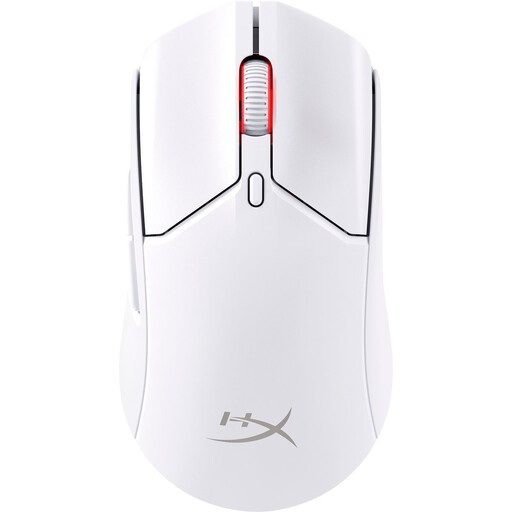
Why it suits this user: The mouse combines 2.4GHz and Bluetooth connectivity with a weight of around 60 to 61 grams. It’s a good fit for gamers looking for one mouse to use with a PC, laptop and for everyday tasks.
It’s not all about DPI: the HyperX specifications list a 26K sensor, six programmable buttons and two wireless modes.
According to the product information: up to 100 hours of battery life, a USB-C cable, Bluetooth and 100% PTFE feet.

Why it suits this user: This compact model is aimed at players looking for a lightweight mouse with a high-resolution sensor and 8K polling for competitive gaming.
The specifications list a weight of 53 grams and a compact shape. Check in advance that this size is right for your hand.
HERO 2 sensor up to 44,000 DPI, up to 8,000 Hz according to the product information, five buttons and stated battery life of up to 95 hours.
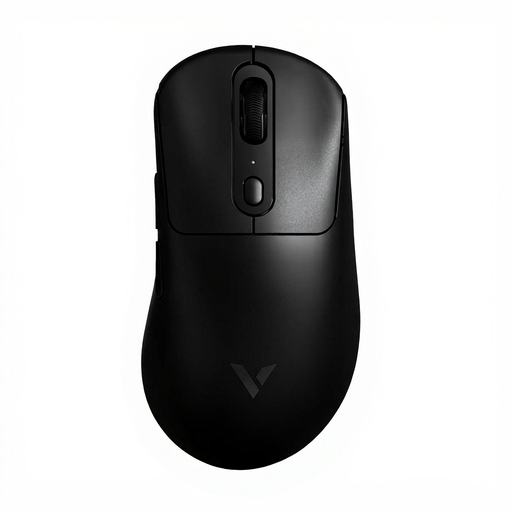
Why it suits this user: FPS and esports players looking for a lightweight mouse, a high polling rate and longer battery life can compare this model with those needs in mind.
The product information lists a weight of 59 grams, an 8K wireless polling rate and battery life of up to 200 hours. Do check that your PC can handle the higher polling rate smoothly.
PAW3950 sensor up to 30,000 DPI, independent X/Y settings and a lightweight design.

Why it suits this user: This ergonomic model is designed for users who value plenty of features, a thumb rest and a consistent hand position more than the lowest possible weight.
The mouse offers more than just DPI, with 11 programmable buttons and an ergonomic shape. Do check that its weight of around 112 grams suits your play style.
Focus Pro 35K optical sensor, 2.4GHz/Bluetooth and wired connectivity, plus Razer Chroma RGB according to the product specifications.
We’ve put together a complete, up-to-date list of products that meet these strict selection criteria and the applicable European safety regulations.
Yes, provided it has a stable 2.4GHz connection, a shape that suits you and a precise optical sensor. For FPS players, weight, grip and the position of the main buttons are often more important than maximum DPI.
Not every player does. A higher polling rate can be useful for fast movements and a monitor with a high refresh rate. However, check CPU usage, the required receiver and support in the mouse software. A lower setting may be more practical on a less powerful PC.
It depends on the model, connection, RGB lighting and polling rate. Stated figures are usually the maximum battery life under specific conditions. As well as battery capacity, look for USB-C charging, the option to use the mouse while it’s charging and whether a replacement battery is available.
