
Vandaag of morgen in huis

Kwaliteit gegarandeerd

Welkomstaanbiedingen ontgrendelen: GRATIS bezorging | Tot 80% korting | Gratis 30 dagen JoyPlus-proefperiode
Download de app
A wireless gaming mouse keeps your desk tidy and gives you more freedom to move. However, not every model is suited to competitive gaming, everyday use and long sessions. A high DPI figure on the box, for example, says little about how much control you’ll actually have. A heavy body, unclear polling rate support or short battery life can also make a mouse less practical.
As a Joybuy Product Recommendation Officer, I check product information against verifiable specifications. This helps you see which features matter for your style of play and which marketing claims are best treated with a little caution.
A high DPI figure sounds impressive, but most players use much lower sensitivity in games. A sensor with 26,000 or 44,000 DPI is mainly useful if you want to fine-tune the sensitivity. Also look at tracking speed, acceleration, software support and the stability of the wireless connection.
A gaming mouse with an 8K polling rate sends up to 8,000 updates per second to your computer. This can refine input response, but the feature may increase CPU usage. According to the Rapoo VT9Pro product information, you may need to switch back to 1,000 Hz if you experience frame drops in games. So check whether your PC, game settings and monitor can make good use of this feature.
An ultralight gaming mouse is easy to move when making quick changes of direction, but a heavier or more ergonomic model may feel more comfortable with a palm grip. Check the dimensions, hand orientation and weight with the battery included. Also consider how it charges: a built-in rechargeable battery, AA battery or optional charging mat will each affect convenience and cost differently.
When choosing a high-DPI wireless gaming mouse, there are three things to consider:
For FPS players, consistent tracking and a shape that suits your grip are generally more important than the highest DPI figure. Set the DPI to suit your preferences and check whether the software supports profiles or DPI switching.
A 2.4GHz connection via a USB receiver is generally designed to offer low latency while gaming. Bluetooth is handy for laptops, tablets and office work, but may offer different performance and settings. A Bluetooth gaming mouse with a tri-mode connection can therefore be practical if you use several devices.
Check whether a mouse supports 8K via the included receiver or requires a separate 4K or 8K receiver. For example, the GravaStar Mercury M1 requires a 4K receiver, sold separately, to achieve 4,000 Hz. The included 1K receiver won’t automatically operate at 4K.
An ergonomic gaming mouse should suit your hand size and grip. Check:
A gaming mouse with programmable buttons is useful for MMOs, software shortcuts and streaming. For FPS games, many players prefer a simpler model to reduce accidental clicks.
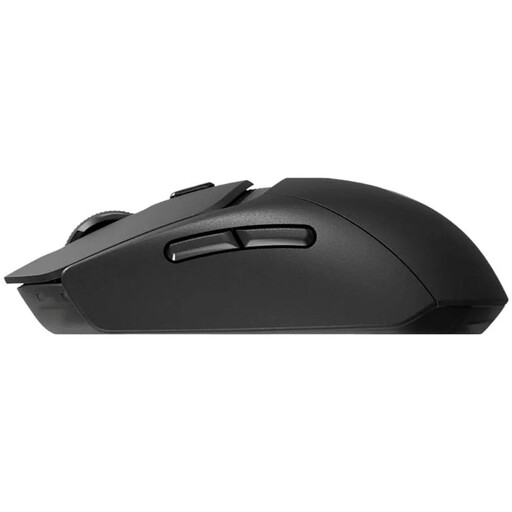
Why it suits this profile: A practical choice if you want to game wirelessly without regularly recharging a built-in battery. It connects via LIGHTSPEED or Bluetooth and uses an AA battery.
The product specifications state that a single AA battery provides up to 300 hours of use. Just make sure you check the connection mode and battery information for the version you choose.
86 grams with AA battery, HERO 25K sensor, six programmable buttons and Bluetooth alongside LIGHTSPEED.
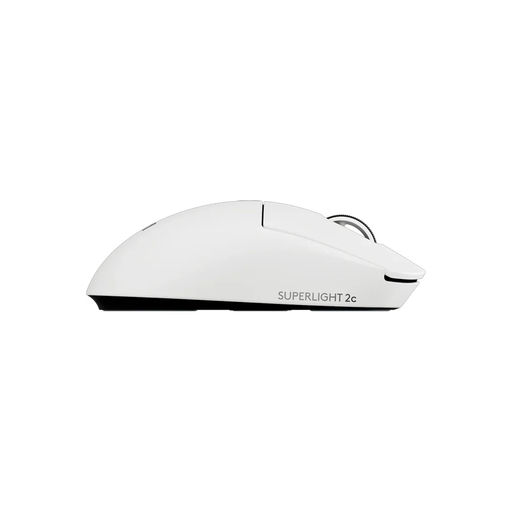
Why it suits this profile: Its compact shape and low weight make it a good fit for FPS players and people with smaller hands or a preference for a claw grip.
At 53 grams, it’s a reminder not to choose a mouse based on a high DPI figure alone. It has no RGB lighting or Bluetooth, making it a straightforward choice for PC gaming via the included receiver.
HERO 2 sensor, up to 44,000 DPI according to the product information, 8K polling rate and up to 95 hours of battery life.

Why it suits this profile: Designed for users who want to combine a lightweight mouse, plenty of buttons and long stated battery life with a high polling rate.
The product specifications state 8,000 Hz wireless operation without an extra receiver and up to 750 hours at 1,000 Hz. Check CPU usage and software settings beforehand.
53 grams, up to 26,000 DPI, ten programmable buttons and macro support via A HUB.
We’ve put together a complete, up-to-date list of products that meet these strict selection criteria and the applicable European safety regulations.
Yes, as long as it has a stable 2.4GHz connection, a shape that suits you and a reliable sensor. Bluetooth is handy for everyday use, but many players choose the USB receiver for competitive gaming.
It varies by model, connection mode and polling rate. Product information may state, for example, 95 hours, 300 hours or 750 hours. These are stated figures; actual battery life depends on settings, lighting and how intensively you use the mouse.
Not for everyone. A higher polling rate may be useful for fast-paced games and a monitor with a high refresh rate, but it may put more demand on your PC. So check the system requirements first and choose a model that lets you switch easily back to 1,000 or 4,000 Hz.
