
Vandaag of morgen in huis

Kwaliteit gegarandeerd

Welkomstaanbiedingen ontgrendelen: GRATIS bezorging | Tot 80% korting | Gratis 30 dagen JoyPlus-proefperiode
Download de app
A wireless gaming mouse gives you more freedom of movement at your desk, but not every model is suited to competitive gaming. A high DPI rating may sound impressive, while the sensor, polling rate or shape may be less suitable for your play style. An awkward dongle, limited software or disappointing battery life can also become a source of frustration.
As a Joybuy Product Recommendation Officer, I filter the most important product information down to practical points. This helps you compare a wireless mouse for PC based on specifications that really matter during FPS games, esports and long gaming sessions.
A gaming mouse with a high DPI rating may support, for example, 30,000 or 42,000 DPI. That does not automatically make you more accurate. Most players use a much lower setting in games. What matters more is whether the sensor tracks consistently at your chosen speed and whether you can adjust the DPI easily.
Look out for:
An extremely high maximum value is therefore mainly a technical upper limit. Also consider the settings you actually use.
The polling rate indicates how often the mouse sends data to your computer each second. A rate of 1,000 Hz is common for wireless gaming mice. Some models support up to 8,000 Hz, usually under specific conditions or in wired mode.
RF Wireless via a USB dongle is generally designed to provide low latency while gaming. Bluetooth is convenient for laptops and multiple devices, but is not the first choice for competitive FPS gaming with every model. Also check that your PC has a free USB port and that the receiver is close enough to the mouse.
An ultra-light gaming mouse weighing around 50 grams moves differently from a 68-gram model. You will notice the difference particularly when making large arm movements or using low sensitivity. However, a lower weight is not necessarily more comfortable for everyone. The shape, grip and button positioning remain just as important.
Check before buying:
An optical sensor uses a light source and image analysis to register movement. The models below include PixArt PAW3950 and other optical sensors. According to Sony’s product information, the INZONE Mouse-A supports up to 30,000 DPI, 750 IPS tracking and 70G acceleration. Treat these figures as product specifications, not a guarantee of better gaming performance.
A higher polling rate can refine data transmission, but may place greater demands on your system and battery. According to their product information, the Sony INZONE Mouse-A and ASUS ROG Keris II Ace are listed with up to 8,000 Hz. For the Keris II Ace, this figure applies in wired mode according to the description. The ASUS ROG Strix Impact III Wireless is listed with up to 1,000 Hz.
For most PC gamers, a stable connection is more important than simply choosing the highest figure.
A gaming mouse with long battery life is practical if you play every day or also use the mouse for work. Pay attention to how the manufacturer measures battery life: lighting, polling rate and connection type can all affect usage time.
The stated figures in this selection range as follows:
These are stated usage figures. According to the brand’s own research, real-world results may vary depending on settings and usage conditions.
A gaming mouse with Bluetooth is useful for a laptop, second PC or tablet. RF Wireless is particularly suitable when you use a dedicated receiver for gaming. A model with USB connectivity also gives you an alternative when the battery runs out.
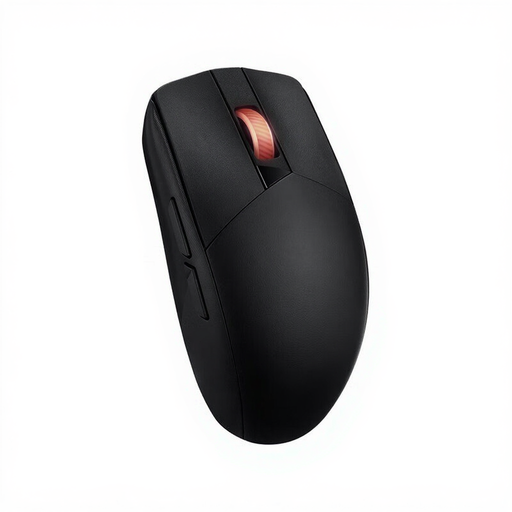
Why it suits this profile: This ambidextrous model offers RF Wireless and Bluetooth, so you are not tied to one type of device. The six-button layout and DPI switch are practical for anyone who wants to configure gaming features step by step.
You are not choosing based on DPI alone: the stated 36,000 DPI is combined with an ambidextrous shape, programmable buttons and multiple connectivity options.
Optical sensor, left- and right-handed design, and a stated battery life of up to 450 hours according to the product information.
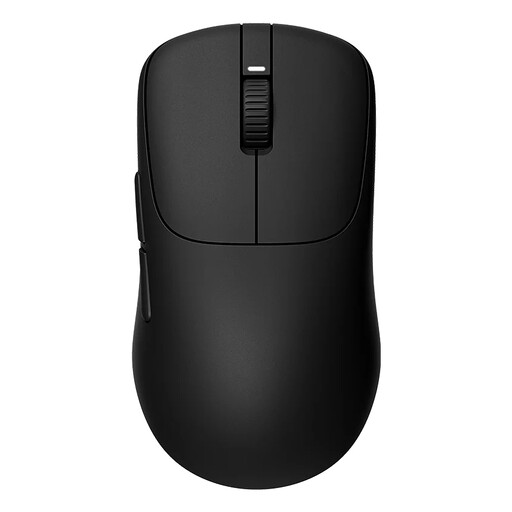
Why it suits this profile: According to the specifications, this right-handed mouse weighs 48.4 grams and is aimed at players who prioritise low weight and a high stated polling rate.
The product information lists more than just 30,000 DPI: it also specifies a PixArt PAW3950 sensor, an 8,000 Hz polling rate and RF Wireless connectivity.
48.4 grams, optical switches, USB-C connection and a stated wireless usage time of up to 90 hours.
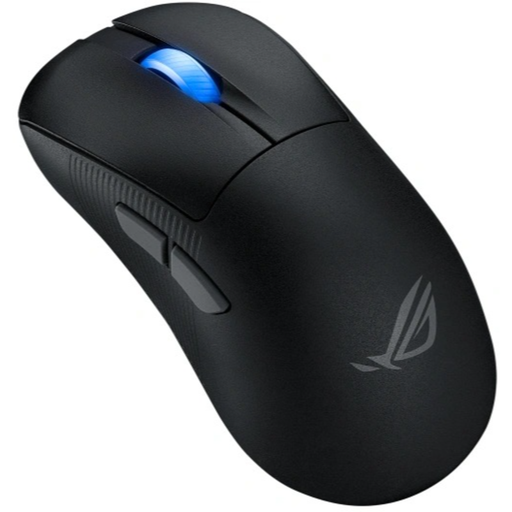
Why it suits this profile: This right-handed model is designed for players who want to combine RF Wireless, Bluetooth and wired use. Its shape and 54-gram weight are well suited to fast FPS movements.
You are not dependent on Bluetooth: the mouse also supports RF Wireless and USB. The software additionally offers settings for DPI and other functions.
42,000 DPI, 54 grams, optical switches and a stated battery life of up to 134 hours according to the product information.
We have put together a complete, up-to-date list of products that fully meet these strict selection criteria and the applicable European safety regulations.
Start with a moderate DPI setting and adjust it in small steps. A higher DPI does not automatically make the cursor more useful. Set up one profile in the software for FPS games and, if needed, a second profile for desktop use.
Also bear in mind:
Yes, provided the model has a stable RF connection, an optical sensor and a suitable polling rate. Also check the shape, weight and button placement. Bluetooth can work, but RF Wireless is the recommended connection for low latency with many gaming models.
It varies by model and usage. Lighting, polling rate and connection mode all affect battery life. The stated figures in this selection range from 90 to 450 hours. Treat these figures as manufacturer information; actual battery life may vary.
Not for most players. A high maximum DPI rating is primarily a product specification. It is better to consider the sensor, adjustability, tracking, polling rate and the mouse’s comfort. A well-matched profile with a lower DPI may be more practical than using the maximum setting.
