
Vandaag of morgen in huis

Kwaliteit gegarandeerd

Welkomstaanbiedingen ontgrendelen: GRATIS bezorging | Tot 80% korting | Gratis 30 dagen JoyPlus-proefperiode
Download de app
A wireless gaming mouse gives you greater freedom of movement, but not every wireless gaming mouse model is automatically suitable for fast-paced PC games. Marketing often focuses on extremely high DPI, RGB lighting or an impressive polling rate. In practice, the connection, shape, weight and battery life also determine whether a mouse remains comfortable to use.
So before buying a gaming mouse, watch out for these common pitfalls:
An optical sensor tracks movement across your mouse mat. As well as the maximum resolution, look at the adjustment options. A high-DPI gaming mouse is particularly useful if you like using different sensitivity levels or play on a large screen.
For most players, an adjustable range is more important than the highest number on the packaging. The Trust GXT 110 Felox, for example, offers DPI levels from 800 to 4,800 DPI. You can switch quickly between settings using the DPI button, such as a lower sensitivity for precise aiming and a higher value for general use.
The polling rate indicates how often the mouse sends information to the computer per second:
The stated benefits of low latency or higher precision are sometimes based on claims made by the brand. According to Rapoo’s own research, certain sensors and polling rates provide greater tracking accuracy or lower delay. Treat this as a product specification, not a guarantee of better gaming results.
A lightweight gaming mouse weighing around 50 to 70 grams can feel comfortable during fast movements in shooters and MOBA games. A heavier model may feel more stable. Also consider the dimensions and grip:
Also check whether the mouse is suitable for left- and right-handed use. An ergonomic gaming mouse is not automatically universally comfortable. The Razer Pro Click V2 Vertical Edition, for example, has a vertical shape and, according to the product specifications, is designed for right-handed use.
A 2.4GHz connection with a USB receiver is generally designed for gaming. Bluetooth is convenient for laptops and multiple devices, but check that the mouse also has a suitable 2.4GHz mode or wired connection if you want to minimise latency.
When choosing a programmable gaming mouse, check the number of buttons and the software required. Some models offer macros and onboard memory, while others only have a DPI button and a few side buttons. The Trust GXT 110 Felox has six buttons, but the product information does not mention extensive software-based button programming. This makes the model straightforward to use, but less suitable if you want to assign lots of actions to additional buttons.
When it comes to battery life, distinguish between the stated maximum and your own usage. A gaming mouse with long battery life may run for less time when RGB lighting or a high polling rate is continuously active. Also check whether you can continue playing while the mouse is charging.
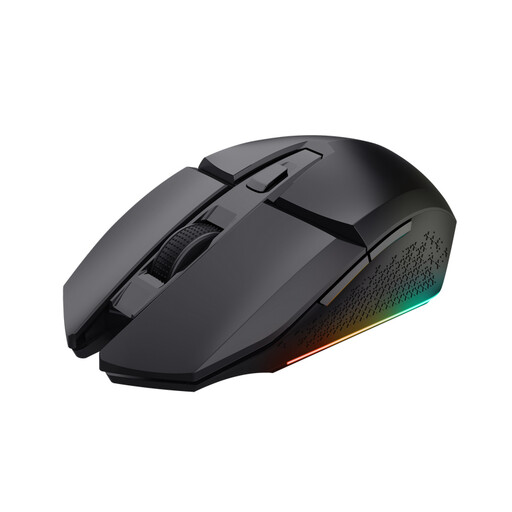
Why it suits this profile: This is a straightforward wireless gaming mouse for PC users looking for a rechargeable model with RGB lighting without immediately needing additional software features.
The specifications make it clear that this model goes up to 4,800 DPI and has six buttons. You are not paying for features you may not use.
2.4GHz receiver, adjustable 800–4,800 DPI, RGB options and a stated battery life of up to 80 hours. According to the product description, you can continue playing while it charges.
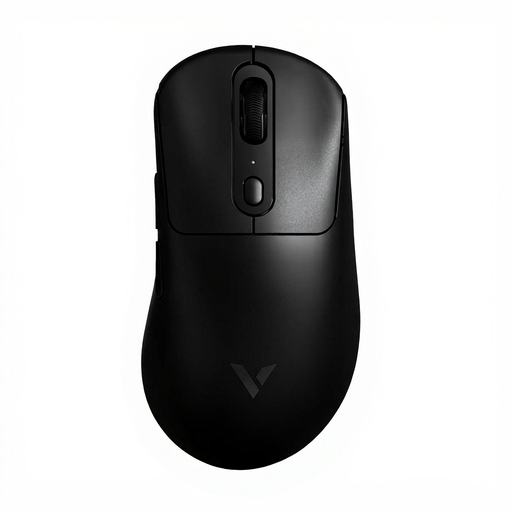
Why it suits this profile: A low weight of 59 grams, adjustable X/Y DPI and a stated polling rate of up to 8KHz are well suited to players who place great importance on technical adjustability.
The product information lists the weight, battery capacity and polling rate. However, check that your PC can handle 8K usage and that you actually need this setting.
59 grams, a PAW 3950 sensor according to the product specifications, independent X/Y DPI adjustment and a stated battery life of up to 200 hours.
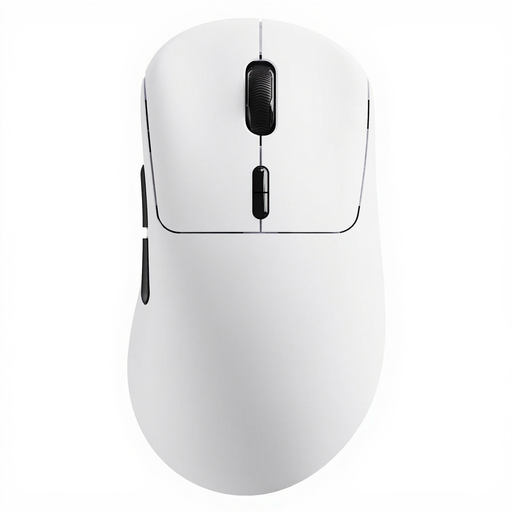
Why it suits this profile: This model combines a low weight with extensive programming options and a long stated battery life. That makes it a good fit for long gaming sessions and users who want to save their settings.
According to the product specifications, the mouse has 10 programmable buttons and software for Windows and Mac. Check in advance whether macros are permitted in your games.
53 grams, native 8K wireless polling according to Rapoo, up to 750 hours of battery life at 1,000 Hz and a sensor resolution of up to 26,000 DPI.
We have put together a complete, up-to-date list of products that fully meet these strict selection criteria and the applicable European safety regulations.
Do not compare the price or DPI value alone. Also check:
It can be. Ideally, choose a model with a 2.4GHz connection and USB receiver if a stable connection while gaming is important to you. A higher polling rate is not automatically necessary. Also check that your PC can process the chosen setting without stuttering.
This varies by model and usage. RGB lighting, high polling rates and a high connection frequency can affect battery life. The Trust GXT 110 Felox states up to 80 hours, while various Rapoo models quote a much longer usage time. Treat these figures as the manufacturer’s indication and check which settings were used.
RGB lighting does not change the sensor, buttons or connection. It is primarily a visual feature for your desk setup. If performance and price are your priorities, you can consider RGB an optional extra. If you want to match your setup to your keyboard or PC, check the available lighting options and accompanying software.
