
Vandaag of morgen in huis

Kwaliteit gegarandeerd

Welkomstaanbiedingen ontgrendelen: GRATIS bezorging | Tot 80% korting | Gratis 30 dagen JoyPlus-proefperiode
Download de app
A wireless gaming mouse gives you more freedom of movement at your desk, but not every model is suitable for competitive PC gaming. For example, a high DPI value on the packaging says little if the sensor does not suit your playing style. An extremely low price can also prove costly later if the battery deteriorates quickly or the software offers limited settings.
Joybuy Product Recommendation Officer filters the most important product specifications and sets them out side by side. This allows you to compare models based on verifiable features, without simply taking marketing claims as fact.
A high-DPI gaming mouse sounds appealing, but most players do not use the highest setting in games. DPI determines cursor sensitivity, while polling rate indicates how often the mouse sends its position to the computer. A higher polling rate can theoretically reduce input latency, but it also places greater demands on the computer.
With an 8K polling rate gaming mouse, you should therefore check:
According to Rapoo’s product information, certain VT models support a native wireless polling rate of 8,000Hz. This is a product specification; the practical benefit depends on your monitor, frame rate and system.
A lightweight gaming mouse weighing around 50 to 70 grams can feel comfortable during fast FPS movements. However, weight is not the only factor that matters. The shape, width, thumb-button placement and grip determine whether you can control the mouse comfortably over longer periods.
Consider the following:
Low weight is particularly useful if you play with low in-game sensitivity and frequently move the mouse across a large surface.
‘Up to’ a certain number of hours does not mean you will achieve that battery life in every configuration. Polling rate, lighting, sleep mode and wireless mode all affect power consumption. For example, the Rapoo VT3 and VT3 MAX product information states up to 750 hours at 1,000Hz. Rapoo also notes that an up-to-date driver may be required for low-power mode.
Always check:
An optical gaming mouse uses an optical sensor to detect its position. In addition to DPI, look at the stated speed, acceleration and ability to fine-tune sensitivity. A sensor with 26,000 or 30,000 DPI does not mean you have to play at that setting. The main benefit lies in the available adjustment range.
Independent X/Y DPI adjustment on some Rapoo models can be useful for wide screens or specific in-game settings. However, check whether this option is configured through the software and whether you can save your settings to the onboard memory.
For competitive gaming, a stable connection is more important than a high number by itself. A wireless PC mouse usually works via a 2.4GHz receiver; some models also offer Bluetooth. Bluetooth is convenient for multiple devices, but for fast-paced games, the included gaming receiver is often the obvious choice.
An 8K polling rate gaming mouse can report its position more frequently than a 1,000Hz model. CPU usage can increase at 4K or 8K. According to the Rapoo VT9Pro 4K product information, switching back to 1,000Hz may be necessary if you notice frame-rate problems.
A programmable gaming mouse is useful for MMOs, MOBAs and productivity, but extra buttons can also be pressed accidentally during FPS games. Check the number of buttons and their layout before placing your order.
Mechanical switches generally provide familiar click feedback. According to the product description, optical switches register clicks using light rather than mechanical contact. Rapoo states a lifespan of 120 million clicks for the VT3 MAX variants and 100 million for some mechanical models. These are manufacturer-stated product specifications, not a guarantee that every user will achieve exactly that lifespan.
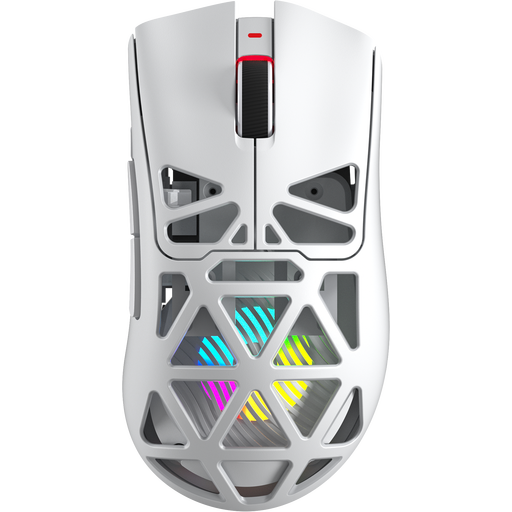
Why it suits this profile: This model combines Bluetooth, 2.4G and USB-C with a weight of 67 grams. It gives beginner PC gamers several connection options without having to choose a heavy office mouse.
The listing specifies a PixArt PAW3311 sensor, 12,000 DPI and seven programmable buttons, so you do not have to choose based on appearance alone.
67 grams, an 8KHz rating, three connection methods and RGB lighting according to the product details.
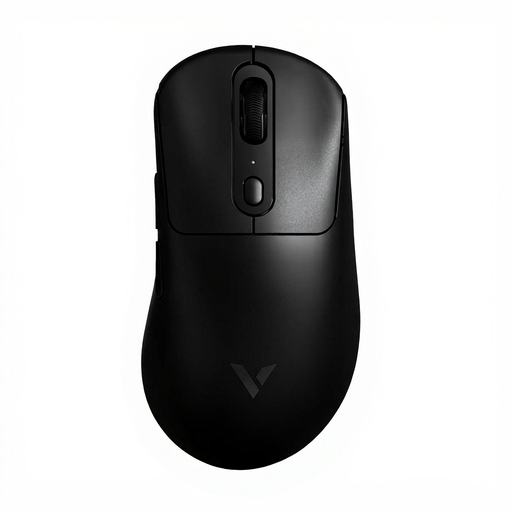
Why it suits this profile: For FPS and MOBA players who value low weight, a high polling rate and an advanced sensor.
The product information states 59 grams, a PAW3950 optical sensor and 8KHz wireless polling. You can compare these points individually with your PC and playing style.
30,000 DPI with independent X/Y adjustment and a stated battery life of up to 200 hours.

Why it suits this profile: Suitable for players who want to combine plenty of buttons, macros and long usage time with a lightweight design.
The listing specifies ten programmable buttons, macro support and onboard memory. Check beforehand whether the A HUB software is available for your operating system.
53 grams, 8KHz wireless polling, 30,000 DPI and, according to Rapoo, up to 750 hours of battery life at 1,000Hz.
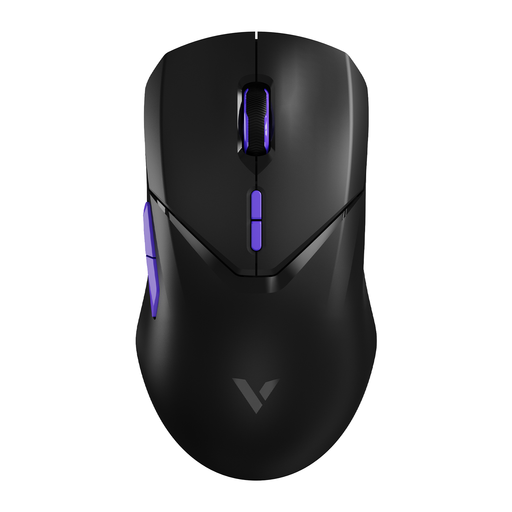
Why it suits this profile: A practical choice for gamers looking for 4K polling, an ambidextrous design and a PAW3398 sensor.
The product information explicitly states that 4K polling can increase CPU usage. This means you can take your PC’s performance into account beforehand.
68 grams, 26,000 DPI, ten programmable buttons and a stated battery life of 180 hours.
Use this quick checklist:
We have put together a complete, up-to-date list of products that fully meet these strict selection criteria and the applicable European safety regulations.
It can be, provided the mouse has a stable 2.4GHz connection, a suitable sensor and an appropriate polling rate. Also check the receiver’s placement and avoid unnecessary wireless interference. A higher polling rate alone does not automatically make a mouse more suitable.
This varies considerably by model and settings. Product listings may quote long battery life at 1,000Hz with the lighting switched off, while 4K or 8K polling can increase power consumption. Always check the usage conditions associated with the stated capacity.
Not necessarily. DPI is primarily an adjustment range. Many players use lower sensitivity for more accurate aiming. Consistent tracking, a good shape, reliable buttons and software that allows you to save profiles are more important.
