
Vandaag of morgen in huis

Kwaliteit gegarandeerd

Welkomstaanbiedingen ontgrendelen: GRATIS bezorging | Tot 80% korting | Gratis 30 dagen JoyPlus-proefperiode
Download de app
A wireless gaming mouse gives you more freedom to move your mouse around your desk and stops a cable getting caught while you’re playing an FPS game. However, not every wireless gaming mouse is automatically suitable for competitive play. A high DPI figure may be little more than marketing, the battery may run out sooner than expected, and an ergonomic shape won’t suit every hand.
Use these practical pointers to compare wireless gaming mice based on verifiable product details. Then take a look at some models for different uses.
A gaming mouse with a high DPI can be set to be extremely sensitive. That doesn’t mean you’ll automatically aim more accurately. Many FPS players find it more comfortable to use lower sensitivity and make larger mouse movements. So don’t just look at the maximum DPI figure. Check for:
A 30,000 or 35,000 DPI sensor mainly gives you plenty of room to adjust the settings. The practical benefits depend on your screen, game settings and personal preference.
A wireless mouse for PC can connect via a 2.4GHz USB receiver, Bluetooth or both. Bluetooth is handy for laptops and everyday use, but for gaming, a USB receiver is usually the obvious choice when low response times matter.
Before you buy, check:
Also consider the distance between the receiver and the mouse. A USB extension cable or positioning the receiver close to your mouse mat can help if there are lots of wireless devices nearby.
A lightweight gaming mouse can feel quick when making flick shots and large movements. However, a mouse with too little weight won’t be comfortable for everyone. Its shape, width and thumb-button placement are just as important.
A 54-gram mouse isn’t automatically a better choice than an 86- or 112-gram model. Check whether it’s designed for right- or left-handed use and whether its dimensions suit your hand and grip. If you use your mouse for hours at a time, focus on stable support and a shape that won’t make you tense up or move unnecessarily.
An optical sensor tracks the mouse’s movement across a surface. DPI determines how far the cursor moves in response to a given physical mouse movement. Polling rate, measured in hertz, tells you how often the mouse sends data to your computer.
For a low-latency gaming mouse, a reliable 2.4GHz connection and a suitable polling rate matter more than an extremely high DPI figure. The models in this selection list polling rates from 1,000 Hz to 8,000 Hz. A higher rate can use more system resources, so check that your computer and game can make effective use of it.
Check whether the model uses an AA battery or has a built-in rechargeable battery.
The Logitech G305 is rated for up to 250 hours on a single AA battery. The Razer Viper V3 HyperSpeed is rated for up to 280 hours. For a rechargeable mouse such as the Trust GXT 929 Helox, the stated battery life is up to 80 hours. So don’t just compare the number of hours; consider how easily you can carry on playing when the battery is running low.
A programmable gaming mouse is particularly useful if you want to assign shortcuts, macros or in-game functions to buttons under your thumb. Check that the buttons can actually be customised using software and that the software is compatible with your operating system.
More buttons aren’t always better. For FPS games, five or six buttons that are easy to reach are often enough. For MMOs, simulations and productivity, a model with 11 programmable buttons may be more appealing. Also check whether the mouse is designed for right- or left-handed use.
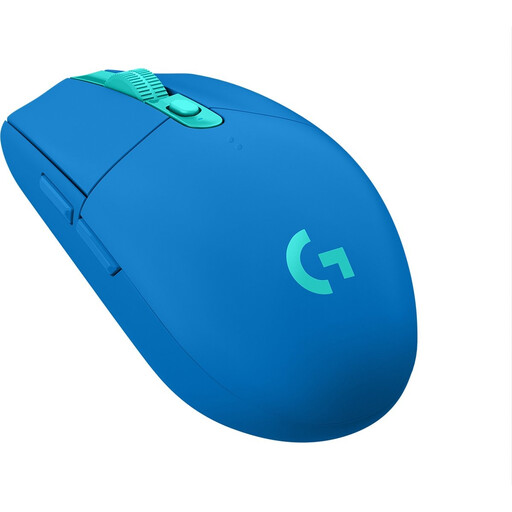
Why it suits this profile: The G305 combines RF and Bluetooth connectivity with an AA battery and weighs 99 grams. That makes it a practical choice for beginners who also use a laptop.
The product information lists 12,000 DPI, a 1 ms response time and up to 250 hours of battery life. So you get clear details on the basics, rather than just a vague claim about speed.
12,000 DPI, six buttons, an AA battery, and support for RF and Bluetooth.

Why it suits this profile: According to the product details, this right-handed model weighs 54 grams and supports both wired and wireless use. That makes it a good fit for FPS players looking for a lightweight gaming mouse with plenty of customisation options.
DPI isn’t the only factor behind this choice: the specifications also list a weight of 54 grams, USB-C, an optical sensor and a maximum polling rate of 8,000 Hz. According to Razer’s product information, battery life is up to 95 hours.
54 grams, 35,000 DPI, programmable buttons, and wired or wireless use.

Why it suits this profile: With 11 programmable buttons, an ergonomic right-handed design, and wireless 2.4GHz, Bluetooth and USB connectivity, this model is aimed at gamers who want to control lots of functions from their mouse.
The shape and weight of around 112 grams are clearly stated upfront. That makes it easier to decide whether control and extra buttons matter more to you than an ultra-light design.
35,000 DPI, 11 programmable buttons, RGB lighting and three connectivity options.
We’ve put together a complete, up-to-date list of products that meet these strict selection criteria and the current European safety requirements.
Yes, as long as you choose a 2.4GHz connection with a USB receiver and position the receiver well. Also check the polling rate, sensor settings and battery level. Bluetooth is handy for general use, but it isn’t always the first choice for competitive gaming.
It varies by model and connection. In this selection, stated battery life ranges from up to 80 hours with a built-in battery to up to 300 hours with an AA battery in certain Logitech models. Actual battery life may vary depending on the settings and how you use the mouse. A rechargeable model is handy if you want to keep playing via USB-C; an AA model can be put back into action quickly.
Use the manufacturer’s software, if available. Logitech uses G HUB, while Razer generally uses Synapse. You can use these programmes to set DPI profiles and button functions. Before buying, check that the software is compatible with your operating system. For basic use, some models also let you switch between preset levels using a DPI button.
When buying, also look out for the minimum two-year statutory guarantee for consumers in the EU. Keep your proof of purchase and follow the safety instructions for batteries, USB cables and wireless receivers.
