
Vandaag of morgen in huis

Kwaliteit gegarandeerd

Welkomstaanbiedingen ontgrendelen: GRATIS bezorging | Tot 80% korting | Gratis 30 dagen JoyPlus-proefperiode
Download de app
A wireless gaming mouse gives you more space on your desk and prevents a cable from catching during a fast movement. However, wireless is not automatically the right choice for every gamer. A high DPI rating may be mainly a marketing feature, while a lightweight casing can be less comfortable if the shape does not suit your hand.
When comparing models, pay particular attention to connectivity, weight, battery life and software. Below, you’ll find the main pitfalls and product specifications to check in advance.
A gaming mouse with a high DPI can be set to a high sensitivity, but that does not automatically mean you’ll play more accurately. DPI determines how far the cursor moves in response to the same physical mouse movement. Many players actually use a lower sensitivity in FPS games.
So also check:
A gaming mouse with an 8K polling rate reports its position, according to the product specification, up to 8,000 times per second. This can refine movement tracking, but the difference compared with 1,000 Hz is not clearly noticeable in every game or on every computer.
A higher polling rate can also use more system resources and drain the battery faster. Check whether your computer, monitor and games can make meaningful use of the setting. For many users, a stable 1,000 Hz connection is sufficient.
‘Up to’ a certain number of hours does not mean that figure will be achieved under every setting. RGB lighting, a high polling rate, wireless mode and power-saving features all affect battery life. Also check whether the mouse can still be used while charging and what type of cable is included.
A lightweight gaming mouse weighing around 53 to 75 grams can be comfortable for fast FPS movements. Some users, however, prefer a heavier model for greater control. As well as the weight, consider:
An ergonomic gaming mouse is not necessarily suitable for every hand. For example, a compact, symmetrical shape may be a better fit for smaller hands or users who want to be able to use their mouse with either hand.
An optical sensor is standard on gaming mice. Pay attention to the maximum DPI, but assess it together with the adjustment options and software. A rating of 12,000 or 30,000 DPI is primarily a range; you do not have to use the maximum setting.
The polling rate is expressed in hertz. Many models offer 1,000 Hz, while some newer models are gaming mice with an 8K polling rate. With wireless connections, it is important that the receiver is close enough and is not obstructed by metal objects or a computer case.
A wireless mouse for gaming usually uses 2.4 GHz via a USB receiver. Bluetooth is useful for a laptop, office work or a second device, but check that the fast gaming mode is available over 2.4 GHz.
For a gaming mouse for PC and Mac, check:

Why it suits this profile: The 2.4GHz connection, six programmable buttons and 4800 DPI provide an easy-to-understand starting point for PC and laptop gamers.
The product specification states both the 1,000 Hz polling rate and battery life of up to 80 hours, allowing you to compare the key usage information.
73 grams, USB-C charging while in use, RGB lighting and six programmable buttons.

Why it suits this profile: This model is aimed at users who want to combine a low weight, plenty of buttons and long battery life.
The stated battery life of up to 750 hours applies at 1,000 Hz and, according to RAPOO, requires a recent driver for power-saving mode. Check this requirement in advance.
53 grams, native wireless 8K polling rate, independent 30K X/Y DPI and ten programmable buttons.
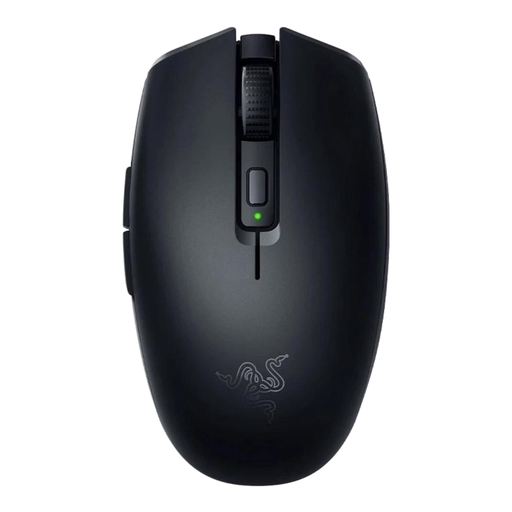
Why it suits this profile: The compact, symmetrical casing and two wireless connection options are ideal for gamers who take their mouse with them or switch between gaming and everyday use.
The stated battery life varies by connection: up to 450 hours via HyperSpeed Wireless and up to 1,000 hours via Bluetooth. This gives you a better idea of the expected usage in each situation.
Around 60 grams, Bluetooth and 2.4GHz, 18,000 DPI and six programmable buttons.
We’ve put together a complete, up-to-date list of products that fully meet these strict selection criteria and the applicable European safety regulations.
Use this quick checklist before completing your purchase:
Yes, provided the mouse has a stable 2.4GHz connection and a suitable polling rate. Ideally, position the USB receiver close to the mouse. Also consider the weight, shape and whether the DPI can be adjusted quickly. A high DPI is not essential for every FPS player.
This varies by model and settings. In the selection mentioned above, the stated battery life ranges from around 80 hours to a maximum of 750 hours under specific conditions. RGB, 8K polling and the selected wireless mode can increase power consumption. A model that continues working while charging reduces interruptions.
That depends on the configuration software. Some models support Windows and Mac with their own driver, while other functions may only be available in a particular mode or on Windows. Before buying, check that macros, DPI profiles and button assignments work with your operating system.
