
Vandaag of morgen in huis

Kwaliteit gegarandeerd

Welkomstaanbiedingen ontgrendelen: GRATIS bezorging | Tot 80% korting | Gratis 30 dagen JoyPlus-proefperiode
Download de app
A new wireless gaming mouse can significantly enhance your gaming experience, but the market is flooded with marketing terms and specifications that confuse more than they clarify. As a Product Recommendation Officer at Joybuy, I cut through the noise and give you practical advice to choose a model that truly suits you, without paying for features you won't use.
Before we get to the recommendations, let's first discuss three common pitfalls that often cost gamers money.
RGB gaming mouse might look great on your desk, but if the shape doesn't fit your hand and grip style, it will lead to cramps and fatigue. Comfort and shape should always take priority over pure aesthetics.To make the right choice, focus on the specifications that truly matter. Here are the three most important factors to check.
The sensor is the heart of your mouse. A high DPI mouse isn't necessarily better; the quality of the sensor determines its accuracy. Look for mice with sensors from well-known manufacturers. The DPI value indicates sensitivity. Most professional esports players use a setting between 400 and 1600 DPI. A mouse with a maximum DPI of around 16,000 is more than enough for virtually everyone. More importantly, the DPI should be adjustable, so you can tailor the sensitivity to your preference and the game you're playing.
For a wireless gaming mouse, the connection is crucial.
A rechargeable gaming mouse is standard, but battery life varies. Pay attention to the estimated usage time, especially with RGB lighting on, and check if you can use the mouse while it's charging.
The shape and weight determine comfort and control.
ergonomic gaming mouse is designed for a specific hand (usually right-handed) and suits a palm or claw grip.Below are some recommendations, linked to specific user profiles. These are not the "best" choices, but models that align well with certain needs based on their specifications.
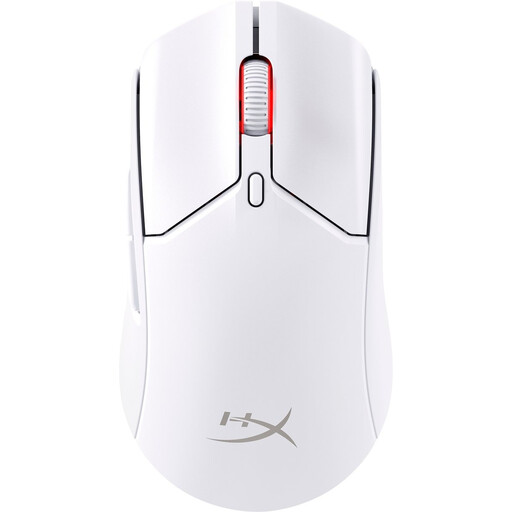
Why This Fits Their Persona: For gamers where every millisecond counts. This mouse is designed for speed and agility, ideal for fast-paced shooters on a `gaming mouse for PC` or `gaming mouse PS5`.
Focuses on performance (low weight, 2.4GHz connection) instead of an unnecessary DPI race. The solid shell avoids the pitfall of uncomfortable, perforated designs.
Extremely light at just 61 grams. According to HyperX, the battery life is up to 100 hours, reducing the need for constant charging.
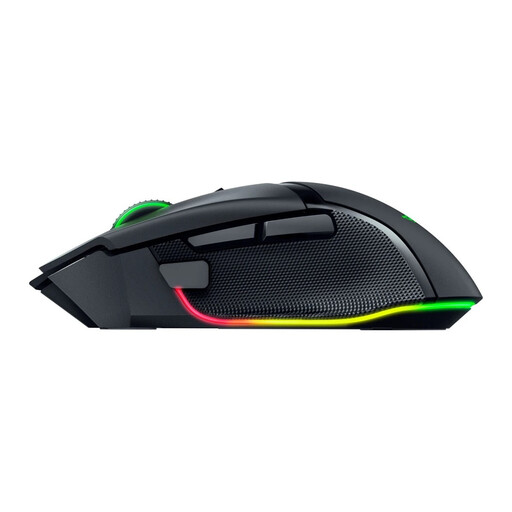
Why This Fits Their Persona: Perfect for players who enjoy various genres and value comfort during long sessions, as well as the ability to fully customise the mouse to their liking.
The focus on a proven ergonomic shape counters the "aesthetics over comfort" pitfall. The 11 programmable buttons offer genuine functionality rather than gimmicks.
Highly customisable with 11 programmable buttons and a tactile scroll wheel. The `ergonomic gaming mouse` shape provides excellent support.
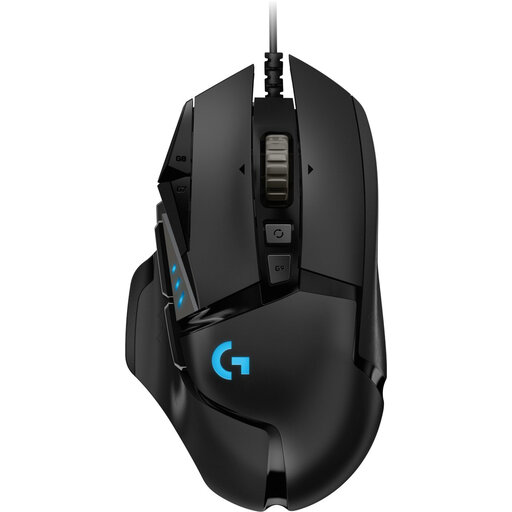
Why This Fits Their Persona: For the player who wants the absolute certainty of a wired connection without worrying about batteries or signal loss, often at a more attractive price point.
Completely bypasses the entire debate on wireless latency and battery life. You get consistent, uncompromising performance, which is the core of a good `gaming mouse for PC`.
According to Logitech, the mouse features the HERO 25K sensor for precision. The weight is adjustable with the included weights for a personalised balance.
Besides the right mouse, personalising your entire gaming setup, for instance with ambient lighting, can complete the experience.
We have compiled a complete, real-time list of products that fully satisfy these strict selection criteria and UK safety regulations.
Yes, modern wireless mice that use 2.4GHz technology have a response time that is virtually identical to that of wired models. For most players, including competitive gamers, the difference is unnoticeable in practice.
This varies greatly by model and usage. Battery life can range from 40 hours to over 100 hours on a full charge. Using features like the lighting on an RGB gaming mouse can significantly reduce battery life. Almost all models can be used wired while charging, so you never have to interrupt a session.
Yes, many USB mice, both wired and wireless via a 2.4GHz dongle, work directly on a PS5. You can use the gaming mouse PS5 in games that support mouse and keyboard controls, such as Call of Duty or Final Fantasy XIV. However, always check on a per-game basis whether this feature is available. Support for Bluetooth mice may be more limited.
