
Vandaag of morgen in huis

Kwaliteit gegarandeerd

Welkomstaanbiedingen ontgrendelen: GRATIS bezorging | Tot 80% korting | Gratis 30 dagen JoyPlus-proefperiode
Download de app
A wireless gaming mouse gives you more freedom of movement when playing FPS, MOBA and strategy games. However, a high DPI figure or striking RGB design doesn’t automatically mean a mouse will suit your play style. When shopping online, important details can sometimes be less visible, such as the actual weight, connection type and whether you need a separate receiver to achieve a high polling rate.
Use this practical guide to compare models based on verifiable specifications. That way, you can avoid paying extra for features that your PC, games or grip won’t make use of.
A sensor with 26,000 or 30,000 DPI sounds impressive, but most players use a much lower sensitivity in games. DPI mainly determines how quickly the cursor moves. More important factors include the available settings, sensor stability and how easily you can adjust the sensitivity.
Also look out for conflicting product information. Some listings show different sensor resolutions. Check the product specifications and software support before you order.
A gaming mouse with a 4K polling rate theoretically sends data to your computer more often per second than a 1,000 Hz model. At 8K, the frequency is even higher. This may be of interest for competitive FPS games and monitors with a high refresh rate.
On the other hand, a high polling rate can require more processing power. According to the product information for the RAPOO VT9Pro, 4K polling can increase CPU usage. If you experience stuttering, you can switch back to 1,000 Hz. A higher figure isn’t a goal in itself.
A lightweight gaming mouse weighing 53 to 68 grams can feel comfortable for quick arm movements, but an ultra-light design won’t feel stable to everyone. A heavier ergonomic model may be a better fit for a palm grip or larger hands.
So, check:
A wireless gaming mouse with high DPI mainly gives you more flexibility when setting sensitivity levels. Sensors such as the PixArt PAW3395, PAW3950 and Logitech HERO series feature in the selected models. Don’t just look at the maximum figure: check the available software, DPI increments and whether settings can be saved to onboard memory.
For FPS games, predictable movement is often more important than an extremely high DPI. MOBA players may place greater value on extra buttons and customisable profiles.
A gaming mouse with a 4K polling rate or gaming mouse with an 8K polling rate usually needs a compatible wireless receiver. According to its product specifications, the GravaStar Mercury M1 achieves 4,000 Hz with a separately available 4K receiver; the package includes a 1K receiver. This is an important detail to check before buying.
Also consider the connection modes:
A gaming mouse with long battery life means fewer interruptions, but check the conditions under which the stated battery life was measured. Polling rate, lighting and connection mode all affect power consumption. For example, the manufacturer states that the RAPOO VT3 lasts up to 750 hours at 1,000 Hz. Battery life may differ when using 8K.
In practice, a replaceable battery, charging dock or USB-C cable may matter more than a high theoretical battery-life figure. With built-in lithium batteries, use the recommended cable and charger, and stop using the mouse if you notice unusual heat, swelling or smoke.
A gaming mouse with programmable buttons is useful if you want quick access to abilities, macros or keyboard shortcuts. Check how many buttons are actually programmable. A model might have six physical buttons, for example, but not all of them can be reassigned.
Onboard memory is useful for everyday use: your settings remain available when you connect the mouse to another PC. Macro features can vary by game or software. Always check a game’s or tournament’s rules before using macros.
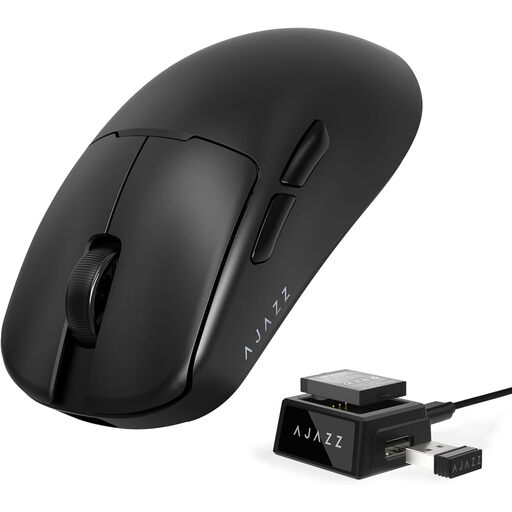
Why it suits this profile: With its 54-gram weight, tri-mode connection and two interchangeable batteries, this mouse is a practical choice if you want to combine gaming with everyday computer use.
The specifications clearly state a maximum polling rate of 1,000 Hz. So you won’t pay for a high polling rate your PC may not need. The two 300mAh batteries help minimise interruptions while charging.
54 grams, PAW3311 sensor up to 24,000 DPI, 2.4 GHz/Bluetooth/USB and interchangeable batteries.

Why it suits this profile: This model is designed for players looking for a lightweight, right-handed mouse with a familiar wireless connection and USB-C charging.
The 60-gram weight and specifications for LIGHTSPEED, the HERO sensor and USB-C are clearly stated. This makes it easy to compare the shape, weight and connection with other models before you buy.
60 grams, HERO 2 sensor according to the product description, USB-C and a stated polling rate of up to 4,000 Hz.

Why it suits this profile: For long gaming sessions and anyone who wants to charge as infrequently as possible, this model combines a low weight with a stated long battery life.
The manufacturer clearly states that the battery life of up to 750 hours applies at 1,000 Hz. Native 8K wireless is also specified, making the required mode clearer than it is with models that need an optional receiver.
53 grams, native 8K according to the manufacturer, 10 programmable buttons and macro support via A HUB.
We’ve put together a complete, up-to-date list of products that meet these strict selection criteria and current European safety regulations.
Before you order, check the following:
RGB lighting can complement your desk, but it has no direct effect on tracking. So, choose an RGB gaming mouse for its shape, sensor and buttons rather than its lighting effects alone.
Yes, as long as it has a stable 2.4GHz connection, a suitable sensor and a shape that works for you. For competitive FPS games, weight, grip and predictable tracking are usually more important than the maximum DPI figure.
It depends on your monitor, game, PC and sensitivity. A higher polling rate can increase the input frequency, but product information for some models indicates that it requires more CPU power. So, test 1,000 Hz, 4K and 8K using the same settings.
Its lifespan depends on the switches, battery, charging habits, hours of use and maintenance. A stated click rating or battery life is a product specification, not a guarantee of a fixed lifespan. Keep the sensor dry and clean, charge the mouse according to the instructions and handle the USB receiver with care.
