
Vandaag of morgen in huis

Kwaliteit gegarandeerd

Welkomstaanbiedingen ontgrendelen: GRATIS bezorging | Tot 80% korting | Gratis 30 dagen JoyPlus-proefperiode
Download de app
A stuttering mouse or a snagging cable can mean the difference between victory and defeat. Switching to a wireless gaming mouse is a logical step for many gamers, but the sheer number of options can be overwhelming. You're constantly bombarded with specs like DPI, weight, and sensor type. This guide is designed to help you make an informed choice, free from marketing jargon. We'll highlight the key features to consider and present a selection of popular models.
Before we dive into specific products, it's helpful to understand a few core specifications. This will help you determine what's most important for your needs.
The sensor is the heart of your mouse. Its precision is often expressed in DPI (Dots Per Inch). A high-DPI mouse can move the cursor a greater distance across the screen with only a small physical movement. While manufacturers advertise extremely high DPI values, most gamers use a setting between 400 and 3,200 DPI. More important than the maximum value is the ability to easily adjust the DPI on the fly. For fast-paced shooters (FPS), a lower DPI is often preferred for precision, whereas in other games, you might want a higher setting for quick camera movements.
A lightweight gaming mouse can reduce fatigue during long sessions and makes quick, snappy movements easier. Mice under 80 grams are generally considered lightweight. The shape is at least as important. Whether you use a palm, claw, or fingertip grip, the mouse must fit comfortably in your hand. Pay attention to the dimensions and design to determine if a mouse is suitable for your hand size and playstyle.
Most wireless gaming mice use a 2.4GHz USB dongle for a low-latency connection, which is crucial for competitive gaming. Some models also offer Bluetooth gaming mouse functionality, which is convenient for use with a laptop without sacrificing a USB port. As a rechargeable mouse, battery life is a key factor. Look at the estimated usage time and how the mouse is charged (USB-C, charging dock) to see what fits your usage patterns.
Below is a selection of models that stand out for their specifications and features.
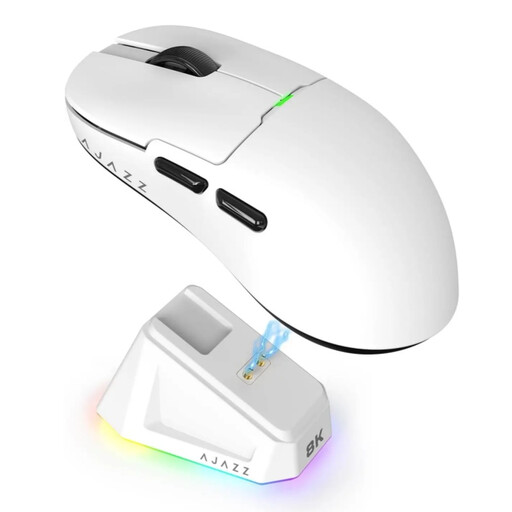
Why It Stands Out: The AJAZZ AJ159 PRO combines a high-performance sensor with an ultra-lightweight design and the convenience of a magnetic charging dock. This makes it a compelling package for gamers seeking both performance and ease of use.
Pros:
Who Is It For? This mouse is an excellent choice for competitive gamers, especially in FPS titles, who want a very light and responsive mouse. The included charging dock adds a layer of convenience to your daily routine.
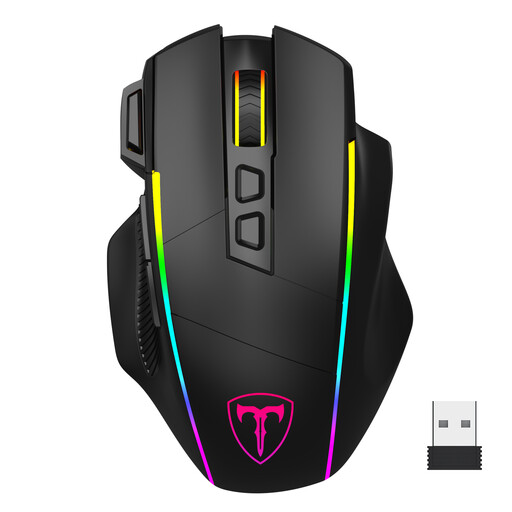
Why It Stands Out: This model from ET focuses on versatility and customisation. With 8 programmable buttons, extensive RGB lighting, and tri-mode connectivity, it's an all-rounder for various game genres and productivity tasks.
Pros:
Who Is It For? The all-round gamer who loves to be in control. If you value setting up macros via programmable buttons and want to personalise your setup with RGB, this mouse offers a wealth of functionality.
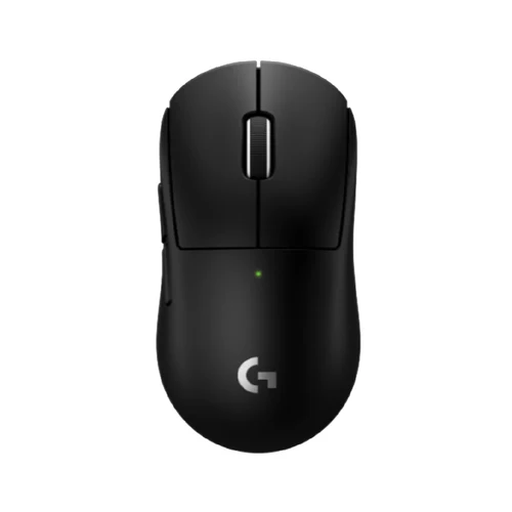
Why It Stands Out: The Logitech G PRO name is a staple in the esports mouse world. The Superlight 2c builds on that reputation with a focus on pure performance, an extremely low weight, and the brand's proprietary LIGHTSPEED technology for a reliable, fast connection.
Pros:
Who Is It For? For the serious, competitive PC gaming mouse user who refuses to compromise. If response time, precision, and low weight are your top priorities, this is a model frequently considered in the professional scene.
The world of gaming accessories is vast. If the models above don't quite match your needs, or if you're looking for other wireless solutions, there's more to explore.
Check out our broader wireless USB category for more peripherals and accessories.
Modern wireless gaming mice that use a 2.4GHz connection have a latency that is indistinguishable from a wired mouse to the human eye. Technologies like Logitech's LIGHTSPEED are specifically designed to minimise delay, making them perfectly suitable for competitive gaming.
This largely depends on personal preference, the game you're playing, and your screen resolution. Most gamers use a setting between 400 and 3,200 DPI. It's advisable to experiment with different settings to discover what works best for you. A mouse with easily adjustable DPI levels is a major advantage here.
Battery life varies greatly by model and usage, ranging from around 20 hours to over 100 hours. Factors like the intensity of the RGB lighting and the polling rate have a significant impact. Most modern gaming mice offer enough battery life for several long gaming sessions before needing a recharge.
