
Vandaag of morgen in huis

Kwaliteit gegarandeerd

Welkomstaanbiedingen ontgrendelen: GRATIS bezorging | Tot 80% korting | Gratis 30 dagen JoyPlus-proefperiode
Download de app
A wireless gaming headset gives you more freedom to move while gaming, streaming and taking calls. However, not every model is right for every player. A budget headset might support Bluetooth, for example, but have too much latency for competitive games. A model with virtual surround sound may only work on PC. And a long battery life is little comfort if the ear cushions become uncomfortable after an hour.
In this buying guide, you’ll learn what to look for in a wireless gaming headset, which specifications make a practical difference, and what type of headset suits the way you use it.
Bluetooth is handy for smartphones, tablets and music. For gaming, however, Bluetooth can introduce more latency than a 2.4 GHz gaming headset with a USB dongle. You’re most likely to notice this in shooters, rhythm games and team chat, where the sound and picture may not arrive at the same time.
A headset with both 2.4 GHz and Bluetooth is therefore more versatile. Use the dongle for gaming and Bluetooth on the go. Do check that the supplied receiver is compatible with your device: USB-A and USB-C aren’t interchangeable without an adapter.
A gaming headset with surround sound won’t necessarily deliver surround audio on every platform. Virtual 7.1 sound may depend on the software, operating system or game. The Corsair HS65, for example, lists Dolby Audio 7.1 Virtual Surround for PC and Mac, while the product specifications state that stereo sound is available on PS4.
Check which audio modes are actually supported on each platform. Stereo may also be perfectly adequate for music, films and many games.
Manufacturers usually quote a maximum battery life. This can depend on the connection method, lighting, volume and software features. The Razer Barracuda X Chroma, for example, is listed as offering up to 70 hours of use with the lighting switched off.
Also check the charging port, fast-charging feature and whether you can keep listening with a wired connection. A built-in battery is convenient, but the product information for several models says it isn’t designed to be replaced by the user.
For PCs and consoles, a USB receiver using 2.4 GHz is often designed to provide a fast wireless connection. Bluetooth is handy for phones and tablets, but check compatibility with your console.
When choosing a gaming headset for PC and PlayStation, look out for the following:
For a gaming headset for Nintendo Switch, a USB-C dongle or Bluetooth support is useful. When using Bluetooth wirelessly, some chat features may vary depending on the game and device.
A gaming headset with a microphone should be easy to use as well as pick up your voice clearly. A flip-up microphone may mute automatically when you raise it. A detachable microphone is useful if you also use the same headset outdoors or on the go.
Check the microphone type, mute function and position. Specifications such as a microphone frequency range of 100 Hz to 10 kHz can be verified, but they don’t tell you everything about how clearly you’ll be heard in a busy room. Noise cancellation may also depend on the software or device.
An over-ear gaming headset surrounds your ears and can help block out some background noise. Consider:
Check the dimensions too if you wear glasses or have larger ears. A good fit is personal and can’t be judged from a product photo alone.

Why it suits this profile: This headset offers both wireless and wired use and, according to the product specifications, is compatible with PC and smartphones. That makes it a straightforward choice for everyday gaming and multimedia.
You’re not limited to Bluetooth: it also offers 2.4 GHz connectivity and a 3,5mm connection. Be sure to check which platforms support the listed surround feature.
50mm drivers, over-ear design, detachable microphone and a stated battery life of up to 22 hours.
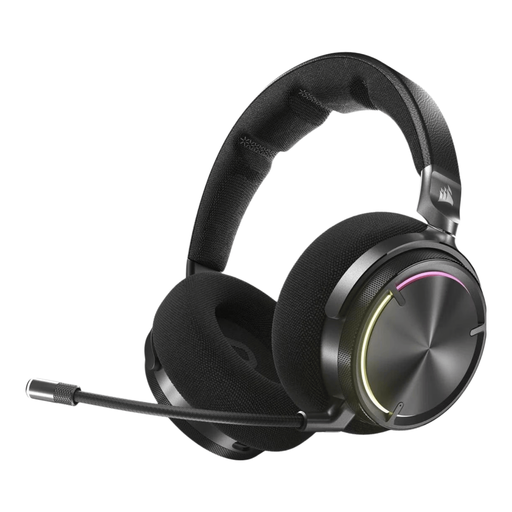
Why it suits this profile: Ideal for users who value extensive audio controls, active noise cancellation and a closed-back over-ear design.
The product description lists both RF wireless and Bluetooth, so you don’t have to rely on just one connection type. Dolby Atmos and noise cancellation may depend on your device and software.
50mm drivers, a frequency range of 20–40.000 Hz, active noise cancellation and a stated battery life of up to 30 hours.

Why it suits this profile: A good choice for long gaming sessions and anyone who switches between PC, console, mobile use and Bluetooth.
According to the product specifications, the headset offers both 2.4 GHz and Bluetooth. The detachable microphone and supplied USB-A and USB-C connections help avoid cable and compatibility issues.
53mm drivers, memory foam ear cushions, detachable microphone and a stated battery life of up to 120 hours via 2.4 GHz and up to 200 hours via Bluetooth.
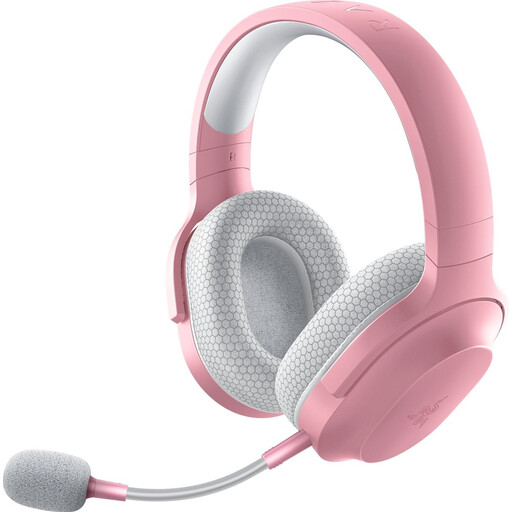
Why it suits this profile: Designed for users looking for a lightweight headset for PC, PlayStation, Nintendo Switch, Android and use on the go.
The combination of 2.4 GHz, Bluetooth 5.2 and a 3,5mm cable gives you several ways to use it. The detachable microphone means you don’t need a fixed boom when you’re out and about.
Approximately 250 grams in weight, 40mm drivers, USB-C dongle and a stated battery life of up to 50 hours.
We’ve put together a complete, up-to-date list of products that meet these strict selection criteria and current European safety regulations.
It varies by model. Check that both your PlayStation version and PC are explicitly listed as compatible. A USB dongle may work with both devices, but some features, such as virtual surround sound or EQ adjustment, may only be available through PC software.
Not necessarily for every use, but 2.4 GHz via a compatible USB receiver is generally the sensible choice when low latency matters. Bluetooth remains handy for phones, tablets and music. A headset with both options gives you more flexibility.
The stated battery life across the range varies from around 22 to 120 hours, depending on the model and connection mode. Lighting, volume and software features can affect actual battery life. Charge the headset according to the instructions and stop using it if the battery or casing becomes unusually hot while charging.
