
Vandaag of morgen in huis

Kwaliteit gegarandeerd

Welkomstaanbiedingen ontgrendelen: GRATIS bezorging | Tot 80% korting | Gratis 30 dagen JoyPlus-proefperiode
Download de app
A wireless gaming headset gives you more freedom to move while gaming, but not every model is right for every player. A headset may promise a lot on the box and still disappoint because of limited compatibility, a poor microphone or a battery that runs out sooner than expected.
The main pitfalls to watch out for are:
A 2.4 GHz gaming headset usually uses a USB receiver. This connection is designed to provide a stable audio stream with low latency. That’s useful for fast-paced games, voice chat and following sounds in the game world.
A Bluetooth gaming headset is particularly handy for phones, tablets and everyday use. Bluetooth 5.2 or 5.3 alone doesn’t mean that latency will be low enough for every game. Also check whether the headset can switch automatically between Bluetooth and 2.4 GHz.
A model with several connection options gives you more flexibility:
If you’re choosing a headset for PS5 and PC, check which receiver is included. For example, the ONIKUMA GT806 is listed as not working directly with PS5, PS4 or PC in Bluetooth mode. You’ll need to use 2.4 GHz mode or a separate USB Bluetooth adapter instead.
A gaming headset with a microphone needs to do more than play audio: it should also pick up your voice clearly. Check:
A detachable microphone is useful if you also want to use the headset as regular wireless headphones. Some models have a microphone that’s specifically tuned for a USB dongle or particular software. Check the product information before assuming it will perform the same way with every device.
An over-ear gaming headset usually covers your ears completely. This can be comfortable during long sessions, but large ear cushions may get warm. Weight matters too: models in the range weigh around 250 to 303 grams, and even a difference of a few dozen grams can become noticeable after several hours.
Also consider battery life alongside features such as RGB lighting. For the ONIKUMA GT806, the manufacturer quotes up to 60 hours of music and video playback without lighting, and up to 40 hours of gaming over 2.4 GHz. The manufacturer also notes that the lighting uses more power.
Keep the volume at a comfortable level and take regular breaks. A headset isn’t waterproof unless the product specifications explicitly say so. Models with lithium batteries should also be stored somewhere dry and away from heat.
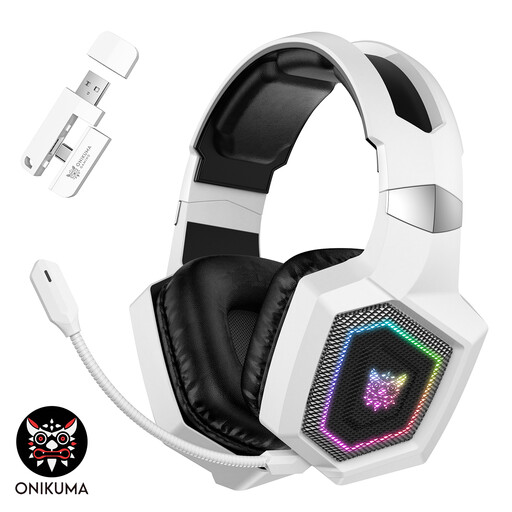
Why it suits this profile: This model offers 2.4 GHz, Bluetooth and a wired mode. That means you can use it for gaming and listening on the go without needing to buy multiple headsets straight away.
The different modes make it clear which connection you’re using. However, according to the product information, Bluetooth doesn’t work directly with PS5, PS4 or PC.
50 mm drivers, a detachable microphone, RGB lighting and, according to the manufacturer, up to 40 hours of use in 2.4 GHz gaming mode.
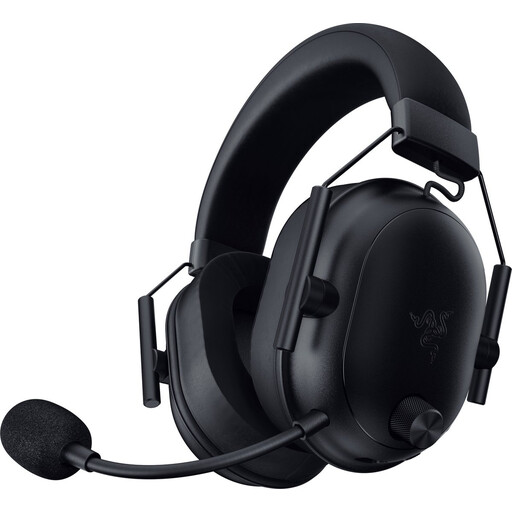
Why it suits this profile: With 2.4 GHz, Bluetooth 5.2, a weight of 280 grams and a detachable microphone, this model is a good fit for players who value both comfort and versatility.
The headset uses a USB-C dongle for wireless gaming and Bluetooth with compatible devices. Check in advance that your console and connection match.
50 mm drivers, HyperSpeed Wireless and a battery life of up to 70 hours, as quoted by Razer.

Why it suits this profile: For long gaming sessions and frequent switching between devices, this model offers a generous battery capacity, two wireless modes and compatibility with PC, PlayStation, Switch and mobile devices.
The quoted figures are broken down by mode: up to 120 hours over 2.4 GHz and up to 200 hours over Bluetooth. This shows how the connection mode affects battery life.
53 mm drivers, a detachable microphone, DTS Spatial Audio according to the product information, and USB-A and USB-C connection options.
We’ve put together a complete, up-to-date list of products that meet these strict selection criteria and current European safety regulations.
That depends on the included dongle and connection modes. A USB receiver for 2.4 GHz often works with PC and PlayStation, while Bluetooth isn’t always supported directly by PS4 or PS5. Check the compatibility list for each model.
For fast-paced games, 2.4 GHz is often a practical choice because of the low latency of the wireless radio connection. Bluetooth is still handy for phones, tablets and music. A headset with both options gives you more ways to use it.
It varies by model and usage. RGB lighting, volume, microphone use and your chosen connection all have an effect. So don’t look only at the maximum figure: check the separate battery-life estimates for Bluetooth, 2.4 GHz and lighting. A wired mode can also come in handy if you can’t charge the headset straight away.
