
Vandaag of morgen in huis

Kwaliteit gegarandeerd

Welkomstaanbiedingen ontgrendelen: GRATIS bezorging | Tot 80% korting | Gratis 30 dagen JoyPlus-proefperiode
Download de app
A wireless gaming headset gives you more freedom to move while you game, but not every model is right for every console or situation. A headset might look impressive on paper, with long battery life, surround sound and a noise-cancelling microphone, but its connection may not actually suit your platform.
So don’t focus only on the price or eye-catching marketing claims. Check the connection, compatibility, comfort and how the quoted specifications were measured.
Bluetooth is handy for a smartphone, tablet or laptop. But for competitive gaming, a Bluetooth gaming headset may have more lag than a 2.4GHz connection via a USB dongle. Check whether the product supports both options.
A 2.4GHz connection is usually designed for low-latency gaming. Bluetooth is more practical for music, mobile devices and everyday use. Some headsets can switch between the two connections, but not all models support using them simultaneously.
A gaming headset with 7.1 surround sound often uses software-based or virtual spatial audio. This can help you make out the direction of sounds in games, but it doesn’t guarantee a better gaming experience. Check which platforms support the feature.
For example, the Corsair HS65 supports Dolby Audio 7.1 Virtual Surround on PC and Mac, according to its product specifications. Sony Tempest 3D Audio is listed for PlayStation 5, while PS4 audio is specified as stereo. So performance can vary depending on the device and software.
A quoted battery life, such as “up to 70 hours”, is a maximum figure under certain conditions. RGB lighting, higher volume, active features and the type of connection can all affect how long the battery lasts.
Check the charging method, too. A built-in lithium battery is convenient, but on many models it can’t be replaced by the user. If you game for long periods every day, look for fast charging, a wired option or a model with a generous quoted battery life.
For a gaming headset for PC and PlayStation, check that the USB receiver works with your console. For Nintendo Switch, also check whether the dongle needs to be plugged directly into the console, the dock or a USB-C adapter.
Look out for the following:
Specifications such as “compatible with Xbox” can vary by version and connection method. Always check the product page and the manufacturer’s instructions before ordering.
When choosing a gaming headset with a microphone, the microphone type, positioning and mute function matter more than the term “noise cancelling” alone. A detachable or flip-up microphone is handy if you also use the headset on the go.
Brands may claim improved voice quality or noise cancellation. Treat these as claims made by the brand, and also look for information you can verify, such as:
An over-ear gaming headset covers your ears and can help block out some background noise. Comfort depends on the fit, clamping force, headband and ear cushion material.
A lighter headset can be more comfortable during long sessions. For example, the models in this selection range from around 250 grams to 340 grams, while the Corsair VIRTUOSO MAX is noticeably heavier at 417 grams. Faux leather can create a good seal, but may make your ears feel warm. Breathable fabric or mesh can be more comfortable in a warm room.
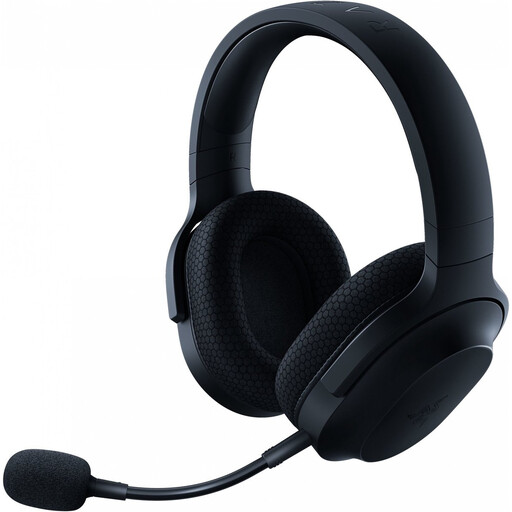
Why it suits this user: A lightweight headset for PC, PlayStation, Nintendo Switch and Android, with 2.4GHz, Bluetooth and a 3.5mm connection.
Its stated compatibility and three connection options make it more flexible than a model that only uses Bluetooth.
Around 250 grams, a detachable cardioid microphone and up to 50 hours of battery life, according to the product specifications.
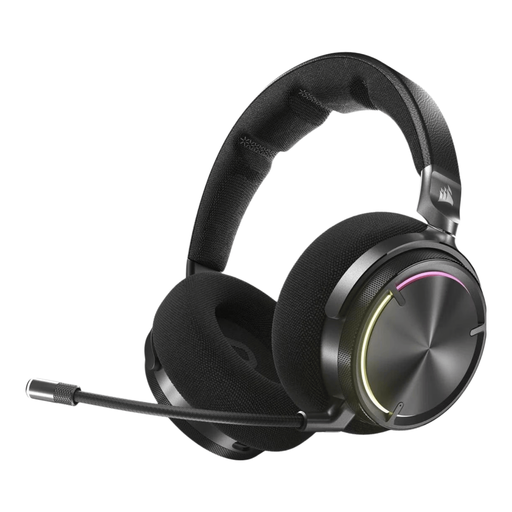
Why it suits this user: Designed for users who value extensive audio features, active noise cancellation and customisation.
The headset lists both RF and Bluetooth, so you’re not reliant solely on a mobile Bluetooth connection.
50mm graphene drivers, Dolby Atmos support, active noise cancellation and up to 30 hours of battery life, according to the product information.

Why it suits this user: For long gaming sessions when you don’t want to keep recharging, and if you regularly switch between devices.
The quoted battery life is broken down by connection: up to 120 hours via 2.4GHz and up to 200 hours via Bluetooth. This makes it clearer which conditions the claim applies to.
53mm drivers, a detachable microphone, memory foam ear cushions and support for PC, PlayStation, Switch and mobile devices.
We’ve put together a complete, up-to-date list of products that meet these strict selection criteria and the applicable European safety regulations.
No. Always check the platform specifications. A USB dongle may work with PC and PlayStation, while Bluetooth support on a console may be limited or unavailable. For Nintendo Switch, you may need a USB-C dongle or a Bluetooth connection. Xbox compatibility varies considerably by model and connection type.
It can be, but for games where reaction time matters, a 2.4GHz connection via a dongle is often preferable. Bluetooth is still handy for mobile gaming, music and calls. Also check whether the microphone continues to work fully in Bluetooth mode.
It depends on the model, volume, lighting and connection. Among the selected models, the quoted maximum battery life ranges from around 22 to 120 hours via 2.4GHz. Use the headset at a moderate volume, charge it with a suitable cable and store it somewhere dry. Also bear in mind that the built-in lithium battery can’t be replaced by the user in many models.
